
In Amazon API Gateway, creating resources and methods means defining the structure of your API.
- A resource represents a specific endpoint (like /users or /orders).
- A method (like GET, POST, PUT, DELETE) defines what type of request can be made to that resource.
Lab Steps
Step 1: Sign to the AWS Management Console
1. Click on the Open Console button, and you will get redirected to AWS Console in a new browser tab.
2. Copy your User Name and Password in the Lab Console to the IAM Username and Password in the AWS Console and click on the Sign in button.
Step 2 : Create an API
1. Go to the Services menu at the top of the AWS console and select API Gateway.
2. Scroll down and click Build under the REST API section (inside Network and Content Delivery).

3. Under Create new API, choose New API.
4.Enter API Name as JeeviAPI and Click on Create API button.
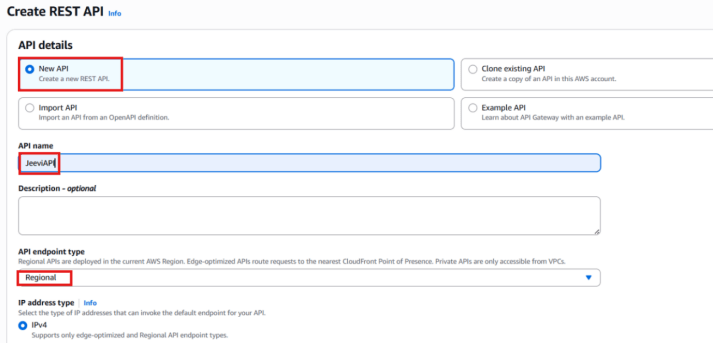
You have created JeeviAPI.
Step 3: Creating a Resource
In this step, you will set up a new resource within your API.
- After your API has been created, select the JeeviAPI.
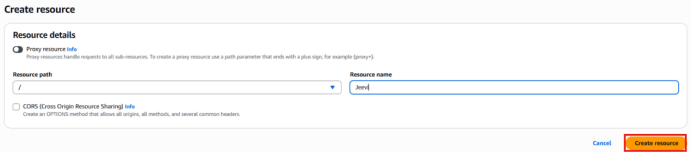
- Click on Create Reource.
- Resources Name: Jeevi (any name your prefer).
- Once you have entered the Resource name, click Create Resource.
Step 4: Creating a Method
- After you’ve created the resource, click Create Method.
From the dropdown list, select the GET option.
2. Set the Integration Type to Mock, then click Create Method.
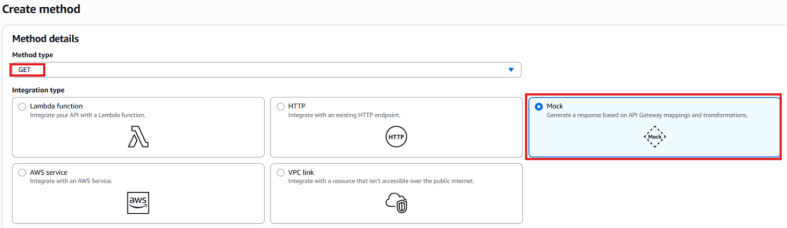
3. Then click Create Method.
Conclusion:
You have successfully created a GET method with a Mock integration for your resource.




