
Introduction:
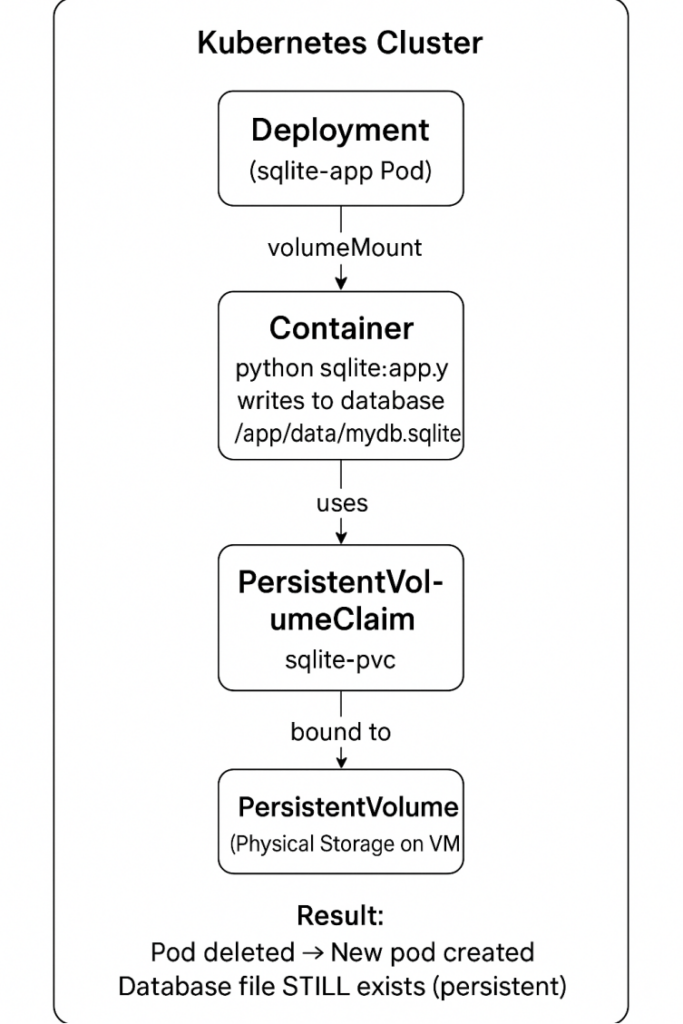
This project demonstrates how to run a simple SQLite-based Python application on Kubernetes using a PersistentVolumeClaim (PVC). In real-world applications, data must not be lost when a pod stops, restarts, or gets recreated. Kubernetes solves this problem using persistent storage.
SQLite stores data inside a single file (mydb.sqlite). If the pod restarts without persistent storage, this file gets deleted. By using a PVC, we ensure that the database file is stored safely outside the pod, so the data remains even if the pod is removed.
What is SQLite?
SQLite is a lightweight database stored in a single file.
It does not need a server like MySQL or PostgreSQL.
Good for beginners because:
- Very easy to use
- No server installation
- Stores data inside a file (mydb.sqlite)
- Perfect for small apps
What is Persistent Storage in Kubernetes?
Normally, when a Pod is deleted, all data inside the container is lost.
Persistent Storage = storage that keeps your data even if Pods are deleted or restarted.
Kubernetes uses PersistentVolume (PV) and PersistentVolumeClaim (PVC) to store data safely
What is a Docker Image?
A Docker Image is like a snapshot of your app that contains:
- Your code (Python scripts, app files)
- All dependencies (libraries like SQLite or Flask)
- Any system tools your app needs to run
It is read-only and used to create a container, which is a running instance of the image.
What is the Pod Lifecycle?
The Pod lifecycle is the sequence of states a Pod goes through from creation to termination.
Basic Pod states:
- Pending → Pod is created but not running yet.
- Running → Container(s) inside the Pod are running.
- Succeeded → Pod completed its task successfully (for batch jobs).
- Failed → Pod stopped because of an error.
- Unknown → Kubernetes cannot determine the Pod state.
What is a PVC (PersistentVolumeClaim)?
A PVC is like a request for storage.
Your app says: “I need 1Gi of space.”
Kubernetes gives you storage if available.
PVC = Student applying for a library card
PV = Actual library space
What is a Volume Mount?
A Volume Mount is a way to give your container a folder that stores data permanently.
Think of it like plugging a USB drive into your container.
- The app writes files to /app/data
- Kubernetes connects this path to storage outside the pod
- So even if the pod dies, the data does not disappear
Why Only One Replica for SQLite?
SQLite is a file-based database.
This means:
- The whole database is just one file (mydb.sqlite)
- Only one writer should write to this file at a time
- If multiple pods try to write to the same file,
the file can get corrupted
So:
➡️ We run only 1 replica
➡️ To avoid conflicts and corruption
➡️ And to keep the SQLite database safe
What is a Deployment in Kubernetes?
A Deployment is like a manager for your Pods in Kubernetes.
It tells Kubernetes:
- How many copies of your app (Pods) should run (replicas)
- Which Docker image to use
- How to restart Pods if they crash
- How to update your app safely
Why Do We Use Storage in Kubernetes?
In Kubernetes, Pods are temporary:
- If a Pod is deleted, all files inside it are lost
- Any data stored inside the container disappears when the Pod restarts
Storage (PersistentVolume + PVC) solves this problem:
- It provides permanent storage outside the Pod
- Data remains safe even if Pods are deleted or recreated
- Your app can continue using the same data across Pod restarts
Create a project folder:
1.Command:
mkdir sqlite-demoExplanation:
Creates a new directory (folder) named sqlite-demo where your entire project files will be stored.
Expected Output:

2.Command:
cd sqlite-demoExplanation:
Moves inside the project directory so you can start working in it.
Expected Output:

Create application file
Command:
nano sqlite_app.pyExplanation:
Opens the nano text editor to create a file named sqlite_app.py.
You paste the Python code inside and save it.
Paste this,
import sqlite3 import os DB_FILE = “/app/data/mydb.sqlite” os.makedirs(“/app/data”, exist_ok=True) conn = sqlite3.connect(DB_FILE) cursor = conn.cursor() # Create table if it doesn’t exist cursor.execute(“CREATE TABLE IF NOT EXISTS todos (task TEXT)”) conn.commit() # Insert sample data cursor.execute(“INSERT INTO todos (task) VALUES (‘Test Task’)”) conn.commit() # Read and print data cursor.execute(“SELECT * FROM todos”) tasks = cursor.fetchall() print(“�� Todo List:”) for task in tasks: print(“-“, task[0]) conn.close()Expected Output:

Create a Dockerfile
Command:
nano DockerfilePaste this,
FROM python:3.10-slim WORKDIR /app COPY sqlite_app.py . RUN pip install –no-cache-dir sqlite3 2>/dev/null || true CMD [“python”, “sqlite_app.py”]Explanation:
Creates and opens a file named Dockerfile where you define how your Docker image will be built.
Expected Output:

Build the image
Command:
docker build -t youruser/sqlite-app:v1 .Explanation:
- Builds a Docker image from the current directory (.).
The -t flag gives the image a name and version tag:
➡️ youruser/sqlite-app:v1 - You must replace youruser with your real Docker Hub username.
Expected Output:

Push the image to Docker Hub
Command:
docker push youruser/sqlite-app:v1Explanation:
Uploads (pushes) the built image to Docker Hub so Kubernetes can pull it later.
Expected Output:

Create the PVC manifest file
Command:
nano pvc.yamlPaste this,
apiVersion: v1 kind: PersistentVolumeClaim metadata: name: sqlite-pvc spec: accessModes: – ReadWriteOnce resources: requests: storage: 1GiExplanation:
- Creates a Kubernetes YAML file to define a PersistentVolumeClaim (PVC).
- PVC requests storage from Kubernetes.
Expected Output:
Create the Deployment manifest with volume mount
Command:
nano deployment-sqlite.yamlPaste this,
apiVersion: apps/v1 kind: Deployment metadata: name: sqlite-app spec: replicas: 1 selector: matchLabels: app: sqlite-app template: metadata: labels: app: sqlite-app spec: containers: – name: sqlite image: youruser/sqlite-app:v1 volumeMounts: – name: sqlite-data mountPath: /app/data volumes: – name: sqlite-data persistentVolumeClaim: claimName: sqlite-pvc
Explanation:
- Creates a YAML file for the Kubernetes Deployment.
- This defines how the Pod should run and how the PVC should be mounted inside it.
Expected Output:

Apply resources to the cluster
1.Command:
kubectl apply -f pvc.yamlExplanation:
- Creates the PersistentVolumeClaim inside the cluster.
- Kubernetes will allocate 1Gi storage for the SQLite database.
Expected Output:

2.Command:
kubectl apply -f deployment-sqlite.yamlExplanation:
Creates the Deployment, Pod, and volume mount using the container image you pushed.
Expected Output:

Check logs to see inserted task
Command:
kubectl logs deploy/sqlite-appExplanation:
- Shows the logs printed by your application (the printed SQLite tasks).
- This confirms whether the app is working.
Expected Output:

Delete the pod to test persistence
Command:
kubectl delete pod -l app=sqlite-appExplanation:
- Deletes the current pod using label selector.
- The Deployment will automatically create a new pod.
- This tests whether the database persists after pod recreation.
Expected Output:

Recheck logs after new pod starts
wait for new pod to start, then:
Command:
kubectl logs deploy/sqlite-appExplanation:
- Checks whether the task stored earlier still exists.
- If the task is still there → Persistence confirmed.
Expected Output:

Conclusion
Deploying a simple SQLite-based application on Kubernetes might seem straightforward, but it highlights several fundamental concepts every Kubernetes user should understand. By pairing SQLite with a PersistentVolume and PersistentVolumeClaim, you ensure that your data survives pod restarts, rescheduling, and updates something that’s essential for any stateful application.
While SQLite isn’t typically used for large, distributed workloads, this deployment pattern provides a clear and practical introduction to handling storage in Kubernetes. With PVCs, Kubernetes abstracts away the complexity of the underlying storage provider, allowing your application to consume reliable, persistent storage with minimal configuration. As you continue exploring, you can extend this setup with more advanced features like StatefulSets, ReadWriteMany volumes, or cloud-based storage classes. Ultimately, mastering persistent storage is a key step toward confidently running real-world, production-ready applications in Kubernetes.
- For more information about Kubernetes, you can refer to Jeevi’s page.




