
Introduction
In Kubernetes, a ServiceAccount is a special type of account used by pods to authenticate and interact with the kubernetes API. Every pod runs as a user, and the ServiceAccount determines what resources the pod can access.
Role-Based Access Control (RBAC) is a security mechanism in Kubernetes that allows administrators to control who can do what in the cluster. With RBAC, you can grant or restrict permissions for ServiceAccounts, users, or groups on specific resources and namespaces.
- Create a ServiceAccount in a Kubernetes cluster.
- Assign permissions using ClusterRoles and ClusterRoleBindings.
- Launch a pod using the ServiceAccount.
- Test the permissions by accessing the Kubernetes API from inside the pod.
What is the Default ServiceAccount?
- In Kubernetes, every namespace automatically has a ServiceAccount named
default. - If you create a pod and do not specify a ServiceAccount, it will automatically use this default ServiceAccount.
- Provides automatic authentication for pods to access the Kubernetes API.
- Useful for simple workloads or testing, because pods can start and run without creating a custom ServiceAccount.
- Caution: In production environments, using the default ServiceAccount can be risky because:
- It may have broader permissions than needed.
- It can allow pods to access resources unintentionally.
- Best practice is to create a custom ServiceAccount with only the permissions required for your application
What is a ServiceAccount Token and Why Do Pods Need It?
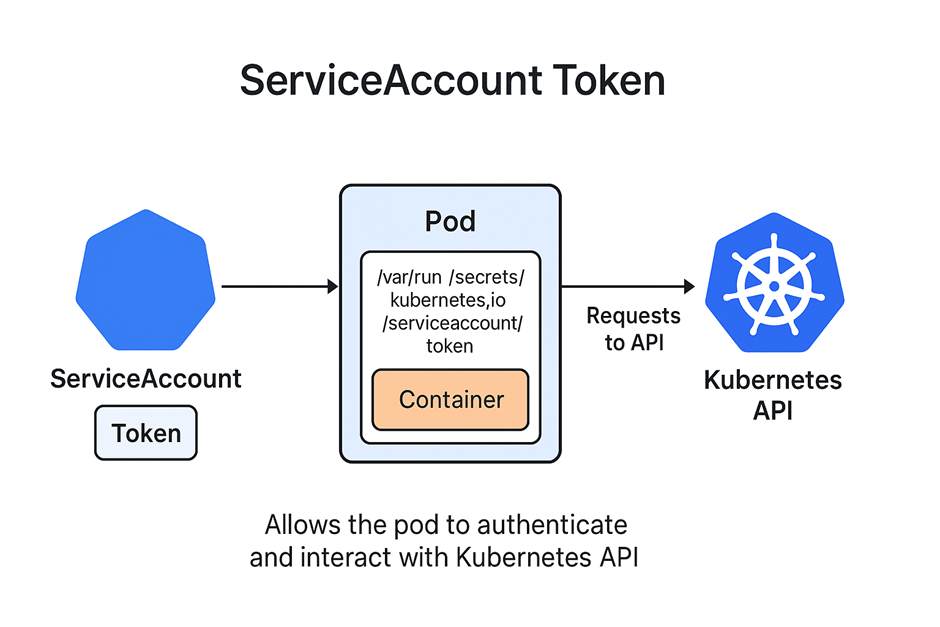
A ServiceAccount token is a special secret in Kubernetes that acts like a key or credential for a pod.
Authentication to Kubernetes API:
- Pods use the token to interact with the API server securely without exposing username/password.
RBAC Enforcement:
- Kubernetes uses the token to check the permissions assigned to the ServiceAccount via Roles or ClusterRoles.
- This ensures pods can only access resources they are allowed to.
Automation & Security:
- Pods don’t need manual credentials.
- Tokens are automatically rotated in newer Kubernetes versions, reducing security risks.
What is a Custom ServiceAccount and Why Should We Use It?
- A Custom ServiceAccount is a ServiceAccount that you create manually instead of using the default one.
- It is specifically configured for a particular application or pod with customized permissions using Roles or ClusterRoles.
Security – Principle of Least Privilege:
- Custom ServiceAccounts allow you to give a pod only the permissions it needs, reducing the risk of accidental or malicious access.
Isolation Between Applications:
- Different pods or applications can use different ServiceAccounts.
- Limits one pod’s access to another application’s resources.
Better Control Over Access:
- You can assign specific Roles or ClusterRoles to a custom ServiceAccount.
- Makes it easier to track and audit which pods have access to which resources.
Production Best Practices:
- Using the default ServiceAccount in production is discouraged because it may have broader permissions.
- Custom ServiceAccounts improve cluster security and manageability.
What Happens if a ServiceAccount Has No Token and Why Should We Check?
· A ServiceAccount normally has a token secret automatically created and mounted inside pods
. If a ServiceAccount has no token, pods running with it cannot authenticate to the Kubernetes API.
. This can happen if the token secret was not generated, deleted, or if automatic token creation is disabled in the cluster Pod Access Verification:
- Without a token, the pod cannot interact with the Kubernetes API.
- Any commands like
kubectl execorcurlto query resources will fail with 403 Forbidden errors.
RBAC Testing:
- To properly test whether a ServiceAccount has the correct permissions, the pod must have a valid token.
- Checking ensures that RBAC rules are enforced correctly.
Troubleshooting:
- Pods stuck in
ContainerCreatingor failing to list resources might be caused by a missing token. - Verifying the ServiceAccount token helps identify this issue.
Security Assurance:
- Knowing which ServiceAccounts have valid tokens ensures only authorized pods can access the cluster.
Create the Service Account:
1.Command:
nano lab-user.yaml
Paste this,
apiVersion:v1
kind:ServiceAccount
metadata:
   name: lab-user
Explanation:
- Opens a text editor (
nano) to create a YAML file. - This file will define a ServiceAccount named
lab-user.
Expected Output:

2.Command:
kubectl apply -f lab-user.yamlExplanation:
- Creates the ServiceAccount in Kubernetes.
- Kubernetes now knows there is a user-like entity (
lab-user) that pods can use to authenticate to the API.
Expected Output:

3.Command:
kubectl get serviceaccount lab-userExplanation:
- Verifies that the ServiceAccount
lab-userwas created successfully. - Shows details like name, namespace, and associated secrets.
Expected Output:

Create Cluster Role
1.Command:
nano lab-cluster-role.yamlPaste this,
apiVersion: rbac.authorization.k8s.io/v1
kind: ClusterRole
metadata:
  name: lab-cluster-role
rules:
- apiGroups: [""]
  resources: ["pods", "deployments"]
  verbs: ["get", "list"]
Explanation:
- Opens a file to define a ClusterRole.
- ClusterRole specifies what permissions the ServiceAccount can have.
Expected Output:

2.Command:
kubectl apply -f lab-cluster-role.yamlExplanation:
- Creates the ClusterRole in Kubernetes.
- Now the role exists and can be bound to a ServiceAccount.
Expected Output:

Create ClusterRoleBinding:
1.Command:
nano lab-role-binding.yamlPaste this,
apiVersion: rbac.authorization.k8s.io/v1
kind: ClusterRoleBinding
metadata:
  name: lab-cluster-role-binding
subjects:
- kind: ServiceAccount
  name: lab-user
  namespace: default
roleRef:
  kind: ClusterRole
  name: lab-cluster-role
  apiGroup: rbac.authorization.k8s.io
Explanation:
- Opens a file to bind a ServiceAccount (
lab-user) to a ClusterRole (lab-cluster-role). - Without this binding, the ServiceAccount cannot use the permissions defined in the ClusterRole.
Expected Output:

Create Pod with Your Service Account:
1.Command:
nano pod.yamlPaste this,
apiVersion: v1
kind: Pod
metadata:
  name: lab-sa-pod
spec:
  containers:
  - name: abc
  image: nginx
  resources:
    requests:
      memory: "64Mi"
      cpu: "250m"
    limits:
      memory: "128Mi"
      cpu: "500m"
serviceAccountName: lab-user
Explanation:
- Opens a YAML file to define a pod.
- The pod will use the ServiceAccount
lab-user, which controls its access to the API.
Expected Output:

2.Command:
kubectl create -f pod.yamlExplanation:
- Creates the pod in the cluster using the ServiceAccount and resource limits.
- Pod should now start in the
ContainerCreatingstate and thenRunning.
Expected Output:

Testing ServiceAccount Permissions Inside a Pod
1.Command:
kubectl exec -it lab-sa-pod – bashExplanation:
- Opens a shell inside the pod.
-it→ Interactive mode (you can type commands).- This lets you run commands as the pod using the ServiceAccount.
Expected Output:

2.Command:
TOKEN=$(cat /var/run/secrets/kubernetes.io/serviceaccount/token)Explanation:
- Reads the ServiceAccount token from the pod’s mounted secret.
- Stores it in a variable called
TOKENfor use in API requests. - Silent command — no output will appear.
Expected Output:

3.Command:
curl -H "Authorization: Bearer $TOKEN" https://kubernetes/api/v1/namespaces/default/pods/ --insecureExplanation:
- Uses
curlto query the Kubernetes API for pods in thedefaultnamespace. - Uses the token from the ServiceAccount for authentication.
--insecure→ skips certificate verification (useful for testing).- Returns JSON listing pods if the ServiceAccount has permission; otherwise
403 Forbidden.
Expected Output:

4.Command:
curl -H "Authorization: Bearer $TOKEN" https://kubernetes/api/v1/namespaces/kube-system/pods/ --insecureExplanation:
- Tests access to another namespace (
kube-system). - Since
lab-userlikely doesn’t have permission forkube-system, this should return Forbidden. - Confirms RBAC rules are working correctly.
Expected Output:

conclusion
You explored how Kubernetes uses ServiceAccounts and RBAC to control pod-level access to the API server. By creating a custom ServiceAccount, defining a ClusterRole with specific permissions, and binding them together, you ensured that only authorized actions can be performed by workloads. Deploying a pod with this ServiceAccount and validating its access using API calls demonstrated how authentication and authorization work in practice using ServiceAccount tokens.
This process highlights the importance of using custom ServiceAccounts instead of the default one, enforcing least-privilege security, and maintaining clear separation of access between applications. Proper RBAC configuration strengthens the overall security and stability of your Kubernetes environment.
For more information about kubernetes ,you can refer to jeevi’s page




