
Introduction:
In Kubernetes, StatefulSets are used to run stateful applications that require stable storage, ordered deployment, and persistent identities.
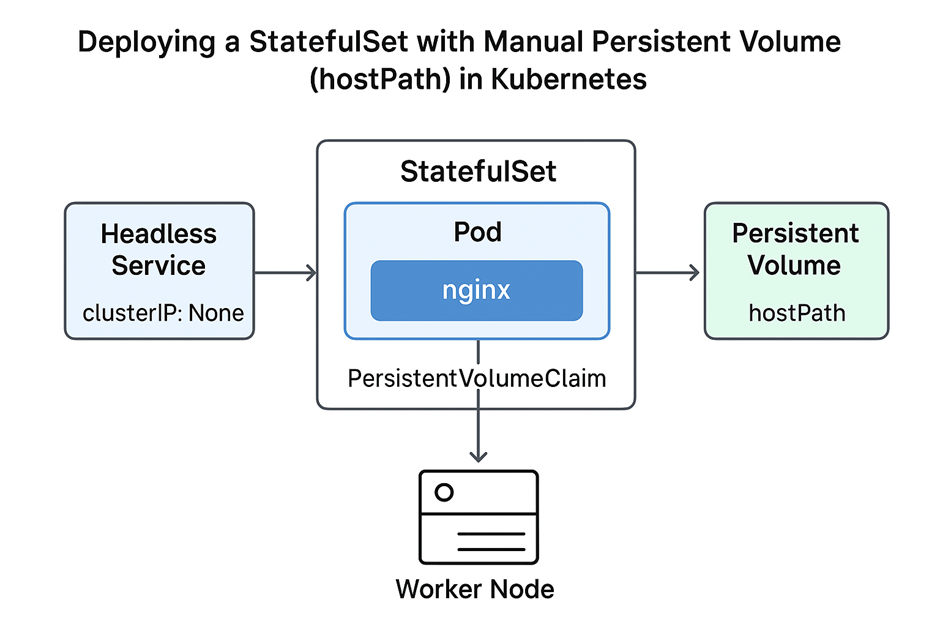
In this guide, we manually create a PersistentVolume (PV) using hostPath, then deploy a StatefulSet that uses this PV for data persistence.
In Kubernetes, some applications need to store data permanently and keep their names stable even if pods restart.
StatefulSets are designed to manage these stateful applications.
Unlike Deployments, StatefulSets give each pod a unique identity and persistent storage.
To store data, Kubernetes uses PersistentVolumes (PV) and PersistentVolumeClaims (PVC).
A Headless Service is used to give pods stable network identities.
In this guide, we will create a StatefulSet with one replica using a manual PV and hostPath.
You will also learn how to test data persistence and clean up resources safely.
Prerequisites
-
- A Kubernetes cluster (Vagrant/Kubeadm/Minikube)
-
- At least one worker node
-
-
kubectlconfigured on the master
-
-
- Worker node must allow port 10250
What is a PersistentVolume (PV)?
A PersistentVolume is a piece of storage in the cluster that Kubernetes manages.
It is created by the admin (you) and used by applications to store data permanently.
Even if pods restart or move to other nodes, the data stays safe.
Why Do We Need a PV in Stateful Applications?
Stateful apps like databases, webapps with data, or Nginx storing site files need their data to survive pod restarts.
Without a PV, the data would disappear every time the pod restarts.
A PV guarantees stable, durable storage.
What is a Headless Service and Why Do We Use It?
Headless Service in Kubernetes is a service created with clusterIP: None.
Instead of giving a single ClusterIP for load balancing, it returns the individual IPs of each pod.
We use a Headless Service when each pod must be reached individually instead of through a load balancer.
What is a StatefulSet in Kubernetes?
A StatefulSet is a Kubernetes workload used to run applications that need stable identity, persistent storage, and ordered deployment.
It ensures that each pod has:
-
- A fixed name (like web-0, web-1)
-
- A stable network identity (DNS name stays same even after restart)
-
- Persistent storage that remains even if the pod is deleted
-
- Ordered start, stop, and scaling
Why StatefulSet Instead of Deployment?
-
- Deployment creates identical, interchangeable pods → good for stateless apps like web servers.
-
- StatefulSet creates unique pods with stable names and storage → needed for stateful apps that must keep data or have a fixed identity.
What is a StorageClass and Why Important?
A StorageClass defines how Kubernetes should create storage dynamically.
OpenEBS or hostPath uses it to create new volumes automatically.
-
- No need to manually create PVs.
-
- Each pod gets its own storage.
-
- Helps with scaling StatefulSets.
What Is Retain Reclaim Policy?
A Reclaim Policy defines what happens to a PersistentVolume (PV) when the PersistentVolumeClaim (PVC) using it is deleted.
Retain Policy
-
- The PV is not deleted when the PVC is removed.
-
- Data remains intact on the storage.
-
- You can manually reuse or delete the PV later.
-
- Protects important data from accidental deletion.
-
- Useful for stateful applications like databases or Nginx with persistent content.
What Happens When a StatefulSet Creates PVCs?
When you deploy a StatefulSet, Kubernetes automatically creates a PersistentVolumeClaim (PVC) for each pod using the volumeClaimTemplates in the YAML.
-
- Each pod in the StatefulSet gets a unique PVC.
-
- Example: web-0 gets www-web-0, web-1 would get www-web-1.
-
- Each pod in the StatefulSet gets a unique PVC.
-
- Kubernetes looks for a PersistentVolume (PV) that matches the requested storage size and access mode.
-
- The PVC is bound to a suitable PV.
-
- The pod mounts the PV and can read/write data to it.
-
- Even if the pod is deleted and recreated, it reuses the same PVC and PV, so data persists.
-
- Each pod has its own private storage.
-
- Ensures data is not lost when pods restart or move to another node
-
- Critical for databases, message queues, and other stateful applications.
What is volumeClaimTemplates?
volumeClaimTemplates is a section in a StatefulSet YAML that automatically creates PersistentVolumeClaims (PVCs) for each pod in the StatefulSet.
How It Works:
-
- You define volumeClaimTemplates inside the StatefulSet.
-
- Kubernetes uses it to create one PVC per pod.
-
- Example: If you have a StatefulSet named web with 3 replicas:
- Pod web-0 → PVC www-web-0
- Pod web-1 → PVC www-web-1
-
- Pod web-2 → PVC www-web-2
- Example: If you have a StatefulSet named web with 3 replicas:
-
- Kubernetes uses it to create one PVC per pod.
-
- Each PVC is automatically bound to a PersistentVolume (PV) that meets the storage requirements.
-
- When pods are deleted or restarted, they reuse the same PVC and PV, keeping their data intact.
-
- Ensures each pod gets its own dedicated storage.
-
- Ensures each pod gets its own dedicated storage.
-
- Essential for stateful applications like databases, Redis, or Nginx with persistent data
Allow Port 10250
1.Command:
sudo firewall-cmd --add-port=10250/tcp –permanentExplanation:
This opens port 10250 on the firewall permanently.
Expected Output:

2.Command:
sudo firewall-cmd –reloadExplanation:
Reloads the firewall to apply the rule you added.
Expected Output:

Prepare HostPath Directory
On the worker node:
1.Command:
sudo mkdir -p /mnt/data/nginx-0Explanation:
Creates folder on node for storing pod data
Expected Output:

2.Command:
sudo chmod 777 /mnt/data/nginx-0Explanation:
Gives full permissions so Kubernetes can write to this folder.
Expected Output:
Create PersistentVolume (PV)
1.Command:
nano nginx-pv-0.yamlPaste this,
apiVersion: v1
kind: PersistentVolume
metadata:
  name: nginx-pv-0
spec:
  capacity:
    storage: 1Gi
   accessModes:
     - ReadWriteOnce
   persistentVolumeReclaimPolicy: Retain
   hostPath: path: "/mnt/data/nginx-0"
Explanation:
-
- Opens the text editor nano.
-
- Creates (or edits) a file named nginx-pv-0.yaml.
-
- This file is used to define a PersistentVolume (PV).
Expected Output:

2.Command:
kubectl apply -f nginx-pv-0.yamlExplanation:
-
- Creates PersistentVolume from the YAML file.
-
- Tells Kubernetes: “Use this directory as storage.”
Expected Output:

Create Headless Service
1.Command:
nano nginx-headless-svc.yamlPaste this,
apiVersion: v1
kind: Service
metadata:
  name: web
spec:
  clusterIP: None
  selector:
    app: nginx
  ports:
    - port: 80
      name: web
Explanation:
-
- Opens/creates a file called nginx-headless-svc.yaml.
-
- This file defines a Headless Service (clusterIP: None).
Expected Output:

Comment:
kubectl apply -f nginx-headless-svc.yamlExplanation:
-
- Creates headless Service with no ClusterIP.
-
- Needed for stable network identity of StatefulSet pods.
Expected Output:

conclusion:
Deploying a StatefulSet with a manually created PersistentVolume using hostPath demonstrates how Kubernetes handles stateful workloads at a low level. By creating the PV, headless service, and StatefulSet step-by-step, we clearly see how stable identities, persistent storage, and ordered pod management work together. This setup ensures that each pod receives dedicated storage and retains data across restarts, providing strong reliability for stateful applications. Although manual PV creation is mainly suited for learning environments, it builds a solid foundation for understanding storage behavior before moving to dynamic provisioning in production.
For more information about kubernetes you can refer to jeevi’s page




