
Introduction:
Persistent storage is a crucial requirement for stateful applications running on Kubernetes. OpenEBS provides a cloud-native solution for dynamic storage provisioning, enabling pods to retain data even when they are restarted or rescheduled. By leveraging OpenEBS, Kubernetes users can create custom StorageClasses and dynamically allocate Persistent Volumes (PVs) using Persistent Volume Claims (PVCs).
This guide demonstrates how to deploy a StatefulSet with OpenEBS-backed storage, write data into a pod, and verify that the data persists across pod restarts. It highlights the simplicity and reliability of using OpenEBS for managing storage in Kubernetes environments.
Prerequisites:
Before proceeding, make sure you have the following ready:
- Kubernetes Cluster
- A running Kubernetes cluster (e.g., set up with
kubeadmon Vagrant, Minikube, or any cloud provider). - The control plane node should have
kubectlinstalled and configured
- A running Kubernetes cluster (e.g., set up with
- OpenEBS Operator Access
- Internet access from the cluster nodes to pull OpenEBS container images.
- Sufficient disk space and memory on each node (minimum 2 GB RAM per node recommended
- Command-Line Tools
kubectlconfigured to interact with your cluster.- ssh access to the nodes if custom storage paths need to be created
- Node Preparation (Optional for Custom StorageClass)
- If using a custom hostPath StorageClass, the specified path (e.g.,
/mnt/openebs-data) must exist on all nodes
- If using a custom hostPath StorageClass, the specified path (e.g.,
What is dynamic storage in Kubernetes using OpenEBS and StatefulSet?
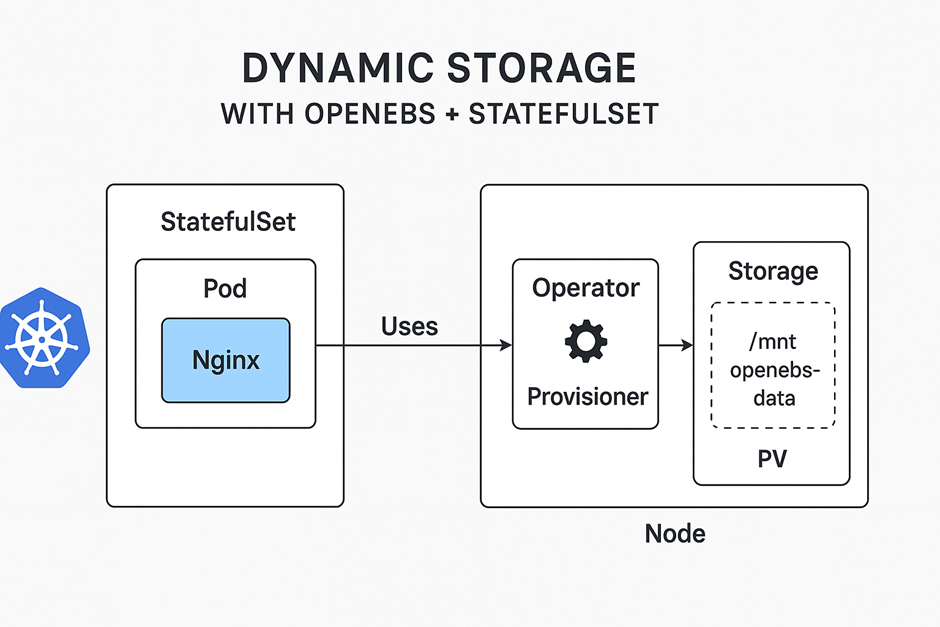
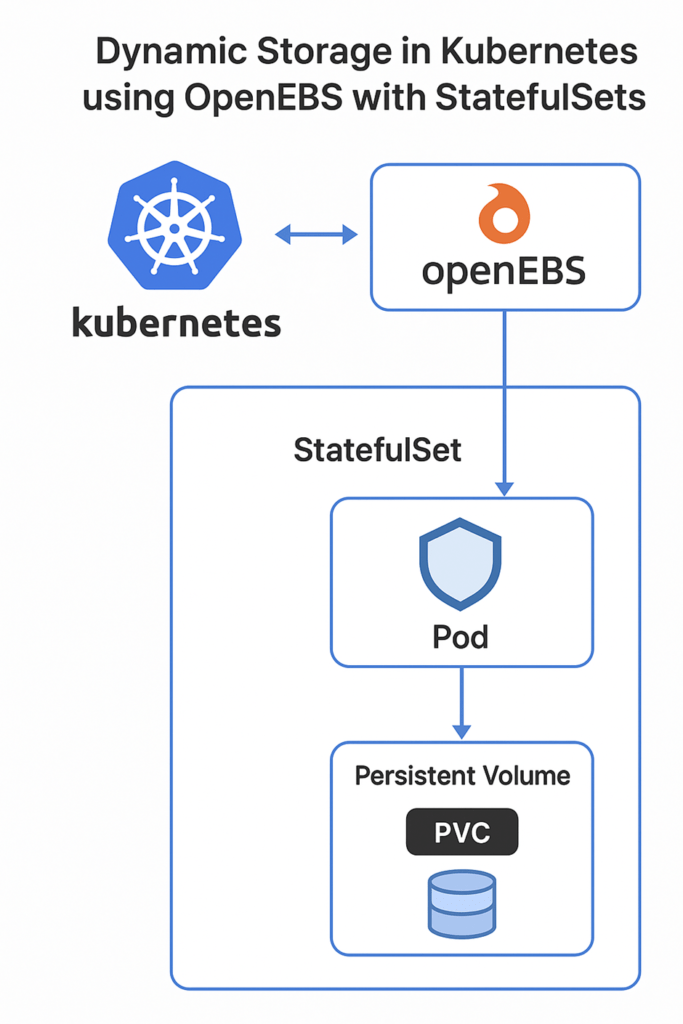
Dynamic storage with OpenEBS and StatefulSet means Kubernetes automatically provisions persistent storage for stateful applications: OpenEBS creates storage on-demand via a StorageClass, and StatefulSets ensure each pod gets its own stable volume that persists even if the pod is restarted or rescheduled.
What is OpenEBS?
OpenEBS is a storage solution built specifically for Kubernetes. Normally, when a pod (container) stops or restarts, it loses all data stored inside it. OpenEBS solves this problem by giving each pod its own persistent storage that remains even if the pod is deleted or restarted. It works directly in the Kubernetes cluster, making storage management easier and dynamic.
Why Use OpenEBS?
- Kubernetes pods are ephemeral, meaning they can die and be recreated anytime. Without persistent storage, data inside them would be lost.
- OpenEBS allows pods to automatically get storage when needed (dynamic provisioning).
- It integrates with applications like databases or web servers, ensuring data is saved and accessible even after pod restarts or migration.
What is a StorageClass?
A StorageClass in Kubernetes is like a recipe for storage. It tells Kubernetes:
- Which type of storage to use (local disk, cloud disk, SSD, etc.)
- How to create storage automatically (dynamic provisioning)
- Any special features like allowing volume expansion
Why Create a Custom StorageClass?
Creating a custom StorageClass lets you:
- Specify storage location (e.g., /mnt/openebs-data) instead of the default location.
- Define policies like “Delete PV when PVC is deleted” or allow volume size to grow.
- Ensure consistency across all nodes, making storage predictable and easy to manage.
What is a StatefulSet?
A StatefulSet is a Kubernetes object used to run stateful applications — apps that need persistent data. Unlike regular Deployments, StatefulSets:
- Give each pod a unique and stable name (like web-0, web-1).
- Ensure each pod gets its own storage volume.
- Keep pod-to-storage mapping stable even if pods are restarted.
Example: Running a database pod that must keep its data intact.
Why Use a Headless Service with StatefulSet?
A headless service has clusterIP: None, meaning it does not assign a single IP.
- Each pod gets a stable DNS name like web-0.web.default.svc.cluster.local.
- This allows pods to communicate directly with each other or for applications to connect to the correct pod.
- Important for applications where each pod has its own data, like databases or persistent web content.
What is Persistent Volume (PV) and Persistent Volume Claim (PVC)?
- Persistent Volume (PV): Actual storage resource in the cluster, like a disk or folder.
- Persistent Volume Claim (PVC): A request by a pod to use a certain amount of storage.
- OpenEBS automatically creates PVs when a PVC is requested (dynamic provisioning).
- This ensures your pods always have the storage they need without manual intervention.
Why Test Persistent Volume?
Testing ensures that:
- Data written by a pod is retained even after restarting or deleting the pod.
- OpenEBS is working correctly and provisioning storage dynamically.
- Beginners understand how persistent storage works in Kubernetes, which is critical for real-world applications like databases, file storage, or web servers.
Installing OpenEBS
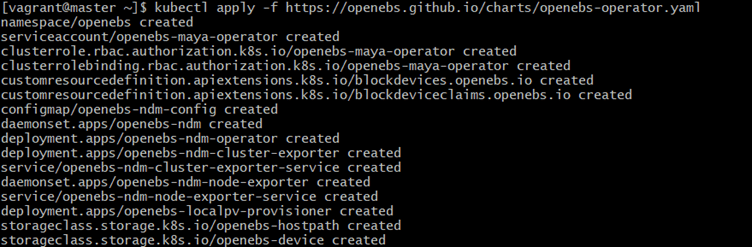
To install OpenEBS, run:
Command:
kubectl apply -f https://openebs.github.io/charts/openebs-operator.yamlExplanation:
- This command installs the OpenEBS operator in your cluster.
- The operator manages all OpenEBS components like storage provisioners and node disk managers.
kubectl applyensures resources are created or updated if they already exist
Expected Output:
Verify the pods are running:
Command:
kubectl get pods -n openebsExplanation:
- This checks the status of all OpenEBS pods in the
openebsnamespace.
- Pods like
openebs-localpv-provisionerandopenebs-ndmshould be in Running state, confirming the installation
Expected Output:

Creating a Custom StorageClass
Save the YAML on the master:
Command:
nano openebs-hostpath-custom.yamlPaste the YAML
apiVersion: storage.k8s.io/v1
kind: StorageClass
metadata:
  name: openebs-hostpath-custom
provisioner: openebs.io/local
allowVolumeExpansion: true
reclaimPolicy: Delete
volumeBindingMode: WaitForFirstConsumer
parameters:
  storageType: hostPath
  basePath: /mnt/openebs-data
Explanation:
- Opens the file
openebs-hostpath-custom.yamlin the Nano text editor. - Purpose: To view or edit the YAML configuration for the custom OpenEBS StorageClass.
- Inside this file, you define:
storageType→hostPath(local storage on the node)basePath→ Directory where OpenEBS will store PV datareclaimPolicy→ Whether PVs are deleted or retained when PVC is deletedvolumeBindingMode→ When the volume is bound to a pod- Using Nano allows you to make changes directly from the terminal.
Expected Output:

verify:
Command:
kubectl apply -f openebs-hostpath-custom.yamlExplanation:
- Creates the custom StorageClass in Kubernetes so it can be used in PVCs
Expected Output:

Create Data Directory for OpenEBS
1.Command:
sudo mkdir -p /mnt/openebs-dataExplanation:
- Creates a directory on the host node at
/mnt/openebs-data. - The
-pflag ensures that all parent directories are created if they don’t exist already. - This directory will be used by OpenEBS to store the persistent volume data for your pods.
Expected Output:

2.Command:
sudo chmod 777 /mnt/openebs-dataExplanation:
- Sets the permissions of the directory to read, write, and execute for all users (owner, group, and others).
- This ensures that Kubernetes pods and the OpenEBS provisioner can freely write data to this directory.
Expected Output:

Deploying StatefulSet with Dynamic PVC
Command:
nano nginx-openebs.yamlPaste,
apiVersion: v1
kind: Service
metadata:
  name: web
spec:
  clusterIP: None
  selector:
    app: nginx
  ports:
    - port: 80
      name: web
 ---
 apiVersion: apps/v1
kind: StatefulSet
metadata:
  name: web
spec:
  serviceName: "web"
  replicas: 1
  selector:
    matchLabels:
      app: nginx
   template:
     metadata:
       labels:
         app: nginx
     spec:
       containers:
         - name: nginx
           image: nginx:1.25
           ports:
            - containerPort: 80
           volumeMounts:
             - name: www
               mountPath: /usr/share/nginx/html
   volumeClaimTemplates:
     - metadata:
         name: www
       spec:
       accessModes: ["ReadWriteOnce"]
       storageClassName: openebs-hostpath-custom
       resources:
         requests:
           storage: 1Gi
Explanation:
- Opens the file
nginx-openebs.yamlin the Nano editor. - Purpose: To view or edit the YAML configuration for:
- The StatefulSet (
web) running Nginx pods
- The headless service (
web) for stable networking
- The volumeClaimTemplates which dynamically provision PVs using OpenEBS
- The StatefulSet (
- You can modify:
- Number of replicas
- Container image
- Volume mount paths
- PVC storage requests and StorageClass
- This file is applied later using
kubectl apply -f nginx-openebs.yamlto deploy the StatefulSet and its persistent storage.
Expected Output:

Apply command:
Command:
kubectl apply -f nginx-openebs.yamlExplanation:
- Deploys the StatefulSet defined in the YAML file (
nginx-openebs.yaml) along with its associated PersistentVolumeClaims (PVCs). - The YAML includes:
- A headless service (
web) for stable network identity. - A StatefulSet (
web) with 1 replica of Nginx. - A volumeClaimTemplate that dynamically provisions a PersistentVolume (PV) using the OpenEBS StorageClass.
- Essentially, this command creates pods, PVCs, and PVs in one step, ensuring each pod has persistent storage attached.
Expected Output:

Verifying Resources:
1.Command:
kubectl get pods -l app=nginxExplanation:
- Lists all pods that have the label
app=nginx. - Verifies that the StatefulSet pods are created and running.
Expected Output:

2.Command:
kubectl get pvcExplanation:
- Lists all PersistentVolumeClaims in the cluster.
- Shows the status of PVCs created by the StatefulSet.
- Key fields:
STATUS→Boundmeans the PVC has successfully claimed a PV.STORAGECLASS→ Indicates which StorageClass was used (openebs-hostpath-custom).CAPACITY→ The storage size allocated to the PVC.
Expected Output:

3.Command:
kubectl get pvExplanation:
- Lists all PersistentVolumes in the cluster.
- Verifies that a PV has been dynamically provisioned for the StatefulSet pod.
- Key fields:
STATUS→Boundmeans the PV is successfully associated with a PVC.CAPACITY→ Confirms the storage size matches the PVC request.ACCESS MODES→ Shows how the volume can be accessed (e.g.,ReadWriteOnce).
Expected Output:

Testing Persistent Volume
Write test data
Command:
kubectl exec -it web-0 -- /bin/bash echo "Hello from OpenEBS" > /usr/share/nginx/html/test.html
exit
Explanation:
- kubectl exec -it web-0 — /bin/bash
- Opens an interactive shell inside the web-0 pod.
- The -it flags allow you to interact with the pod as if you were inside a terminal.
- This is necessary to directly access the container’s filesystem.
- echo “Hello from OpenEBS” > /usr/share/nginx/html/test.html
- Writes the string “Hello from OpenEBS” into a file named test.html inside the pod.
- The file path /usr/share/nginx/html/ is the directory served by Nginx.
- Since the pod uses a persistent volume mounted at this path, the data is stored in the OpenEBS volume and will persist even if the pod is deleted or restarted.
- exit
- Exits the interactive shell and returns you to your local terminal.
Expected Output:

Restart pod
Command:
kubectl delete pod web-0Explanation:
- Deletes the
web-0pod from the cluster. - Since
web-0is part of a StatefulSet, Kubernetes automatically recreates the pod to maintain the desired replica count. - This simulates a pod failure or restart scenario to test if the persistent volume retains data.
Expected Output:

Read the data again
Command:
kubectl exec -it web-0 -- cat /usr/share/nginx/html/test.htmlExplanation:
- Opens an interactive session inside the restarted
web-0pod and reads the contents of the test file. - Since the pod’s Nginx directory is backed by the OpenEBS persistent volume, the file created earlier should still exist.
Expected Output:

conclusion
ynamic storage provisioning is a critical capability for running stateful workloads reliably in Kubernetes. By integrating OpenEBS with StatefulSets, the cluster is able to automatically create and manage persistent volumes that remain consistent across pod restarts, rescheduling, or failures. This ensures that applications such as databases, content management systems, and file-serving workloads can operate with data durability and predictable performance.
In this guide, you deployed OpenEBS, configured a custom StorageClass, and implemented a StatefulSet with dynamically provisioned PVCs. You also verified that the storage behaves as expected by writing data inside a pod and confirming that it persists even after the pod is recreated. This workflow demonstrates how OpenEBS simplifies persistent storage management while maintaining flexibility for different storage backends and node configurations.
For more information about kubernetes ,you can refer to jeevi’s page




