
Introduction
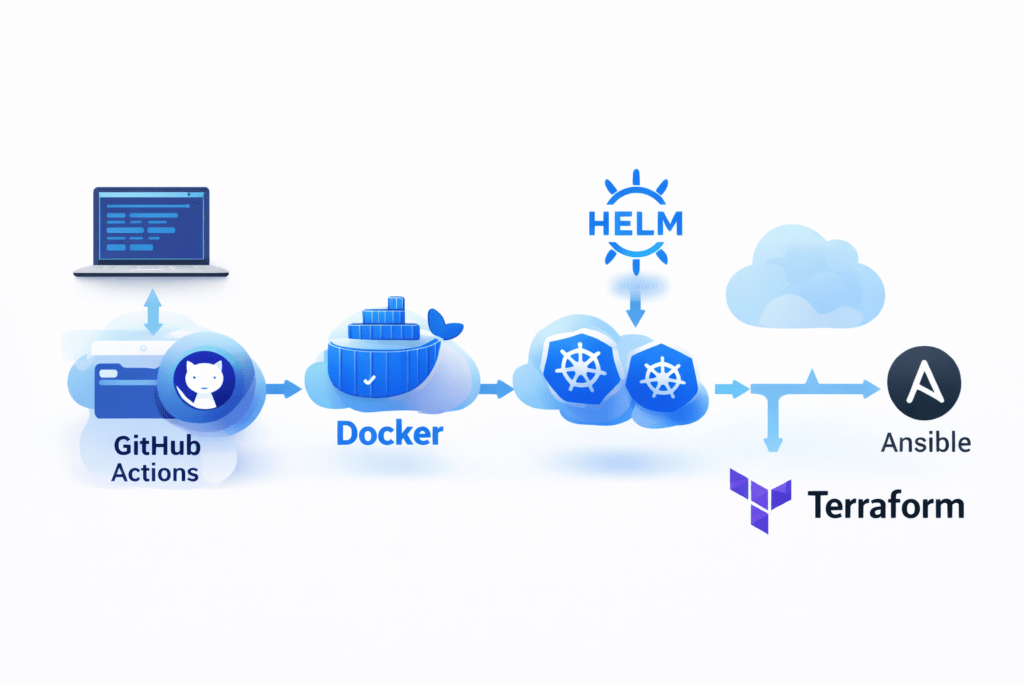
This repository is a small, hands-on lab to learn modern DevOps:
-
- Build a container image with Docker.
-
- Deploy it to Kubernetes using Helm or raw YAML.
-
- Manage infrastructure with Terraform.
-
- Run server tasks with Ansible.
-
- Validate things automatically with CI (GitHub Actions).
Who is this for
-
- Developers and students who want a practical end-to-end CI/CD example.
-
- Ops/SRE folks who want a minimal, self-contained demo.
What you’ll build
-
- A tiny static website served by Nginx inside a Docker container.
-
- Deployment to a Kubernetes cluster.
-
- Optional infrastructure steps with Terraform.
-
- Optional configuration steps with Ansible.
-
- A CI pipeline that runs checks on every commit.
Repository map
docker/
- docker/ — Dockerfile + static index.html.
Contains everything related to containerizing the application.
-
Dockerfile– Defines how the Nginx image is built -
index.html– A simple static webpage served by Nginx
Purpose: Build a lightweight Docker image for the application.
helm/myapp/
- helm/myapp/ — Helm chart for Kubernetes.
Contains a Helm chart for deploying the application to Kubernetes.
-
Templates for Deployment, Service, etc.
-
values.yamlallows easy configuration (image, ports, replicas)
Purpose: Provide a reusable and configurable Kubernetes deployment.
k8s/
-
- k8s/ — Raw Kubernetes manifests (Deployment/Service).
Contains raw Kubernetes YAML manifests.
-
Deployment– Defines how the application runs in the cluster -
Service– Exposes the application inside the cluster
Purpose: Show a plain Kubernetes deployment without Helm (for learning or comparison).
terraform/
-
- terraform/ — Minimal Terraform example (AWS S3 bucket).
Contains a minimal Terraform configuration.
-
Demonstrates Infrastructure as Code (IaC)
-
Example uses an AWS S3 bucket
Purpose: Validate and demonstrate Terraform workflows (init, fmt, validate).
ansible/
-
- ansible/ — Example inventory and playbook for localhost.
Contains basic Ansible automation files.
-
inventory.ini– Defines target hosts (localhost) -
playbook.yml– Runs a simple task using Ansible
Purpose: Show how Ansible can automate configuration or server tasks.
-
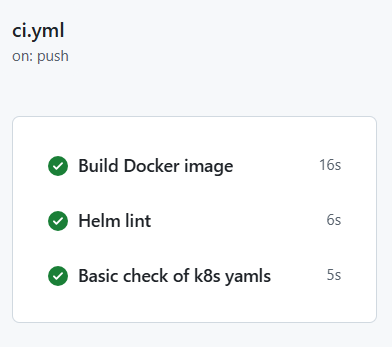
- .github/workflows/ci.yml — CI pipeline: Docker build, Helm lint, k8s YAML checks, DOCX export.
.github/workflows/ci.yml
Defines the GitHub Actions CI pipeline.
The pipeline:
-
Builds the Docker image (no push)
-
Lints the Helm chart
-
Performs basic Kubernetes YAML validation
-
Exports README to DOCX as an artifact
Purpose: Automatically validate the project on every commit or pull request.
-
- .gitlab-ci.yml — GitLab pipeline definition .
.gitlab-ci.yml
Defines a GitLab CI pipeline with similar checks.
Purpose: Demonstrate CI portability across platforms.
Prerequisites
-
- Docker – Docker is a containerization tool that packages an application and its dependencies into a lightweight, portable container.
-
- A Kubernetes cluster +
kubectl(kind, minikube, or any kubeconfig) – Kubernetes is a container orchestration platform that manages the deployment, scaling, and availability of containerized applications. kubectl is the command-line tool used to interact with a Kubernetes cluster.
- A Kubernetes cluster +
-
- Helm 3 – Helm is a package manager for Kubernetes that simplifies application deployment using reusable and configurable charts.
-
- Terraform – Terraform is an Infrastructure as Code (IaC) tool that allows infrastructure to be defined, validated, and managed using configuration files.
-
- Ansible – Ansible is an automation and configuration management tool that runs tasks using simple, human-readable playbooks.
1) Build the Docker image
This builds an Nginx-based image serving docker/index.html.
# From repo root
 docker build -t local/myapp:latest -f docker/Dockerfile docker
Result: You have local/myapp:latest in your local Docker.
2) Deploy with Helm (recommended)
Helm makes Kubernetes configs reusable and configurable.
# Create namespace (safe to re-run)
 kubectl create namespace myapp --dry-run=client -o yaml | kubectl apply -f -
 # Install/upgrade the chart, pointing to your local image
 helm upgrade --install myapp helm/myapp -n myapp \
 --set image.repository=local/myapp --set image.tag=latest
Check status and service:
kubectl -n myapp get pods,svcNote:
-
- The default values run the container as non-root (UID 101) with port 80. Some nginx images can’t bind 80 as non-root.
-
- If your pod keeps restarting, either:
-
- Use an Nginx image built to run non-root on 80, or
-
- Switch the app to listen on 8080 and change the Service
targetPort, or
- Switch the app to listen on 8080 and change the Service
-
- Temporarily disable
runAsNonRootfor testing.
- Temporarily disable
-
- If your pod keeps restarting, either:
3) Deploy with raw Kubernetes YAML (optional)
This is the simplest path without Helm.
kubectl apply -f k8s/
kubectl get pods,svc-
- Uses
nginx:latest.
- Uses
-
- Service is
ClusterIP(inside-cluster only). Usekubectl port-forwardfor local access:
- Service is
kubectl port-forward deploy/myapp 8080:80Then open http://localhost:8080
4) Terraform example (optional)
Formats and validates a minimal AWS config.
cd terraform
terraform init
terraform fmt -check
terraform validate
# terraform plan   # requires AWS credenti
Notes:
-
- For
plan/apply, configure AWS creds.
- For
-
- Bucket names must be globally unique; change
my-ci-cd-demo-bucket.
- Bucket names must be globally unique; change
5) Ansible example (optional)
Runs a simple task on your local machine.
cd ansible
ansible-playbook -i inventory.ini playbook.yml
CI: What runs on every commit
File:
-
- Triggers: push, pull request, manual dispatch.
-
- Jobs:
-
- Docker Build (no push).
-
- Helm Lint (helm/myapp).
-
- Basic k8s YAML checks (greps for apiVersion/kind).
-
- DOCX export of README via Pandoc (artifact for download).
-
- Jobs:
How to try:
-
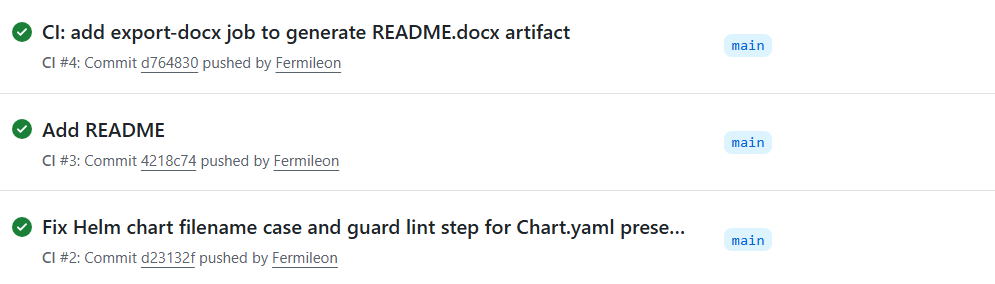
- Push a commit or trigger it manually in GitHub Actions.
Troubleshooting
-
- Docker: Make sure Docker Desktop/daemon is running.
-
- Helm deploy crash-loop:
-
- Likely due to non-root + port 80. Adjust security context or switch to 8080.
-
- Helm deploy crash-loop:
-
- Kubernetes: Ensure your context points to a reachable cluster.
-
- Try “
kubectl get nodes“.
- Try “
-
- Terraform:
-
- Set AWS credentials for
plan/apply.
- Set AWS credentials for
-
- Use a unique S3 bucket name.
-
- Terraform:
-
- Ansible: Ensure Ansible is installed and your Python environment is okay.
What to customize next
-
- Replace the static site with your app.
-
- Add tests in CI.
-
- Push images to a registry.
-
- Extend Helm values (resources, autoscaling, ingress).
-
- Add real Terraform modules (VPC, EKS, etc.).
-
- Use Ansible to configure real hosts.
Wrap-up
This repo is a clean, beginner-friendly path to learn the full flow: build a container, deploy to Kubernetes, manage infra as code, and run checks in CI. Clone it, run the commands above, and iterate.
For more information about this CI-CD pipeline you can refer https://github.com/Fermileon/infra-ci-cd.git this repository.




