

If you’re new to CI/CD or even if you’ve been using it for years you’ve probably nodded along in meetings while silently thinking:
“I know what this does… but what does it actually mean?”
CI/CD is packed with jargon. Words like pipeline, artifact, runner, and deployment strategy get thrown around as if everyone learned them on day one. In reality, CI/CD terminology is one of the biggest barriers to understanding and adopting DevOps practices.
This article breaks down the most confusing CI terminology and CI/CD concepts, with simple explanations, real-world analogies, and specific notes for GitLab CI/CD terminology where relevant.
No fluff. No vendor hype. Just clarity.
What Is CI/CD (Quick Refresher)
Before diving into terminology, let’s align on the basics.
- CI (Continuous Integration): Automatically testing and validating code every time someone pushes changes.
- CD (Continuous Delivery / Continuous Deployment):
- Continuous Delivery: Code is always ready to deploy.
- Continuous Deployment: Code is automatically deployed to production.
CI/CD is not a tool. It’s a process supported by automation.
Now let’s decode the language.
Core CI Terminology (The Basics Everyone Pretends to Know)
1. Pipeline
What people think it means:
Some magical DevOps thing.
What it actually means:
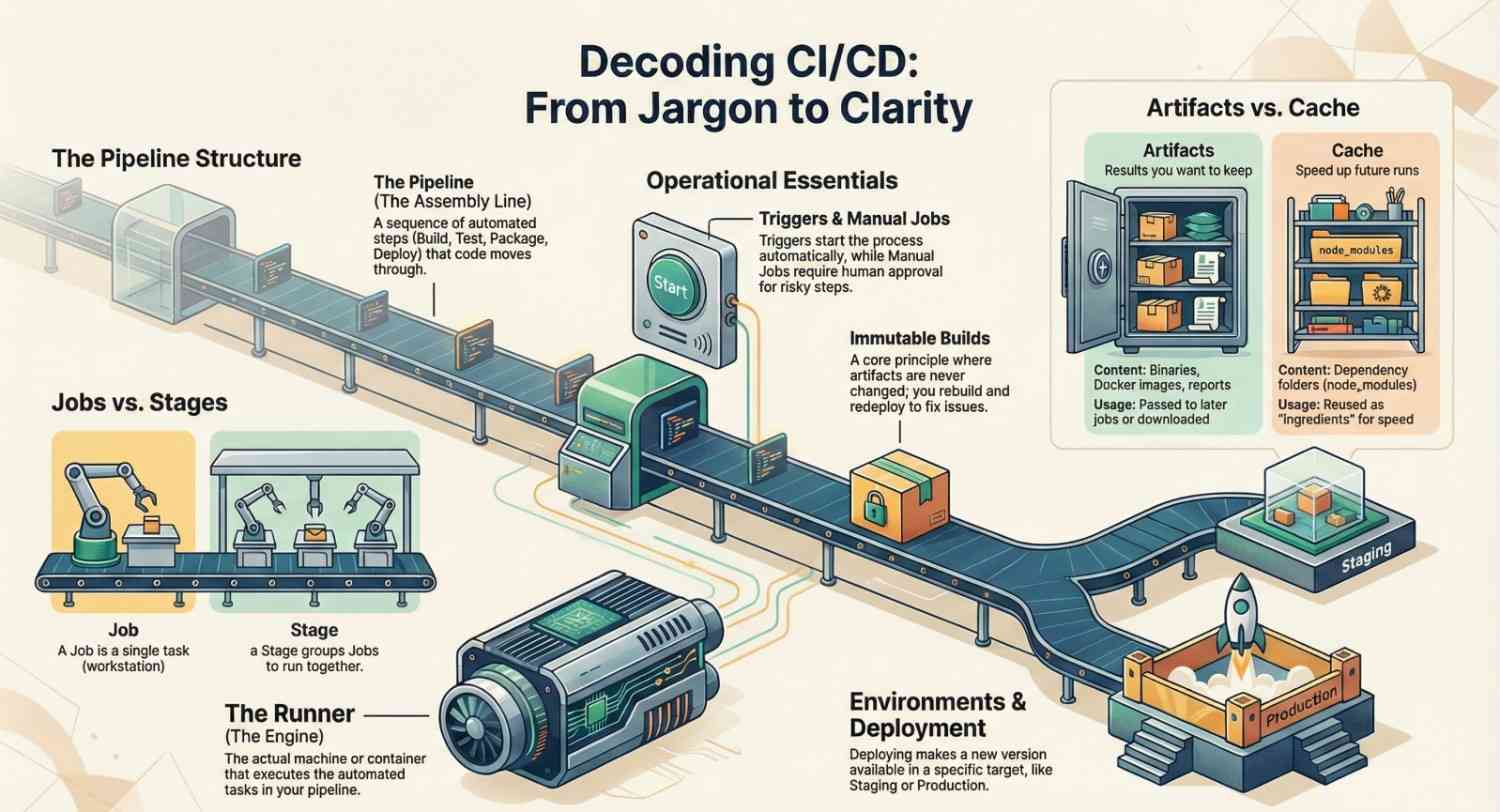
A pipeline is a sequence of automated steps that your code goes through.
Simple explanation:
Think of a pipeline like a factory assembly line:
- Build the code
- Test the code
- Package the code
- Deploy the code
In GitLab CI/CD terminology, a pipeline is triggered by events like:
- A code push
- A merge request
- A scheduled run
2. Job
What people think it means:
Same as a pipeline.
What it actually means:
A job is one single task inside a pipeline.
Simple explanation:
If the pipeline is the assembly line, a job is one workstation.
Examples:
- Run unit tests
- Build a Docker image
- Run security scans
In GitLab CI/CD, jobs are defined inside .gitlab-ci.yml.
3. Stage
What people think it means:
Environment (dev, test, prod).
What it actually means:
A stage is a logical grouping of jobs that run together.
Simple explanation:
Stages organize jobs into steps like:
buildtestdeploy
Jobs in the same stage usually run in parallel, while stages run in order.
4. Runner (GitLab CI/CD Specific)
What people think it means:
Some GitLab service you don’t need to worry about.
What it actually means:
A runner is the machine that executes your CI jobs.
Simple explanation:
Your pipeline doesn’t run “in GitLab.”
It runs on a runner which can be:
- A shared GitLab runner
- Your own VM
- A Kubernetes pod
- A Docker container
No runner = no CI.
This is one of the most misunderstood pieces of GitLab CI/CD terminology.
Build & Artifact Terminology (Where Confusion Peaks)
5. Build
What people think it means:
Compiling code.
What it actually means:
A build is the process of turning source code into something runnable.
Examples:
- Compiling Java into a JAR
- Building a Docker image
- Bundling frontend assets
Not all projects “compile,” but almost all projects build something.
6. Artifact
What people think it means:
Logs.
What it actually means:
An artifact is an output generated by a CI job that you want to keep.
Simple explanation:
Artifacts are things produced by the pipeline:
- Compiled binaries
- Docker images
- Test reports
- Coverage reports
In GitLab CI/CD, artifacts can be:
- Passed to later jobs
- Downloaded manually
- Stored for a limited time
7. Cache
What people think it means:
Same as artifacts.
What it actually means:
A cache is used to speed up pipelines, not store results.
Simple explanation:
Artifacts = results
Cache = reusable ingredients
Examples:
- Dependency folders (
node_modules,.m2) - Package manager caches
Triggering & Flow Control Terminology
8. Trigger
What people think it means:
A button.
What it actually means:
A trigger is an event that starts a pipeline.
Common triggers:
- Code push
- Merge request
- Tag creation
- Scheduled run (cron)
In CI terminology, everything starts with a trigger.
9. Manual Job
What people think it means:
Bad DevOps.
What it actually means:
A job that requires human approval to run.
Simple explanation:
Manual jobs are often used for:
- Production deployments
- Database migrations
- Risky operations
CI/CD doesn’t mean “no humans.”
It means humans intervene intentionally.
10. Conditional Execution (Rules / Only / Except)
What people think it means:
Advanced YAML magic.
What it actually means:
Rules that control when jobs run.
Examples:
- Only run on
main - Skip on documentation changes
- Run only for merge requests
In GitLab CI/CD terminology, this is handled with rules.
Environment & Deployment Terminology
11. Environment
What people think it means:
A server.
What it actually means:
An environment is a logical target where code runs.
Examples:
- Development
- Staging
- Production
In GitLab CI/CD, environments help with:
- Deployment tracking
- Rollbacks
- Visibility
12. Deployment
What people think it means:
Uploading files.
What it actually means:
A deployment is making a new version of your application available in an environment.
This could involve:
- Updating containers
- Restarting services
- Applying infrastructure changes
13. Rollback
What people think it means:
Undo button.
What it actually means:
Deploying a previous known-good version.
Rollbacks are easier when:
- Artifacts are versioned
- Deployments are automated
- CI/CD pipelines are consistent
Testing & Quality Terminology
14. Unit Tests
Tests small pieces of code in isolation.
CI relevance:
Fast, cheap, and should always run in CI.
15. Integration Tests
Tests how multiple components work together.
CI relevance:
Slower, but catch real-world failures.
16. Flaky Tests
What people think it means:
Bad code.
What it actually means:
Tests that sometimes pass and sometimes fail without code changes.
Flaky tests destroy trust in CI pipelines and should be treated as production bugs.
Security & Advanced CI/CD Terminology
17. Secrets
What people think it means:
Environment variables.
What it actually means:
Sensitive data like:
- API keys
- Passwords
- Tokens
In GitLab CI/CD, secrets are usually stored as CI variables, never hard-coded.
18. Immutable Builds
What people think it means:
Buzzword.
What it actually means:
Once built, the artifact is never changed.
You rebuild → you redeploy
You don’t “fix it on the server”
This is a core CI/CD principle.
19. GitOps
What people think it means:
Another DevOps trend.
What it actually means:
Using Git as the single source of truth for deployments.
CI/CD updates Git → Git triggers deployment.
20. Pipeline as Code
What people think it means:
YAML files.
What it actually means:
Your CI/CD logic lives in version control.
Benefits:
- Code review
- History
- Rollbacks
- Consistency
This is foundational CI terminology across all platforms.
Why CI/CD Terminology Matters
Misunderstanding CI/CD terminology leads to:
- Bad pipeline design
- Security risks
- Slow builds
- Fear of deployments
- “DevOps is hard” culture
Once the language clicks, CI/CD becomes boring and boring is good.
Final Thoughts
CI/CD isn’t confusing because it’s complex.
It’s confusing because we skip the vocabulary lesson.
If you understand:
- Pipelines vs jobs
- Artifacts vs cache
- Runners vs environments
You’re already ahead of most teams.
Explore CICD basics here, then master it with Jeevi’s resources and our complete DevOps training.




