

In modern software development, automated testing in a CI pipeline is no longer optional it’s essential. Without automated tests in your continuous integration (CI) pipeline, bugs slip into production, releases slow down, and developer confidence drops.
In this guide, you’ll learn:
- What automated testing in CI means
- Why CI pipeline testing matters
- How to add automated tests to your CI pipeline
- CI/CD testing best practices
- A practical example using GitHub Actions
Let’s dive in.
What Is Automated Testing in a CI Pipeline?
Automated testing in a CI pipeline means running tests automatically every time code is pushed to a repository.
Instead of manually testing features, your CI server:
- Pulls the latest code
- Builds the application
- Runs automated tests
- Reports results
- Blocks broken code from merging
This process is the core of continuous integration testing.
Popular CI tools include:
- GitHub Actions
- GitLab CI/CD
- Jenkins
- CircleCI
Why CI Pipeline Testing Is Critical
Adding automated tests to your CI pipeline helps you:
Catch Bugs Early
Fixing bugs during development is 10x cheaper than fixing them in production.
Prevent Broken Builds
If tests fail, the pipeline fails preventing bad merges.
Improve Developer Confidence
Engineers can deploy frequently without fear.
Enable Continuous Deployment
You can’t safely deploy automatically without reliable automated testing.
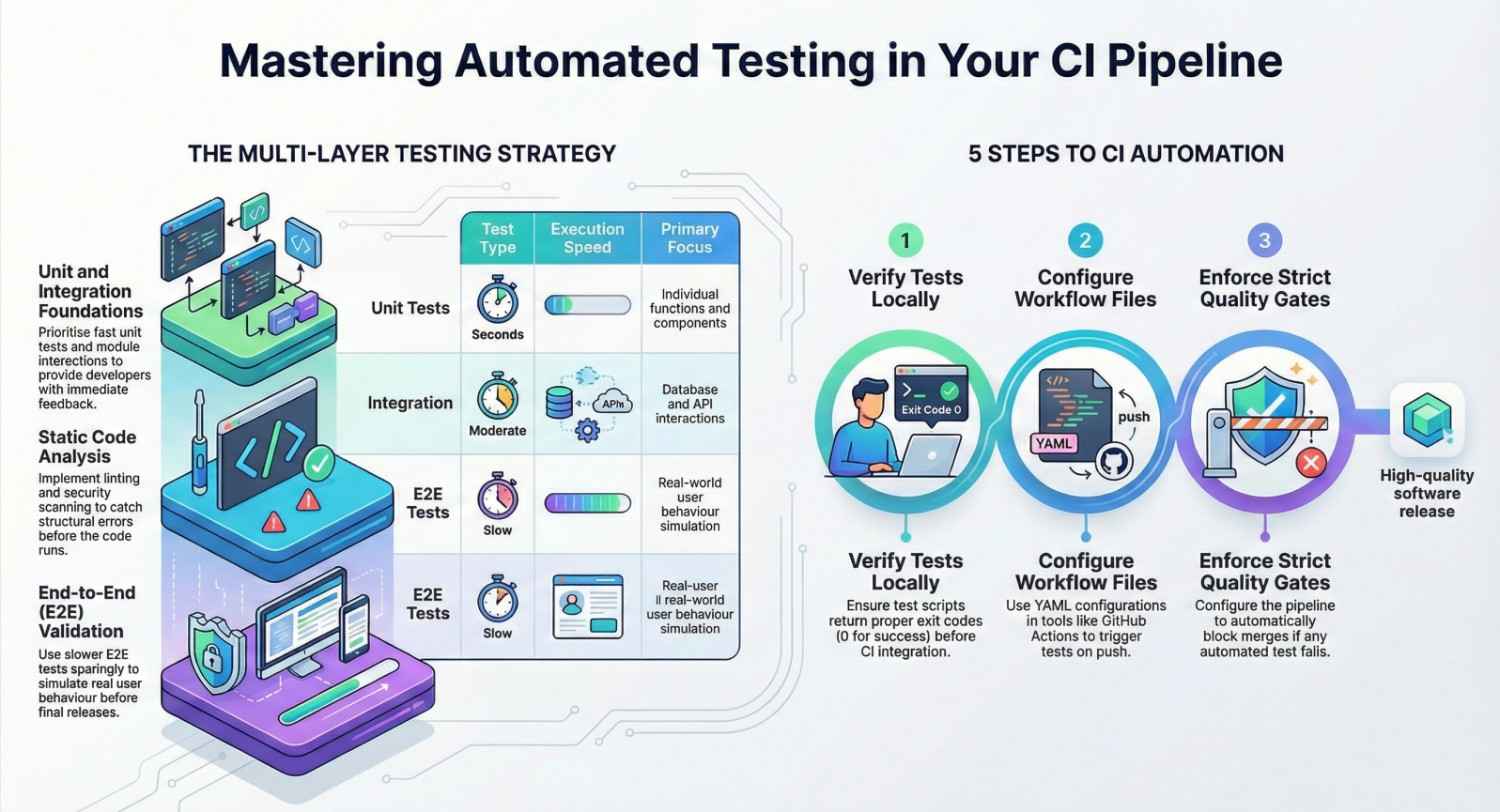
Types of Automated Tests to Add to Your CI Pipeline
To build a strong CI/CD testing strategy, include multiple test layers:
1. Unit Tests
- Fast
- Test individual functions/components
- Run on every commit
2. Integration Tests
- Test how modules work together
- Validate database/API interactions
3. End-to-End (E2E) Tests
- Simulate real user behavior
- Slower but critical before release
4. Static Code Analysis
- Linting
- Security scanning
- Code quality checks
A mature CI pipeline testing setup includes at least unit + integration tests.
Step-by-Step: How to Add Automated Testing to Your CI Pipeline
Let’s walk through a practical example.
Step 1: Write Automated Tests Locally
Before adding tests to CI, ensure they:
- Run locally
- Exit with proper status codes
- Fail when expected
Example (Node.js project):
npm test
Your test script should return:
0→ Success- Non-zero → Failure
CI systems rely on this behavior.
Step 2: Create a CI Workflow File
If you’re using GitHub Actions, create:
.github/workflows/ci.yml
Example configuration:
name: CI Pipeline Testingon:
  push:
    branches: [ main ]
  pull_request:jobs:
  test:
    runs-on: ubuntu-latest    steps:
      - uses: actions/checkout@v3
      - uses: actions/setup-node@v3
        with:
          node-version: 18      - run: npm install
      - run: npm test
Now, every push triggers automated testing in your CI pipeline.
Step 3: Fail the Pipeline on Test Failure
By default, if npm test fails, the pipeline stops.
This is critical.
Never allow:
- Ignored test failures
- Manual overrides
- “Test later” culture
Your CI pipeline testing process should enforce quality gates.
Step 4: Add Code Coverage
Code coverage helps measure how much of your code is tested.
You can integrate tools like:
- Jest coverage
- Coverage reports uploaded as artifacts
- Pull request coverage comments
CI/CD testing best practices recommend setting minimum coverage thresholds.
Step 5: Parallelize Tests for Speed
Slow CI pipelines reduce productivity.
Ways to optimize:
- Run tests in parallel
- Cache dependencies
- Use smaller Docker images
- Separate unit and integration jobs
Fast feedback is the key to effective DevOps testing automation.
CI/CD Testing Best Practices
Here are proven best practices when adding automated tests to your CI pipeline:
Keep Tests Fast
Unit tests should run in seconds, not minutes.
Run Tests on Every Pull Request
Never merge untested code.
Use Test Isolation
Tests should not depend on shared state.
Test in a Production-Like Environment
Use containers (e.g., Docker) to ensure consistency.
Shift Security Left
Add security scanning tools into CI early.
Monitor Test Flakiness
Flaky tests destroy trust in CI.
Example CI Pipeline Testing Workflow
A mature CI pipeline might look like this:
- Code pushed
- Linting runs
- Unit tests run
- Integration tests run
- Security scan runs
- Build artifact created
- Deployment triggered (if tests pass)
This is the foundation of reliable continuous integration testing.
Common Mistakes When Adding Automated Tests to CI
- Running only E2E tests (too slow)
- Ignoring failed tests
- Not testing edge cases
- Sharing test databases across builds
- Letting CI pipelines become slow and bloated
Final Thoughts
Adding automated testing to your CI pipeline is one of the highest ROI improvements you can make in DevOps.
It:
- Reduces bugs
- Speeds up releases
- Improves developer productivity
- Enables continuous deployment
- Strengthens software quality
If you’re serious about modern DevOps practices, CI/CD testing automation should be a top priority.
- If you want to explore DevOps, start your training here.




