

Modern data platforms rely heavily on automated data pipelines. As organizations scale their analytics workloads, manually deploying ETL scripts becomes inefficient and error-prone. This is where CI/CD for data engineering becomes essential.
In this blog, we will walk through how to set up a CI/CD pipeline for AWS Glue jobs using GitHub Actions. By the end, you’ll understand how to automate testing, packaging, and deployment of Glue ETL jobs for faster and more reliable data workflows.
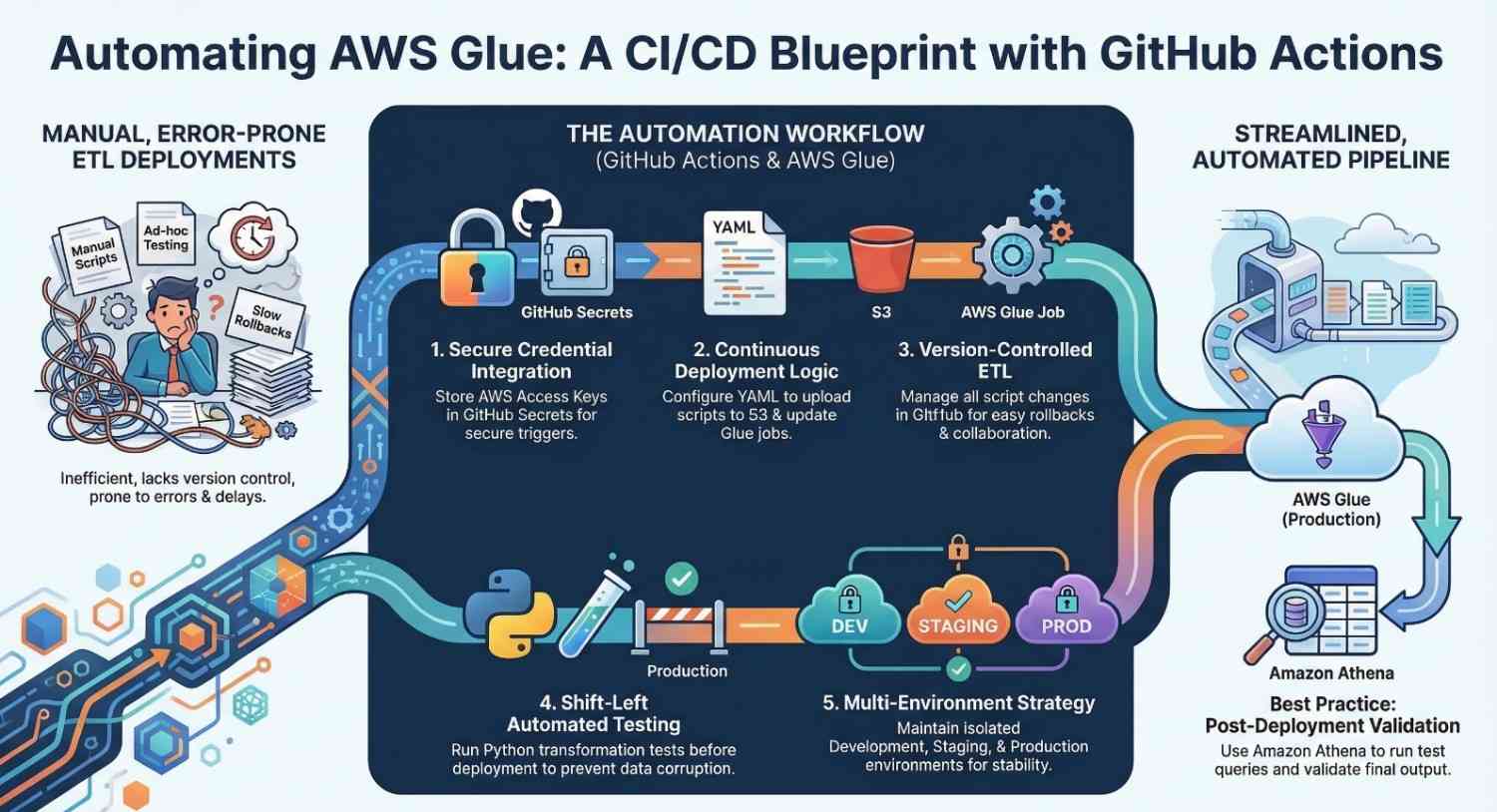
Why CI/CD is Important for Data Pipelines
Traditionally, ETL pipelines were deployed manually. Data engineers uploaded scripts directly into Glue or modified jobs via the console.
However, this approach creates several challenges:
- Lack of version control
- Difficult collaboration
- Risk of breaking production pipelines
- No automated testing
Implementing CI/CD for AWS Glue jobs helps solve these problems by enabling:
- Automated testing
- Version-controlled ETL scripts
- Faster deployment cycles
- Reliable production releases
Using CI/CD pipelines for Glue ensures every change to your ETL logic is validated before deployment.
Overview of the Architecture
The CI/CD pipeline for Glue jobs typically follows this workflow:
- Developer commits ETL script changes to GitHub.
- GitHub Actions triggers a workflow.
- Automated tests run on the ETL scripts.
- The pipeline packages the code.
- Deployment updates the Glue job.
Core components used:
- Source Control: GitHub
- CI/CD Engine: GitHub Actions
- ETL Service: AWS Glue
- Query Service (optional validation): Amazon Athena
This architecture enables fully automated ETL deployment.
Prerequisites
Before setting up CI/CD, ensure you have:
- An AWS account
- An existing AWS Glue job
- GitHub repository for ETL scripts
- IAM permissions for deployment
- AWS CLI configured
The deployment pipeline will interact with AWS using secure credentials.
Step 1: Store Glue ETL Scripts in GitHub
Start by creating a repository to manage your ETL scripts.
Example repository structure:
glue-cicd-pipeline/
│
├── scripts/
│   └── glue_etl_job.py
│
├── tests/
│   └── test_etl.py
│
└── .github/workflows/
    └── deploy.yml
Benefits of version control:
- Track changes in ETL logic
- Enable team collaboration
- Rollback failed deployments easily
This is a best practice for data engineering CI/CD workflows.
Step 2: Configure AWS Credentials in GitHub
Next, store AWS credentials securely inside GitHub Secrets.
Go to:
Repository → Settings → Secrets → Actions
Add the following secrets:
AWS_ACCESS_KEY_IDAWS_SECRET_ACCESS_KEYAWS_REGION
These credentials allow GitHub Actions to deploy Glue jobs automatically.
Step 3: Create the GitHub Actions Workflow
Now create the CI/CD workflow file.
Path:
.github/workflows/deploy.yml
Example workflow:
name: Deploy Glue Jobon: push: branches: – mainjobs: deploy: runs-on: ubuntu-latest steps: – name: Checkout repository uses: actions/checkout@v3 – name: Configure AWS credentials uses: aws-actions/configure-aws-credentials@v2 with: aws-access-key-id: ${{ secrets.AWS_ACCESS_KEY_ID }} aws-secret-access-key: ${{ secrets.AWS_SECRET_ACCESS_KEY }} aws-region: us-east-1 – name: Upload Glue Script to S3 run: | aws s3 cp scripts/glue_etl_job.py s3://my-glue-bucket/scripts/ – name: Update Glue Job run: | aws glue update-job \ –job-name my-glue-job \ –job-update file://job-config.jsonThis workflow automates the deployment whenever code is pushed to the main branch.
Step 4: Add Automated Testing
Testing ETL logic before deployment is critical.
Example test using Python:
def test_transformation(): input_data = [1,2,3] result = [x*2 for x in input_data] assert result == [2,4,6]Benefits of automated tests:
- Validate transformation logic
- Prevent data corruption
- Improve pipeline reliability
Testing is a core principle of DataOps practices.
Step 5: Deploy and Monitor the Pipeline
Once everything is configured:
- Commit your changes.
- Push to GitHub.
- The CI/CD workflow triggers automatically.
You can monitor pipeline execution in the Actions tab of your repository.
Deployment steps will:
- Upload updated scripts
- Update the Glue job configuration
- Prepare the pipeline for execution
This provides continuous deployment for AWS Glue ETL pipelines.
Best Practices for CI/CD with Glue
To build a reliable data pipeline CI/CD system, follow these best practices:
Use Multiple Environments
Maintain separate environments:
- Development
- Staging
- Production
Implement Infrastructure as Code
Use tools like:
Add Data Validation
Run test queries in Amazon Athena to validate pipeline output.
Monitor Job Performance
Use AWS monitoring tools to track:
- Job failures
- Execution time
- Resource utilization
Benefits of CI/CD for AWS Glue
Implementing CI/CD for Glue pipelines provides several advantages:
- Faster deployment cycles
- Safer production releases
- Better data pipeline reliability
- Improved collaboration among data engineers
Organizations adopting DataOps practices can significantly reduce pipeline downtime and errors.
Conclusion
As data platforms grow in complexity, manual ETL deployments become unsustainable. Implementing CI/CD pipelines for AWS Glue jobs using GitHub Actions enables automated testing, reliable deployments, and better collaboration.
By combining the power of AWS Glue, GitHub Actions, and optionally Amazon Athena, data teams can build scalable and maintainable data pipelines.
Adopting CI/CD practices not only improves developer productivity but also ensures high-quality data delivery for analytics and business intelligence.
- If you want to explore AWS, start your training here.
- If you want to explore DevOps, start your training here.




