

Introduction
DevOps has become the backbone of modern software delivery. Whether you’re a developer, system admin, or aspiring engineer, understanding CI/CD, containers, and cloud computing is essential.
This guide is a DevOps cheat sheet designed to give you a fast yet practical understanding of the most important DevOps conceptswithout overwhelming theory
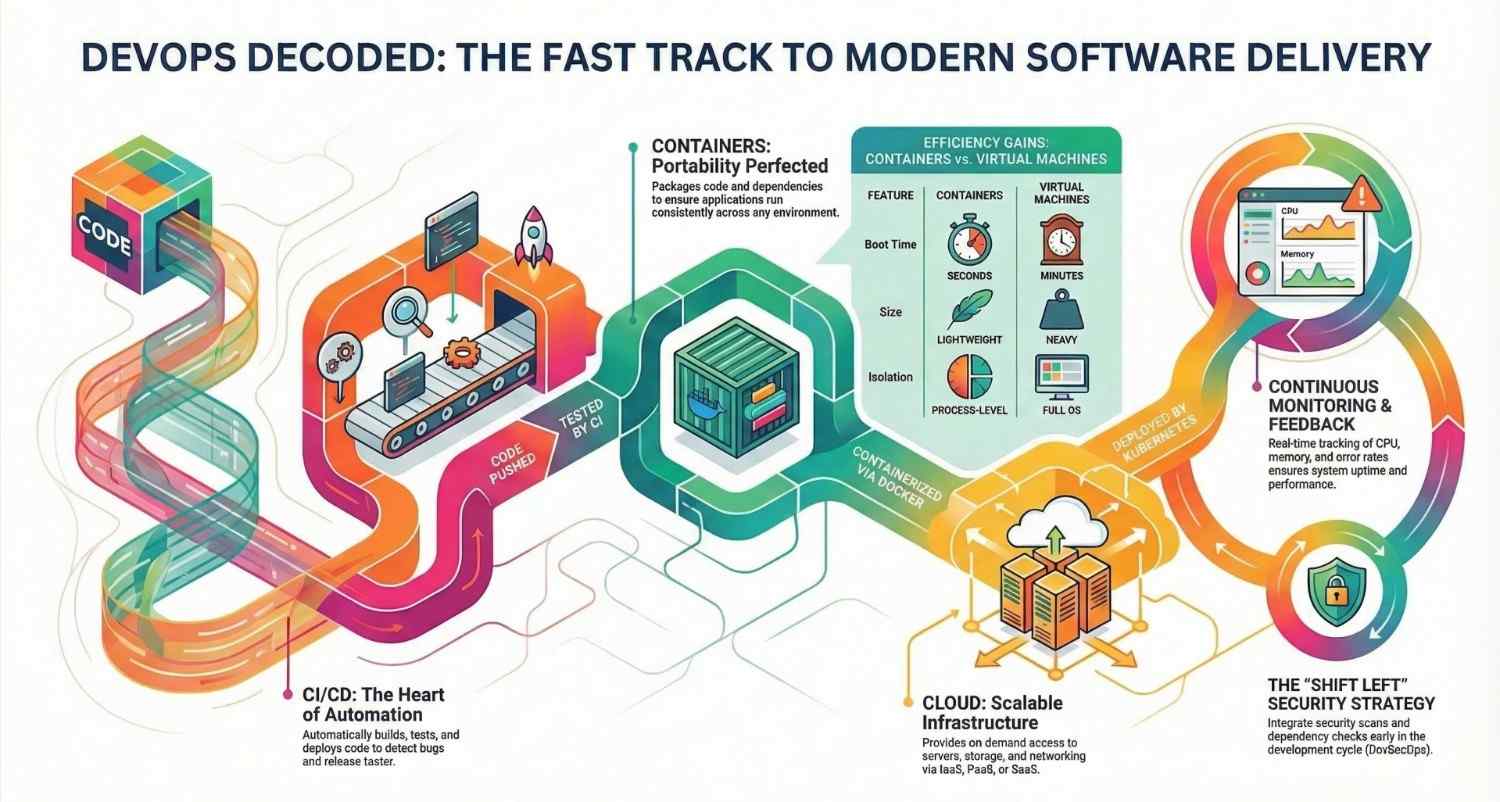
What is DevOps?
DevOps is a combination of:
- Development (Dev)
- Operations (Ops)
Goal:
Deliver software faster, more reliably, and with better quality
Key Principles
- Automation
- Continuous Integration & Delivery
- Collaboration
- Monitoring & Feedback
CI/CD Cheat Sheet
What is CI/CD?
CI/CD = Continuous Integration + Continuous Delivery/Deployment
Continuous Integration (CI)
- Developers push code frequently
- Code is automatically:
- Built
- Tested
- Detect bugs early
Continuous Delivery (CD)
- Code is automatically prepared for release
- Manual approval before deployment
Continuous Deployment
- Fully automated release to production
CI/CD Pipeline Flow
Code → Build → Test → Package → Deploy → Monitor
Popular CI/CD Tools
- Jenkins
- GitHub Actions
- GitLab CI
- CircleCI
Sample CI/CD YAML (Simple)
name: CI Pipeline on: [push]jobs: build: runs-on: ubuntu-latest steps: – name: Checkout code uses: actions/checkout@v2 – name: Run tests run: npm testBest Practices
- Keep builds fast
- Automate testing
- Use version control (Git)
- Fail fast on errors
Containers Cheat Sheet
What are Containers?
Containers package:
- Application code
- Dependencies
- Runtime
Runs anywhere consistently
Why Use Containers?
- Eliminates “works on my machine” issue
- Lightweight vs Virtual Machines
- Fast startup
- Easy scaling
Containers vs Virtual Machines
| Feature | Containers | Virtual Machines |
|---|---|---|
| Size | Lightweight | Heavy |
| Boot Time | Seconds | Minutes |
| Performance | High | Moderate |
| Isolation | Process-level | Full OS |
Docker Cheat Sheet
🔹 Basic Commands
docker build -t app . docker run -p 3000:3000 app docker ps docker stopSample Dockerfile
FROM node:18 WORKDIR /app COPY . . RUN npm install CMD [“npm”, “start”]Container Orchestration
Kubernetes Basics
- Manages containers at scale
- Handles:
- Deployment
- Scaling
- Networking
Kubernetes Core Concepts
- Pod → Smallest unit
- Deployment → Manages pods
- Service → Exposes app
- Namespace → Logical grouping
Cloud Computing Cheat Sheet
What is Cloud Computing?
Delivering computing services over the internet:
- Servers
- Storage
- Databases
- Networking
Cloud Models
🔹 IaaS (Infrastructure as a Service)
- Virtual machines
- Example: AWS EC2
🔹 PaaS (Platform as a Service)
- Deploy apps without managing infra
- Example: Heroku
🔹 SaaS (Software as a Service)
- Ready-to-use apps
- Example: Gmail
Popular Cloud Providers
Key Cloud Services
- Compute → Virtual machines
- Storage → Object/file storage
- Networking → VPC, Load Balancer
- IAM → Access control
Cloud Benefits
- Scalability
- Pay-as-you-go
- High availability
- Global reach
DevOps + Security (DevSecOps)
Key Concepts
- Secure code early
- Scan dependencies
- Use secrets management
- Automate security checks
Monitoring & Logging Cheat Sheet
Why Monitoring Matters
- Detect issues early
- Improve performance
- Ensure uptime
Key Metrics
- CPU usage
- Memory
- Latency
- Error rates
Popular Tools
- Prometheus
- Grafana
- ELK Stack
DevOps Lifecycle Cheat Sheet
Plan → Code → Build → Test → Release → Deploy → Operate → Monitor
DevOps Best Practices
- Automate everything
- Use Infrastructure as Code (IaC)
- Monitor continuously
- Shift left (test early)
- Use microservices architecture
- Implement version control
Quick Interview Cheat Sheet
Common Questions
- What is CI/CD?
- Difference between Docker & VM?
- What is Kubernetes?
- What is Infrastructure as Code?
- Explain blue-green deployment
Real-World Example
Scenario:
You push code to GitHub →
- CI runs tests automatically
- Docker builds image
- Image pushed to registry
- Kubernetes deploys app
- Monitoring tools track performance
Result: Fully automated deployment pipeline
Conclusion
DevOps is not just a toolset it’s a culture that enables:
- Faster delivery
- Better collaboration
- Reliable systems
If you master:
- CI/CD pipelines
- Containers (Docker, Kubernetes)
- Cloud platforms
You’re already ahead in the DevOps journey.
Next Steps
- Practice Docker & Kubernetes hands-on
- Build a CI/CD pipeline
- Deploy an app on cloud
- Learn Terraform & monitoring tools
- If you want to explore DevOps, start your training here.




