

As organizations scale their cloud-native infrastructure, one of the most important architectural decisions is whether to run a single Kubernetes cluster or adopt a multi-cluster strategy.
At first glance, using one Kubernetes cluster seems simpler. But as systems grow in size, complexity, and geographic distribution, multi-cluster setups become increasingly attractive.
This in-depth guide breaks down the real-world trade-offs, use cases, architecture patterns, and decision frameworks to help you choose the right approach.
Understanding the Basics
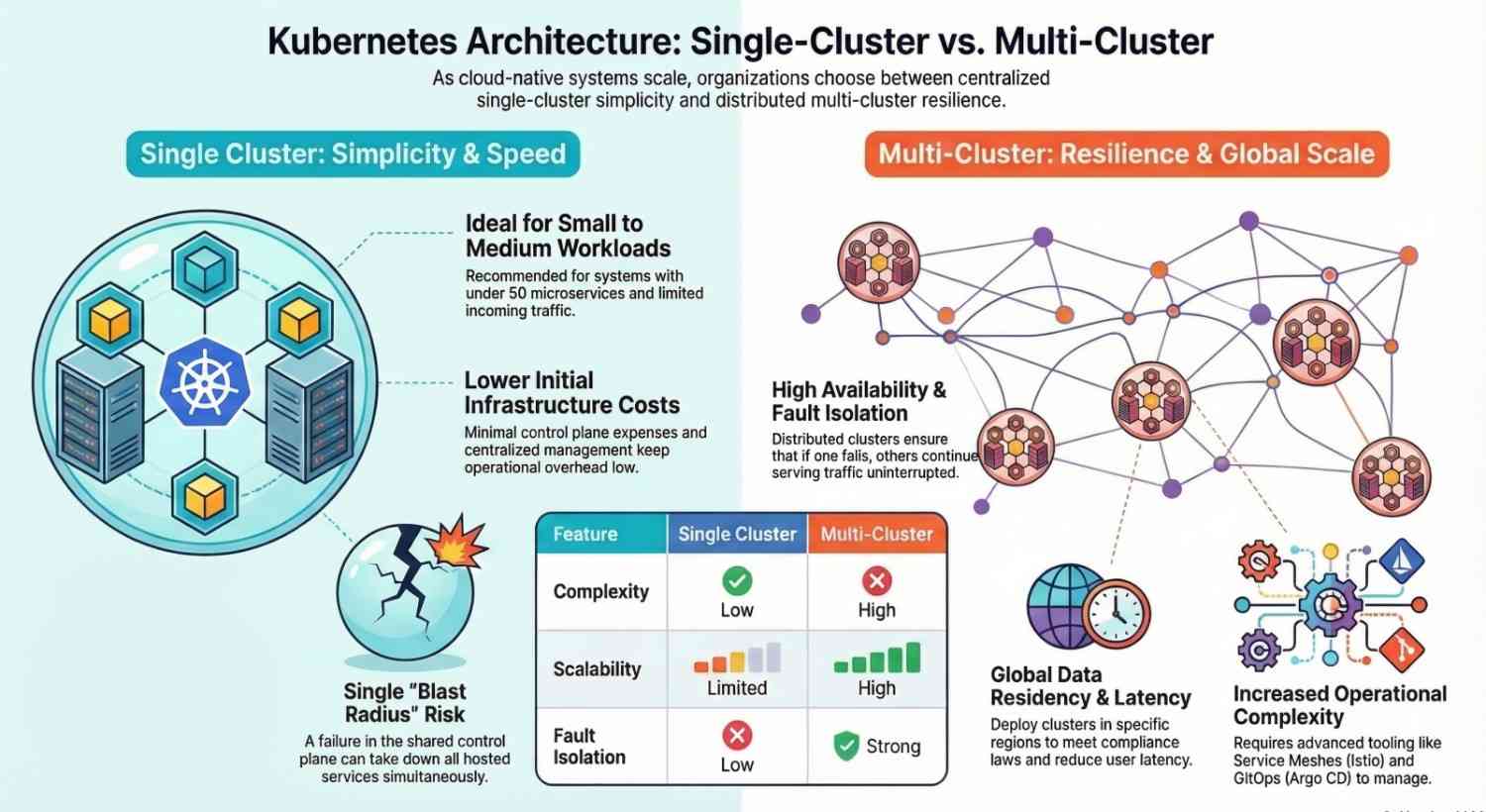
What is a Single Cluster?
A single cluster architecture means:
- All workloads run inside one Kubernetes cluster
- Shared control plane
- Centralized management
Ideal for simplicity and smaller-scale environments.
What is Multi-Cluster?
A multi-cluster architecture uses multiple Kubernetes clusters:
- Distributed across regions, environments, or teams
- Each cluster operates independently
- Managed collectively via tooling
Designed for scale, resilience, and flexibility.
Single Cluster vs Multi-Cluster: Key Differences
| Feature | Single Cluster | Multi-Cluster |
|---|---|---|
| Complexity | Low | High |
| Scalability | Limited | High |
| Fault Isolation | Low | Strong |
| Cost | Lower initially | Higher upfront |
| Operational Overhead | Minimal | Significant |
| Flexibility | Limited | High |
When a Single Cluster Makes Sense
1. Small to Medium Workloads
If your system:
- Has < 50 microservices
- Limited traffic
- Few teams
A single Kubernetes cluster is more than enough.
2. Simplicity is a Priority
Managing one cluster means:
- Easier deployments
- Centralized logging and monitoring
- Fewer moving parts
3. Cost Optimization
Running multiple clusters increases:
- Control plane costs
- Networking overhead
- Tooling complexity
A single cluster minimizes cost.
4. Strong Namespace Isolation is Enough
You can isolate workloads using:
- Namespaces
- RBAC policies
- Network policies
5. Faster Setup & Time-to-Market
For startups or MVPs:
- Faster deployment cycles
- Less infrastructure work
Limitations of Single Cluster
Even though it’s simple, it has drawbacks:
Blast Radius Risk
If the cluster fails → everything goes down.
Scalability Constraints
- API server limits
- Resource contention
Security Concerns
- Multi-tenant environments can be risky
When Multi-Cluster is the Better Choice
1. High Availability & Fault Isolation
Multi-cluster provides:
- Regional redundancy
- Disaster recovery
If one cluster fails, others continue running.
2. Multi-Region Deployments
For global applications:
- Deploy clusters in different regions
- Reduce latency for users
3. Large Organizations & Team Autonomy
Different teams can have:
- Dedicated clusters
- Independent release cycles
4. Compliance & Data Residency
Some industries require:
- Data to stay within specific regions
Multi-cluster helps meet compliance needs.
5. Environment Isolation
Separate clusters for:
- Dev
- Staging
- Production
Reduces risk of accidental failures.
Multi-Cluster Architecture Patterns
1. Active-Active
- Multiple clusters serve traffic simultaneously
- Load balanced globally
Best for high availability
2. Active-Passive
- One primary cluster
- Backup cluster for failover
Best for disaster recovery
3. Federated Clusters
Use tools to manage multiple clusters centrally.
Tools include:
- Kubernetes Federation
- This
4. Hub-and-Spoke Model
- Central management cluster (hub)
- Multiple workload clusters (spokes)
Key Tools for Multi-Cluster Management
Managing multiple clusters manually is not scalable.
Essential tools:
- Istio (multi-cluster networking)
- Argo CD (GitOps deployments)
- Prometheus (metrics)
- Grafana (dashboards)
Cost Considerations
Single Cluster:
- Lower infrastructure cost
- Easier to manage
Multi-Cluster:
- Higher compute & control plane costs
- Increased networking costs
But:
- Better reliability can save money long-term
Real-World Decision Framework
Ask these questions:
1. Scale
- Small app → Single cluster
- Large system → Multi-cluster
2. Availability Needs
- Downtime acceptable → Single
- Zero downtime → Multi
3. Team Structure
- Small team → Single
- Multiple teams → Multi
4. Geography
- One region → Single
- Global users → Multi
Real-World Case Study
SaaS Company Scaling Journey
Phase 1:
- Single Kubernetes cluster
- 20 services
Challenges:
- Resource contention
- Deployment conflicts
Phase 2: Multi-Cluster Migration
Results:
- 99.99% uptime
- 35% performance improvement
- Better team autonomy
Common Mistakes to Avoid
Over-Engineering Too Early
Don’t start with multi-cluster unless necessary.
Ignoring Networking Complexity
Multi-cluster networking is hard.
Lack of Observability
Use:
- Prometheus
- Grafana
Future Trends
1. Multi-Cluster by Default
Large companies are adopting it as standard.
2. Platform Engineering Integration
Platform teams abstract multi-cluster complexity.
3. AI-Driven Cluster Optimization
Smarter scaling and placement decisions.
Final Thoughts
There’s no one-size-fits-all answer.
Start simple with a single Kubernetes cluster
Move to multi-cluster when scale, reliability, or compliance demands it
The key is evolution, not over-engineering.




