

The AWS Certified SysOps Administrator – Associate exam is often considered one of the more challenging associate-level certifications. Unlike other AWS exams that focus heavily on theory, this one tests your ability to monitor, manage, and operate systems in real-world cloud environments.
If you’re preparing for this certification, you need more than just reading you need hands-on experience, smart strategy, and a focused plan. This guide walks you through everything you need to know: from exam structure to preparation tips, resources, and proven strategies to pass confidently.
Understanding the AWS SysOps Administrator Exam
Before diving into preparation, it’s important to understand what you’re up against.
The exam focuses on your ability to:
- Deploy, manage, and operate workloads on AWS
- Implement monitoring, logging, and alerting systems
- Handle networking, security, and compliance
- Optimize performance and costs
- Troubleshoot real-world issues
Exam Format:
- Duration: 130 minutes
- Questions: ~65 (multiple choice & multiple response)
- Passing Score: ~720/1000
- Exam Type: Includes scenario-based questions and sometimes hands-on labs
Why This Exam Is Challenging
Many candidates find this exam tougher than others at the same level. Here’s why:
- Heavy focus on troubleshooting
You’re expected to identify issues and fix them, not just recall concepts. - Deep understanding of monitoring tools
Services like CloudWatch, CloudTrail, and Config are tested in depth. - Scenario-based questions
You must choose the best solution, not just a correct one. - Hands-on experience is critical
Pure theory won’t be enough to pass.
Key Topics You Must Master
1. Monitoring & Logging
This is one of the most important sections of the exam.
Focus on:
- CloudWatch metrics, alarms, logs, dashboards
- CloudTrail for auditing API activity
- AWS Config for compliance tracking
Tip: Understand how these services work together in real-world scenarios.
2. High Availability & Fault Tolerance
You need to know how to design resilient systems.
Key areas:
- Auto Scaling groups
- Load Balancers (ALB, NLB)
- Multi-AZ deployments
- Route 53 health checks and routing policies
3. Deployment & Provisioning
Learn how to deploy infrastructure efficiently.
Important tools:
- CloudFormation (must-know)
- Elastic Beanstalk
- Systems Manager (SSM)
4. Security & Compliance
Security is always a major topic.
Focus on:
- IAM roles, policies, and permissions
- Security groups vs NACLs
- Encryption (KMS, SSL/TLS)
- Secrets Manager and Parameter Store
5. Networking
Networking questions can be tricky.
Understand:
- VPC design (subnets, route tables, gateways)
- NAT Gateway vs Internet Gateway
- VPN and Direct Connect basics
- DNS with Route 53
6. Cost & Performance Optimization
You should know how to:
- Choose cost-effective resources
- Use Reserved Instances and Savings Plans
- Monitor usage and optimize performance
Best Study Resources
Choosing the right resources can make or break your preparation.
1. Official AWS Resources
Start with AWS’s own materials:
- Exam guide
- Sample questions
- Whitepapers (especially Well-Architected Framework)
2. Online Courses
Look for structured courses that include:
- Real-world demos
- Practice quizzes
- Hands-on labs
Platforms like Udemy, Coursera, and A Cloud Guru offer strong options.
3. Practice Exams
Practice tests are essential.
They help you:
- Understand question patterns
- Identify weak areas
- Improve time management
Pro Tip: Don’t just memorize answers understand why each option is correct or incorrect.
4. Hands-On Practice
This is non-negotiable.
Use:
- AWS Free Tier
- Sandbox environments
- Labs and mini projects
Try building:
- Auto-scaling web apps
- Monitoring dashboards
- Secure VPC setups
Proven Study Strategy
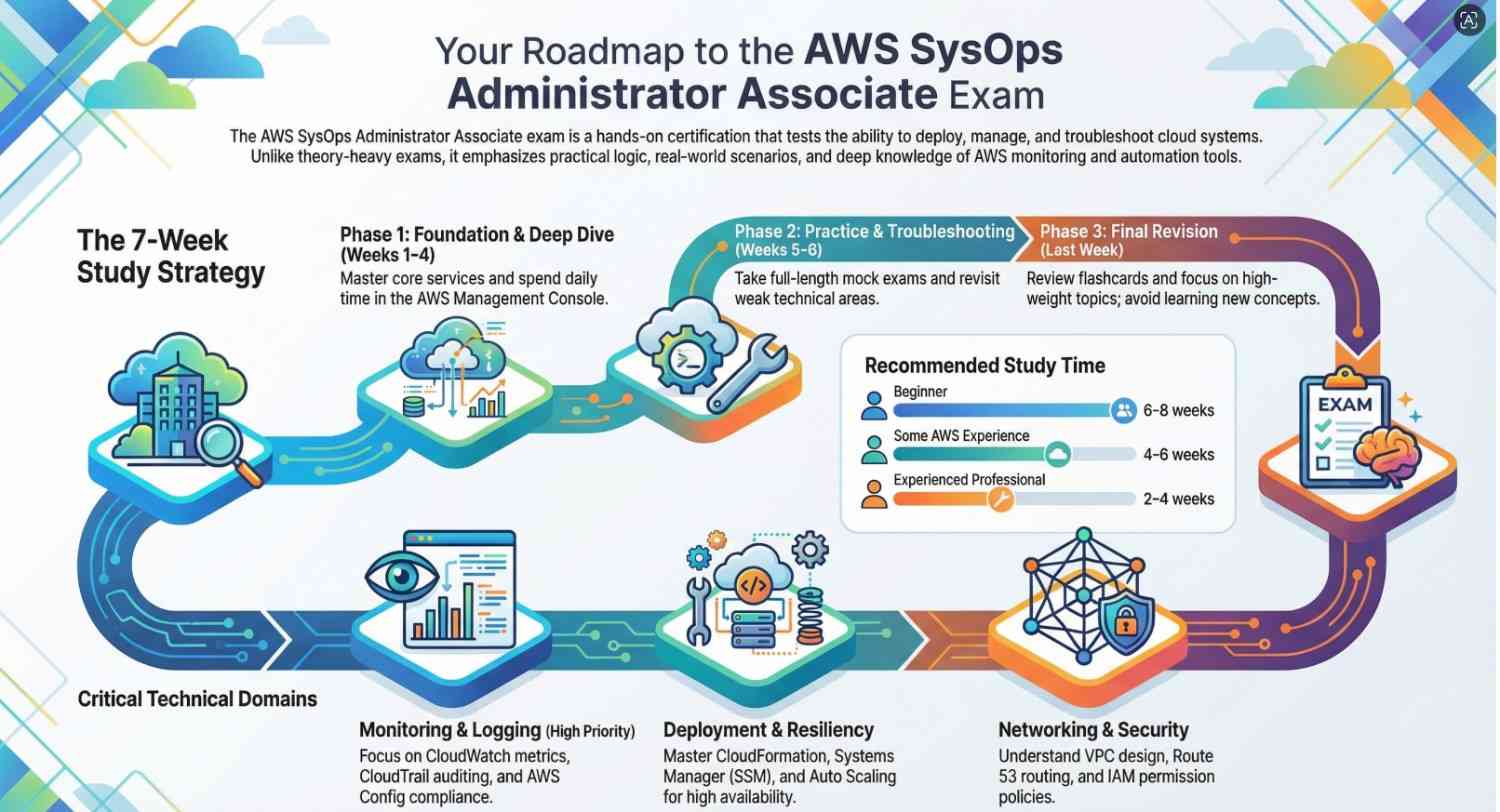
Step 1: Build a Strong Foundation (Week 1–2)
- Learn core AWS services
- Watch course videos
- Take notes on key concepts
Step 2: Deep Dive into Core Topics (Week 3–4)
- Focus on monitoring, networking, and security
- Practice real-world scenarios
- Start using AWS console daily
Step 3: Hands-On & Practice Tests (Week 5–6)
- Take full-length mock exams
- Review mistakes thoroughly
- Revisit weak topics
Step 4: Final Revision (Last Week)
- Go through notes and flashcards
- Focus on high-weight topics
- Avoid learning new concepts
Exam Day Strategy
1. Read Questions Carefully
AWS questions are often tricky. Look for keywords like:
- MOST cost-effective
- HIGHLY available
- LEAST operational effort
2. Eliminate Wrong Answers
Usually, 2 options are clearly incorrect. Narrow it down.
3. Manage Your Time
- Don’t spend too long on one question
- Flag difficult ones and revisit later
4. Stay Calm During Labs
If your exam includes labs:
- Follow instructions carefully
- Don’t panic if something doesn’t work immediately
Common Mistakes to Avoid
- Skipping hands-on practice
This is the biggest mistake. - Memorizing instead of understanding
AWS questions require logic, not memory. - Ignoring weak areas
Fix your gaps early. - Overloading resources
Stick to 1–2 main courses and a few practice tests.
Realistic Preparation Timeline
| Experience Level | Recommended Study Time |
|---|---|
| Beginner | 6–8 weeks |
| Some AWS experience | 4–6 weeks |
| Experienced professional | 2–4 weeks |
Final Tips for Success
- Practice daily, even if only for 1–2 hours
- Focus on understanding how services interact
- Use diagrams to visualize architectures
- Learn from mistakes in practice tests
- Stay consistent rather than cramming
Conclusion
The AWS SysOps Administrator exam is not just about passing a test it’s about proving you can operate and manage real-world cloud systems effectively.
If you combine:
- Strong conceptual understanding
- Consistent hands-on practice
- Smart exam strategy
you’ll significantly increase your chances of passing on your first attempt.
Remember, this certification rewards practical skills over theory, so spend more time building and troubleshooting than just reading.
Stay focused, practice consistently, and you’ll be well on your way to becoming a certified AWS SysOps Administrator.
- Want to prepare for AWS certification? Click here to get started.




