

Understanding how to design systems on Amazon Web Services can feel overwhelming at first. With dozens of services like Amazon EC2, Amazon S3, and AWS Lambda, beginners often struggle to visualize how everything fits together.
That’s where AWS architecture diagrams come in.
This guide will help you understand AWS architecture diagrams from scratch, learn common patterns, and even build your first diagram step by step.
What is an AWS Architecture Diagram?
An AWS architecture diagram is a visual representation of your cloud infrastructure. It shows how different AWS services interact to deliver an application.
Think of it like a blueprint for your system.
Instead of reading long documentation, you can quickly understand:
- Where your app is hosted
- How users access it
- How data flows
- How security is handled
Why Architecture Diagrams Matter
For beginners, diagrams are not just optional they’re essential.
1. Simplifies Complex Systems
AWS environments can get complicated quickly. Diagrams break them into understandable components.
2. Helps in Planning
Before deploying resources, you can design everything visually.
3. Improves Communication
Teams use diagrams to explain systems to developers, clients, or stakeholders.
4. Useful for Interviews & Certifications
If you’re preparing for AWS certifications, diagrams are heavily used.
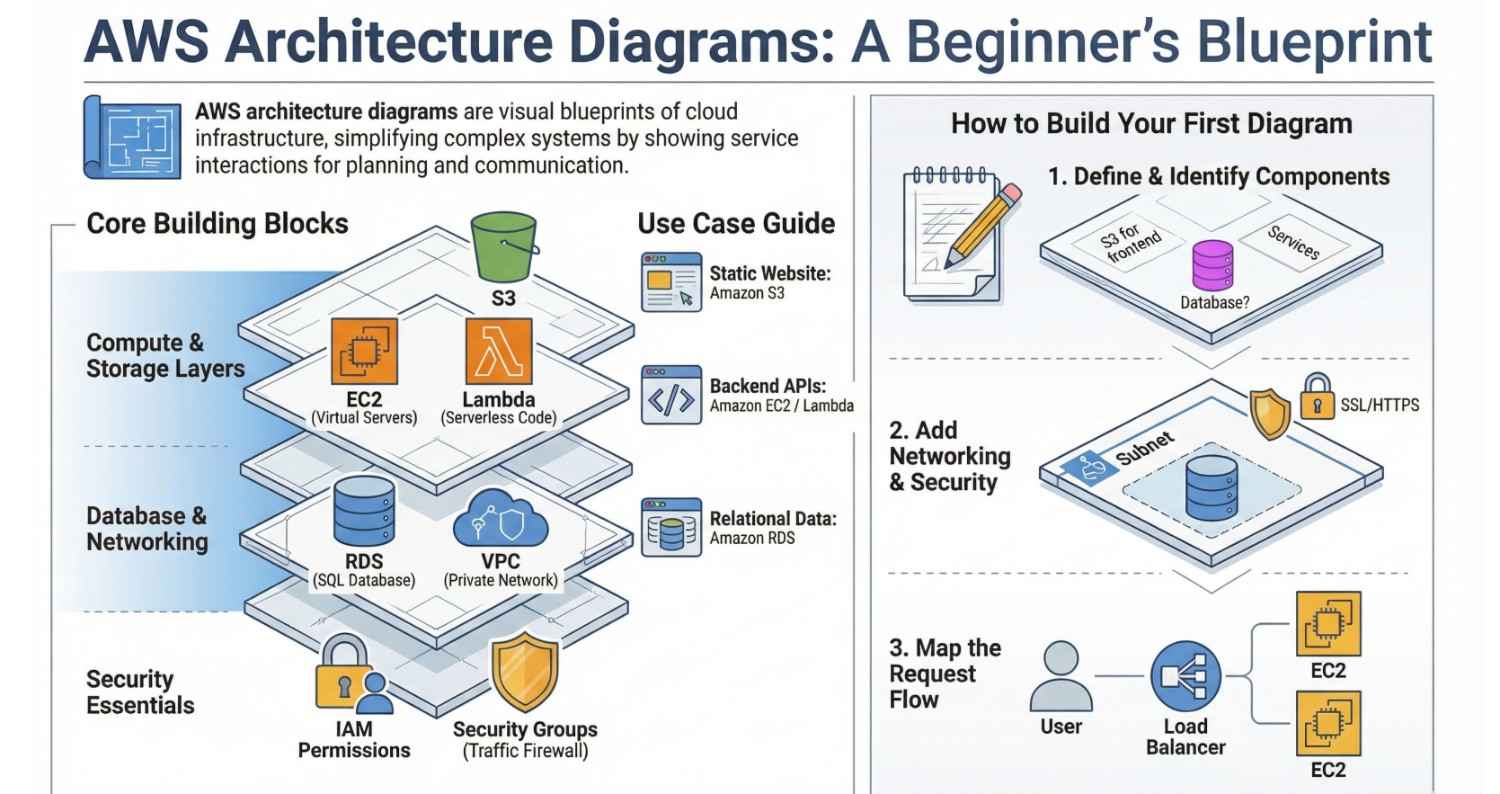
Core AWS Components You Must Know
Before creating diagrams, you need to understand the building blocks.
1. Compute Layer
This is where your application runs.
- Amazon EC2 – Virtual machines
- AWS Lambda – Run code without servers
Use EC2 for full control, Lambda for serverless apps.
2. Storage Layer
- Amazon S3 – Store files, images, backups
- Amazon EBS – Disk storage for EC2
3. Database Layer
- Amazon RDS – SQL databases
- Amazon DynamoDB – Fast NoSQL
4. Networking
- Amazon VPC – Private network
- Elastic Load Balancer – Distributes traffic
5. Security
- AWS IAM – Permissions
- AWS Shield – Protection
Basic AWS Architecture Diagram (Beginner Example)
Let’s build a simple web application architecture.
Scenario:
You want to host a website.
Architecture Flow
- User opens website
- Request goes to Load Balancer
- Load Balancer sends request to EC2
- EC2 processes request
- Data fetched from database
- Static files served via S3
Text-Based Diagram
User
  ↓
Load Balancer
  ↓
EC2 Instance (Web Server)
  ↓
Database (RDS)
  ↓
S3 (Static Files)
Explanation
- User: Browser or mobile app
- Load Balancer: Distributes traffic
- EC2: Runs your application
- RDS: Stores structured data
- S3: Stores images, videos, assets
Step-by-Step: Create Your First AWS Diagram
You don’t need advanced tools. Follow this simple process:
Step 1: Define Your Application
Ask yourself:
- Is it a website?
- Is it an API?
- Does it need a database?
Step 2: Identify Components
Example:
- Frontend → S3
- Backend → EC2
- Database → RDS
Step 3: Add Networking
Wrap everything inside:
- VPC
- Public subnet (for web servers)
- Private subnet (for database)
Step 4: Add Security
- IAM roles
- Security groups
- HTTPS via SSL
Step 5: Draw Connections
Connect services using arrows to show flow.
Tools to Draw AWS Architecture Diagrams
Here are beginner-friendly tools:
- Draw.io (Free)
- Lucidchart
- Cloudcraft (AWS-specific)
- Figma (for custom designs)
Use official AWS icons for accuracy.
Common AWS Architecture Patterns
Understanding patterns helps you design better systems.
1. 3-Tier Architecture
This is the most common setup.
Layers:
- Presentation (Frontend)
- Application (Backend)
- Database
Example:
- Frontend → S3
- Backend → EC2
- Database → RDS
2. Serverless Architecture
Uses:
- AWS Lambda
- Amazon API Gateway
Flow:
User → API Gateway → Lambda → Database
No server management required.
3. Microservices Architecture
Application is split into small services.
Uses:
- Amazon ECS or Amazon EKS
Common Beginner Mistakes
Avoid these:
Overcomplicating diagrams
Keep it simple.
Ignoring security
Always include IAM and VPC.
No data flow arrows
Without arrows, diagrams are confusing.
Mixing environments
Separate dev, staging, and production.
Best Practices for AWS Diagrams
- Use clear labels
- Keep diagrams clean and minimal
- Group services logically
- Use AWS official icons
- Highlight critical paths
Real-World Example (Simple Startup App)
Let’s say you’re building a startup MVP.
Architecture:
- Frontend → S3
- Backend → EC2
- Database → RDS
- CDN → CloudFront
Flow:
User → CloudFront → S3 / EC2 → RDS
This setup is low cost + scalable
Adding Security to Your Diagram
Security is critical.
Include:
- IAM roles
- Security groups
- HTTPS (SSL certificates)
- Private subnets for databases
Scaling Your Architecture
As your app grows:
Add:
- Auto Scaling for EC2
- Read replicas for RDS
- Caching (Redis via ElastiCache)
When to Use What?
| Use Case | Recommended Service |
|---|---|
| Static website | S3 |
| Backend APIs | EC2 / Lambda |
| Relational data | RDS |
| High-speed NoSQL | DynamoDB |
| Event-driven apps | Lambda |
Final Thoughts
AWS architecture diagrams are your foundation for cloud success.
As a beginner, focus on:
- Understanding core services
- Learning basic patterns
- Practicing simple diagrams
Don’t try to learn everything at once.
Start small:
Build a simple web app diagram
Then improve it step by step
- If you want to explore AWS, click here.




