
Introduction
Modern software development has rapidly shifted toward containerization, and Docker sits at the center of this transformation. Whether you’re building microservices, deploying scalable applications, or streamlining development environments, understanding Docker container architecture is essential.
This guide breaks down Docker architecture in a simple, visual, and beginner-friendly way without overwhelming you with jargon. By the end, you’ll understand how Docker works behind the scenes and how its components interact.
What Is Docker Container Architecture?
Docker container architecture refers to the structure and components that allow Docker to build, run, and manage containers efficiently.
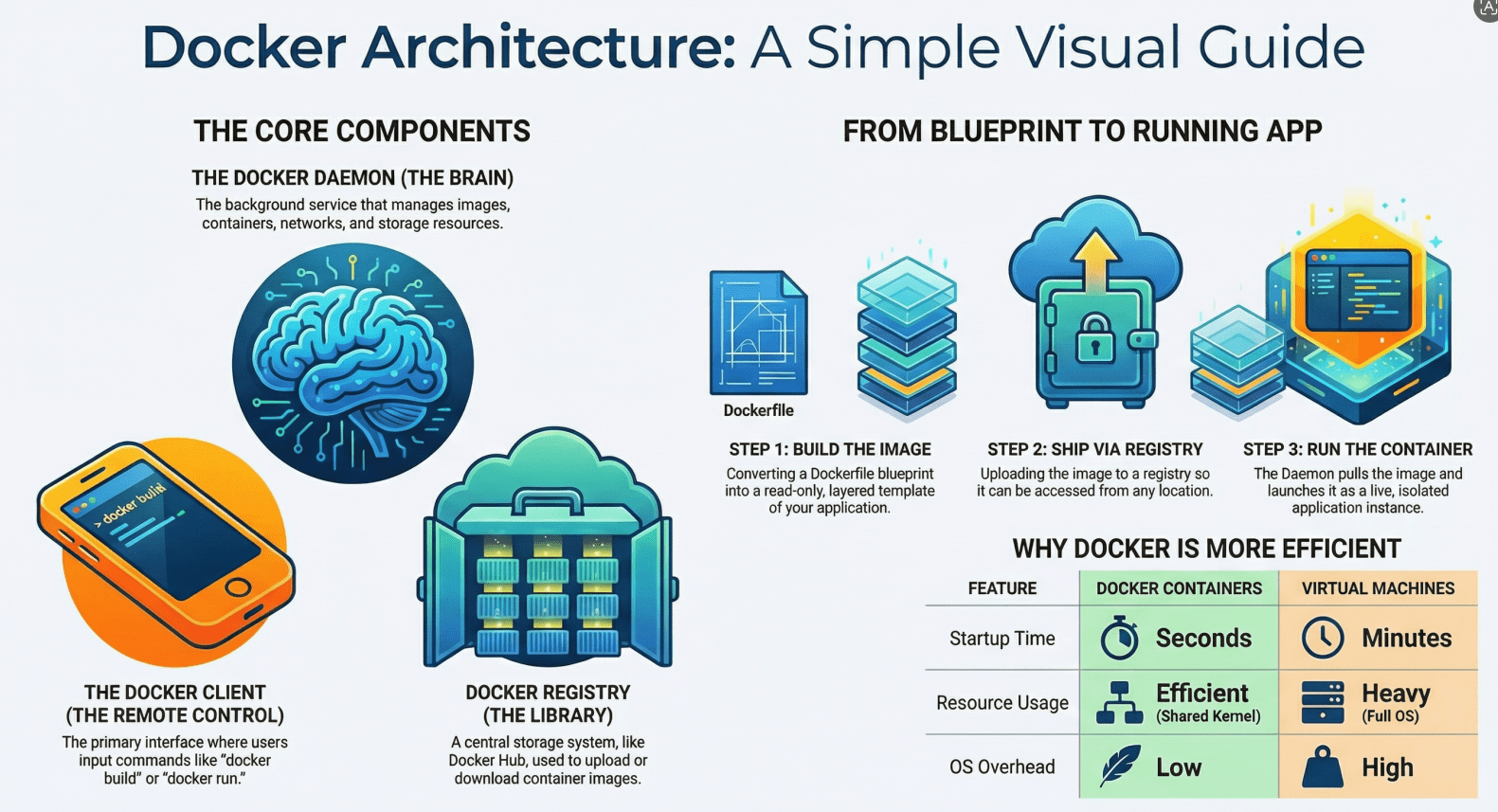
At a high level, Docker uses a client-server architecture where different components communicate to perform tasks like building images, running containers, and managing resources.
High-Level Architecture Overview
Let’s start with a simple mental model:
[ Docker Client ]  →  [ Docker Daemon ]  →  [ Containers ]
                          ↓
                     [ Docker Images ]
                          ↓
                     [ Docker Registry ]
Each part plays a specific role in making Docker work seamlessly.
Core Components of Docker Architecture
1. Docker Client
The Docker Client is the interface you interact with when using Docker commands.
Examples:
docker builddocker rundocker pull
When you type a command, the client sends it to the Docker Daemon for execution.
Think of it as: A remote control for Docker operations.
2. Docker Daemon (dockerd)
The Docker Daemon is the brain of Docker.
It:
- Builds Docker images
- Runs and manages containers
- Handles networking and storage
- Communicates with other daemons if needed
The daemon listens for API requests from the Docker Client and executes them.
Think of it as: The engine that does all the heavy lifting.
3. Docker Images
A Docker Image is a read-only template used to create containers.
It contains:
- Application code
- Runtime
- Libraries
- Dependencies
- Configuration files
Images are built using a Dockerfile.
Example flow:
Dockerfile → docker build → Docker Image
Key concept: Layered Architecture
- Each instruction in a Dockerfile creates a new layer
- Layers are cached and reused for efficiency
Think of it as: A blueprint for containers.
4. Docker Containers
Containers are running instances of Docker images.
They are:
- Lightweight
- Isolated
- Fast to start
Each container includes:
- The application
- Its dependencies
- A writable layer on top of the image
Think of it as: A live, running application created from an image.
5. Docker Registry
A Docker Registry stores Docker images.
There are two types:
- Public (like Docker Hub)
- Private registries
Common actions:
docker pull→ Download imagedocker push→ Upload image
Think of it as: A cloud storage for images.
How Docker Architecture Works (Step-by-Step)
Let’s walk through a simple workflow:
Step 1: Write a Dockerfile
You define how your application should be packaged.
Step 2: Build an Image
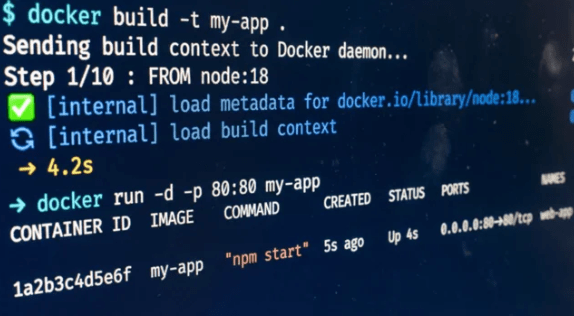
docker build -t my-app .
Docker converts your Dockerfile into an image.
Step 3: Store or Pull Image
- Push to registry OR
- Pull from registry
Step 4: Run a Container
docker run -d my-app
The daemon creates and starts a container from the image.
Visual Flow of Docker Operations
        (User Command)
              ↓
      [ Docker Client ]
              ↓
      [ Docker Daemon ]
         /        \
 [ Images ]    [ Containers ]
       ↓
 [ Docker Registry ]
Key Concepts Behind Docker Architecture
1. Namespaces (Isolation)
Docker uses Linux namespaces to isolate containers.
Each container gets its own:
- Process space
- Network stack
- File system
- User IDs
Result: Containers don’t interfere with each other.
2. Control Groups (Cgroups)
Cgroups limit and allocate system resources.
They control:
- CPU usage
- Memory usage
- Disk I/O
Result: Fair resource distribution across containers.
3. Union File System (Layering)
Docker uses a layered file system.
Benefits:
- Faster builds
- Efficient storage
- Easy rollback
Example layers:
Base OS → Dependencies → App Code → Config
4. Container Runtime
The runtime is responsible for actually running containers.
It:
- Sets up isolation
- Allocates resources
- Starts processes
Docker Architecture vs Virtual Machines
| Feature | Docker Containers | Virtual Machines |
|---|---|---|
| OS Overhead | Low | High |
| Startup Time | Seconds | Minutes |
| Resource Usage | Efficient | Heavy |
| Isolation Level | Process-level | Full OS-level |
Key Insight: Containers share the host OS kernel, while VMs run separate OS instances.
Real-World Example
Imagine deploying a web application:
Without Docker:
- Install dependencies manually
- Works on one system but fails on another
- Difficult to scale
With Docker:
- Package app into an image
- Run it anywhere as a container
- Scale by launching multiple containers
Benefits of Docker Architecture
1. Portability
Run containers anywhere:
- Local machine
- Cloud
- CI/CD pipelines
2. Consistency
Same environment across:
- Development
- Testing
- Production
3. Scalability
Easily scale applications by running multiple containers.
4. Efficiency
Lightweight containers use fewer resources than VMs.
Common Misconceptions
“Containers are Virtual Machines”
Not true. Containers share the host OS kernel.
“Docker replaces Linux”
Docker actually depends heavily on Linux features like namespaces and cgroups.
“Containers are completely secure”
They are isolated, but not as strongly as VMs. Security still requires best practice
When Should You Care About Docker Architecture?
Understanding Docker architecture is important when:
- Debugging container issues
- Optimizing performance
- Designing scalable systems
- Working with orchestration tools
Summary
Docker container architecture is built around a simple yet powerful idea: package applications with everything they need and run them consistently anywhere.
At its core:
- The Docker Client sends commands
- The Docker Daemon executes them
- Images act as templates
- Containers run applications
- Registries store and distribute images
Behind the scenes, Linux features like namespaces and cgroups make containers lightweight, isolated, and efficient.
Final Thoughts
Docker simplifies application deployment, but its true power lies in its architecture. Once you understand how the components interact, you can build more reliable, scalable, and efficient systems.
If you’re just getting started, focus on:
- Writing Dockerfiles
- Running containers
- Understanding images and layers
As you grow, diving deeper into architecture will help you unlock advanced use cases like microservices and orchestration.
- If you want to explore DevOps, click here.




