
Amazon Web Services (AWS) provides multiple ways to interact with its cloud platform, but two of the most commonly used methods are the AWS Command Line Interface (CLI) and the AWS Management Console. Whether you’re a beginner launching your first EC2 instance or a DevOps engineer automating infrastructure, choosing between these tools can significantly affect your workflow.
In this guide, we’ll explore both approaches in depth, compare their strengths and weaknesses, and help you decide when to use each.
What is AWS CLI?
The AWS Command Line Interface (CLI) is a unified tool that allows you to manage AWS services directly from your terminal or command prompt. Instead of clicking through a graphical interface, you execute commands to interact with AWS resources.
For example, you can create an EC2 instance with a single command:
aws ec2 run-instances –image-id ami-123456 –count 1 –instance-type t2.microThis makes the CLI extremely powerful for automation, scripting, and repetitive tasks.
What is AWS Management Console?
The AWS Management Console is a web-based graphical user interface (GUI) that allows users to manage AWS services visually. It’s accessible through a browser and provides dashboards, dropdown menus, and configuration wizards.
For example, launching an EC2 instance via the console involves:
- Selecting an AMI
- Choosing instance type
- Configuring networking
- Reviewing and launching
This makes it intuitive and beginner-friendly.
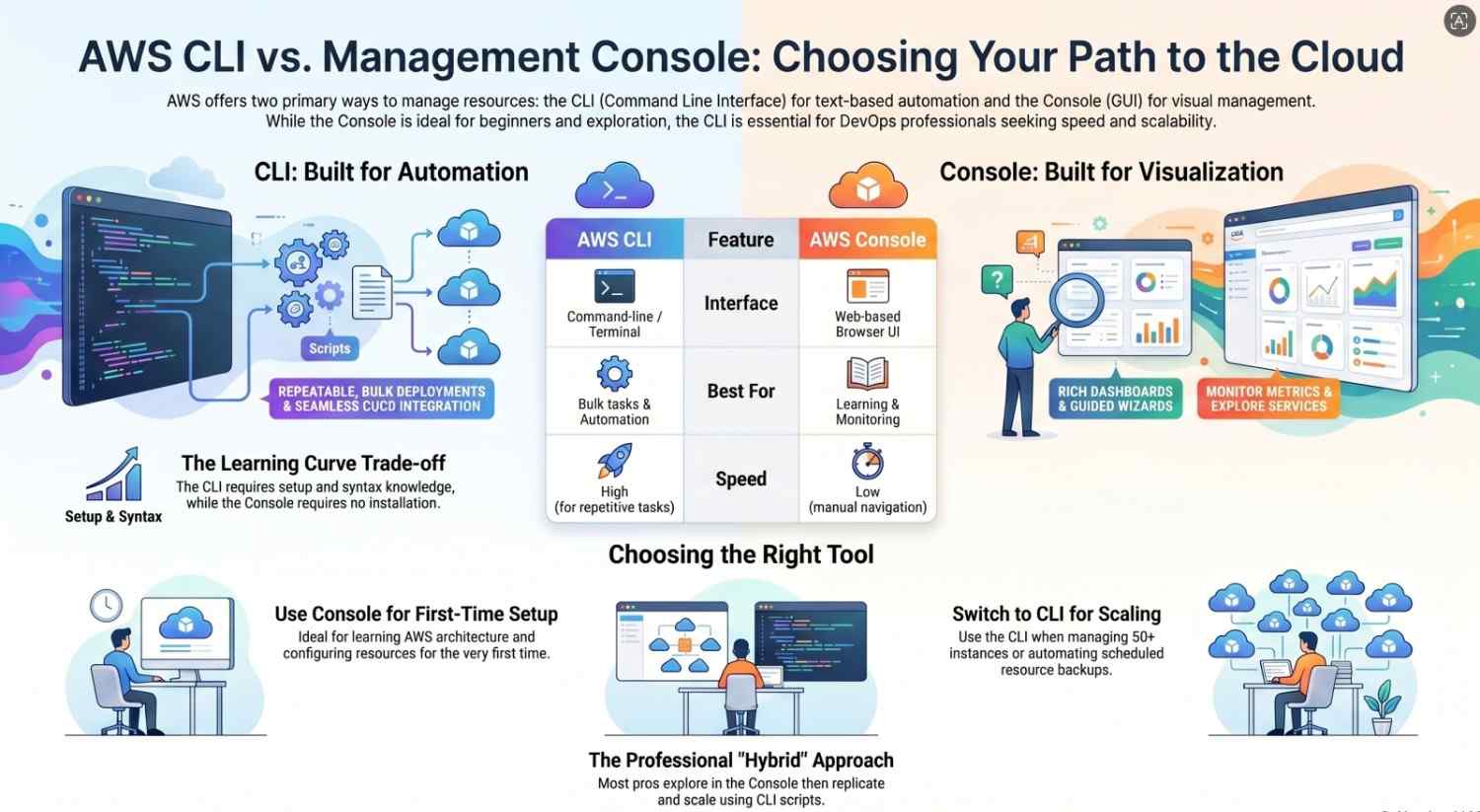
Key Differences at a Glance
| Feature | AWS CLI | AWS Console |
|---|---|---|
| Interface | Command-line | Graphical UI |
| Learning Curve | Steep | Easy |
| Speed | Very fast (once learned) | Slower for repetitive tasks |
| Automation | Excellent | Limited |
| Visualization | Minimal | Rich dashboards |
| Error Handling | Command-based | Guided prompts |
Advantages of AWS CLI
1. Automation and Scripting
The biggest advantage of the CLI is automation. You can write scripts to create, modify, and delete resources automatically.
For example:
- Automating backups
- Deploying infrastructure
- Running scheduled tasks
This is especially useful for DevOps engineers managing large-scale environments.
2. Speed and Efficiency
Once you know the commands, CLI is significantly faster than navigating through multiple UI screens.
Instead of:
- Clicking 10 steps in the console
You can: - Run 1 command in CLI
3. Repeatability
CLI commands can be saved in scripts, making them reusable and consistent across environments.
This reduces:
- Human error
- Configuration drift
4. Integration with DevOps Tools
CLI works seamlessly with tools like:
- CI/CD pipelines
- Shell scripts
- Automation frameworks
It’s essential for infrastructure automation.
5. Fine-Grained Control
CLI allows access to almost every AWS feature and parameter, even those not immediately visible in the console.
Disadvantages of AWS CLI
1. Steep Learning Curve
Beginners often find CLI intimidating due to:
- Complex syntax
- Numerous parameters
- Lack of visual guidance
2. Error-Prone
A small mistake in a command can lead to:
- Failed execution
- Wrong configurations
Example:
- Typo in instance type
- Incorrect region
3. No Visual Feedback
Unlike dashboards, CLI doesn’t provide:
- Graphs
- Visual summaries
- Resource maps
This makes monitoring harder.
4. Setup Required
Before using CLI, you must:
- Install it
- Configure credentials
- Set up permissions
Advantages of AWS Console
1. Beginner-Friendly
The console is ideal for beginners because:
- It provides guided workflows
- No need to remember commands
- Easy navigation
2. Visual Representation
You can easily:
- View resource status
- Monitor usage
- Analyze metrics
Services like CloudWatch dashboards are easier to interpret visually.
3. Reduced Risk of Mistakes
With dropdowns and validation:
- Fewer syntax errors
- Built-in warnings
- Step-by-step configuration
4. Easy Exploration
The console helps users:
- Discover new services
- Understand configurations
- Learn AWS architecture
5. No Installation Needed
You only need:
- A browser
- AWS account
No local setup required.
Disadvantages of AWS Console
1. Time-Consuming
Performing repetitive tasks manually can be slow.
Example:
- Launching multiple instances
- Updating configurations
2. Limited Automation
The console doesn’t support:
- Bulk scripting
- Automation workflows
3. Not Ideal for Large-Scale Operations
Managing hundreds of resources via UI becomes:
- Inefficient
- Error-prone
4. Hard to Track Changes
Manual actions in the console are harder to:
- Document
- Reproduce
When Should You Use AWS CLI?
Use CLI when:
- You need automation
- You are managing multiple resources
- You want repeatable deployments
- You are working in DevOps environments
Best for:
- Developers
- DevOps engineers
- System administrators
When Should You Use AWS Console?
Use the console when:
- You are a beginner
- You are learning AWS
- You need visual insights
- You are configuring something for the first time
Best for:
- Beginners
- Students
- Occasional users
Real-World Scenario Comparison
Scenario 1: Launching One EC2 Instance
- Console: Easier and guided
- CLI: Faster if you know the command
Scenario 2: Launching 50 EC2 Instances
- Console: Tedious
- CLI: Efficient with scripts
Scenario 3: Monitoring Performance
- Console: Better (graphs, dashboards)
- CLI: Limited
Scenario 4: CI/CD Deployment
- Console: Not practical
- CLI: Essential
Best Practice: Use Both Together
In reality, most professionals use both CLI and Console.
Typical workflow:
- Use console to learn and explore
- Use CLI to automate and scale
For example:
- Configure a resource in console
- Replicate it using CLI scripts
Final Thoughts
Choosing between AWS CLI and AWS Console isn’t about which one is better it’s about when to use each.
- If you value speed, automation, and scalability → CLI is the better choice
- If you value simplicity, visualization, and ease of use → Console is ideal
As you grow in your AWS journey, you’ll naturally transition from relying heavily on the console to using the CLI for more advanced tasks.
The most effective cloud professionals don’t choose one they master both.
Bonus Tip
If you’re serious about AWS:
- Start with the console
- Gradually learn CLI commands
- Practice automating small tasks
Over time, this hybrid approach will make you far more efficient and job-ready.
Happy Learning and Building on AWS!
- If you want to explore AWS Click here.




