Vibe coding is an AI-assisted software development approach where natural language prompts are used to generate, iterate, and refine code, allowing creators to focus on high-level ideas rather than manual coding. Coined by Andrej Karpathy in early 2025, it shifts the developer’s role from writing syntax to directing AI agents, often accepting results without deeply reviewing internal structure, making it ideal for rapid prototyping.
Module 1 – How the Internet & Web Apps Work
Understand how the internet actually works behind the scenes. Learn how frontend, backend, databases, and APIs connect together. Build a strong foundation before touching AI.
What is a website?
A collection of web pages accessible through the internet using a domain name.
What is frontend?
Frontend is the visual part of a website or app that users directly interact with. It includes design, buttons, forms, and everything you see on the screen.
What is backend?
Backend is the server-side part of an application that handles logic and data processing. It works behind the scenes to manage requests and communicate with databases.
What is database?
A database is a system used to store and organize application data. It allows data to be saved, retrieved, and managed efficiently.
What is API?
An API is a communication bridge between different software systems. It allows applications to send and receive data securely.
What is request/response?
A request is sent by a client to ask for data or action from a server. The server processes it and sends back a response.
What is JSON?
JSON is a lightweight format used to exchange structured data. It is easy for both humans and machines to read and write.
What is authentication?
Authentication is the process of verifying a user’s identity. It ensures only authorized users can access certain features.
What is deployment?
Deployment is the process of publishing your application online. It makes your project accessible to users over the internet.

Module 2 – Web Basics (Minimal but Practical)
Master only what truly matters in modern web development. Build clean, responsive interfaces that talk to real APIs. Focus on practical skills, not unnecessary theory.
Basic HTML structure
HTML forms the skeleton of every webpage. It structures content using elements like headings, paragraphs, and sections.
CSS basics (color, layout, typography)
CSS styles and designs your webpage visually. It controls colors, spacing, fonts, and layout positioning.
Responsive design concept
Responsive design makes websites adapt to different screen sizes. It ensures a smooth experience on mobile, tablet, and desktop.
Basic JavaScript
JavaScript adds interactivity to web pages. It enables dynamic content updates and user interactions.
Fetch API
Fetch API allows the frontend to request data from servers. It helps connect your UI with backend services.
Intro to React (components, state, props)
React builds reusable UI components efficiently. State and props help manage and pass dynamic data.

Module 3 – Understanding AI & LLM
Decode how AI and Large Language Models actually function. Learn how models predict text, handle tokens, and manage context. Build real understanding — not just hype knowledge.
What is AI?
Artificial Intelligence enables machines to simulate human intelligence. It can analyze data, recognize patterns, and make decisions. AI powers systems like chatbots, recommendations, and automation tools.
What is ML?
Machine Learning is a subset of AI focused on learning from data. It identifies patterns without being explicitly programmed. Models improve their performance over time with more data.
What is Generative AI?
Generative AI creates new content like text, images, or code. It learns from existing data to generate original outputs. Tools like chatbots and image generators use this technology.
What is LLM?
Large Language Models are advanced AI systems trained on massive text data. They understand context and generate human-like responses. LLMs are used in chatbots, writing assistants, and coding tools.
How LLM predicts text
LLMs predict the next word based on learned patterns. They analyze context from previous words in a sentence. This probability-based prediction creates coherent responses.
Tokens
Tokens are small units of text processed by AI models. They can be parts of words, full words, or punctuation.
AI calculates responses based on token sequences.
Context window
The context window is the amount of text the model can remember at once. It determines how much conversation history is retained. Larger context windows improve long-form understanding.
Model parameters (high-level)
Parameters are internal values that store learned knowledge. More parameters generally allow better pattern recognition. They define the model’s capability and performance.
Temperature & randomness
Temperature controls how creative or predictable AI responses are. Lower values produce safer and consistent answers. Higher values generate more diverse and creative outputs.

Module 4 – Prompt Engineering & Vibe Coding
Learn how to “code with AI” instead of just using it. Write structured prompts that generate reliable outputs.
Turn AI into your development partner.
Vibe coding is the process of building software by collaborating with AI using structured prompts. It involves giving clear and specific instructions so the AI can generate accurate and useful responses. Instead of handling everything at once, complex problems are broken down into smaller, AI-friendly steps to improve precision and manageability. AI-assisted debugging helps identify and fix errors faster, while AI-assisted refactoring improves code structure, readability, and performance. Through a prompt refinement cycle, prompts are continuously improved to achieve better results. However, it is important to understand when not to trust AI by verifying critical or sensitive outputs, as AI can sometimes make mistakes or incorrect assumptions.
Module 5 – Building APIs
Create powerful backend systems that serve real applications. Understand REST, middleware, and proper error handling.Build APIs that are clean, scalable, and secure.
REST API basics
A standard way to structure backend endpoints.
CRUD operations
Create, Read, Update, and Delete data operations.
Node.js + Express (or FastAPI)
Popular frameworks for building backend APIs quickly.
Middleware
Functions that run between request and response handling.
Error handling
Managing failures gracefully without breaking the app.
Environment variables
Securely storing sensitive configuration data.
Module 6 – Authentication & Session Handling
Secure your application like a real product. Implement login systems using tokens and protected routes.
Control who accesses what — safely and efficiently.
Module 6 covers Authentication and Session Handling, focusing on how users securely access applications. It begins with the login and signup flow, explaining how users create accounts and log in to systems. The module introduces JWT basics, highlighting how token-based authentication is used to maintain secure user sessions. It also explains the difference between session-based and token-based authentication, two common approaches for maintaining login states. Additionally, it covers protecting routes to restrict access to authorized users only and implementing role-based access control to manage permissions based on different user roles.
Module 7 – Database & SQL
Store, organize, and retrieve data efficiently. Understand relationships and write powerful SQL queries.
Make your AI app remember conversations and users.
What is a database?
A system to store structured application data.
Tables & relationships
Organizing data into linked structures.
SQL basics
Query language used to manage relational databases.
Connecting backend to database
Integrating server logic with stored data.
Storing AI chat history
Saving conversations for continuity and analytics.
Module 8 – Object Storage
Learn how modern apps handle files and media. Upload, store, and secure images or documents. Build apps that manage content professionally.
Object storage is a scalable method used to store files such as images, documents, and other media efficiently. It allows applications to manage file uploads securely while ensuring data is organized and easily accessible. Upload handling involves processing and validating user-submitted files to maintain security and prevent errors. Additionally, access control basics define who is permitted to view, download, or manage stored files, ensuring proper data protection and user authorization.

Module 9 – AI Integration in Apps
Connect your app directly with AI models. Handle system prompts, responses, and streaming output. Build real-world AI-powered features.
In AI-powered applications, understanding the difference between a system prompt and a user prompt is essential. A system prompt sets the overall behavior, rules, and tone of the AI, acting as a hidden instruction layer that guides how the model should respond. In contrast, a user prompt is the direct input given by the user during interaction. Handling responses involves properly processing, formatting, and displaying AI-generated outputs in a way that is clear, structured, and user-friendly. The concept of streaming allows responses to appear in real-time as they are generated, creating a faster and more interactive experience instead of waiting for the full output. Additionally, cost awareness is crucial when working with AI APIs, as token usage directly impacts expenses, so optimizing prompts and managing response length helps control operational costs effectively.

Module 10 – RAG Basics
Understand why AI forgets and how to fix it. Learn embeddings and vector databases. Build intelligent document-based AI systems.
Why AI forgets
Understanding context limitations in LLMs.
What is embeddings?
Converting text into numerical vectors for similarity search.
Vector database concept
Storing embeddings for intelligent retrieval.
Basic document Q&A system
Building AI that answers questions from custom documents.

Module 11 – Encryption & Security Basics
Protect user data and secure your application. Understand hashing, HTTPS, and API key safety. Learn essential web security fundamentals.
Hashing passwords
Securely storing passwords without saving raw text.
Protecting API keys
Keeping sensitive credentials private.
HTTPS concept
Encrypting communication between client and server.
Input validation
Preventing malicious or incorrect data from entering the system.
Basic OWASP awareness
Understanding common web security risks.
Module 12 – Testing
Ensure your application works as expected. Test APIs, debug AI-generated code, and validate logic.
Build reliable software with confidence.
Manual testing
Checking application behavior through real usage.
API testing
Verifying backend endpoints function correctly.
Debugging AI-generated code
Reviewing and correcting AI-written code carefully.
Basic unit test idea
Testing individual components in isolation.
Module 13 – Deployment Using Free Platforms
Take your project from local machine to live internet. Deploy frontend, backend, and database smoothly.Understand real production environments.
Git & GitHub
Version control and collaboration for code management.
Deployment basics
Steps to move your app from local to live.
Environment configuration
Managing settings for different environments.
Production vs development
Understanding differences between testing and live apps.
Vercel (frontend)
Simple platform for deploying frontend applications.
Railway / Render (backend)
Cloud services for hosting backend APIs.
Supabase (database)
Managed database and backend-as-a-service platform.
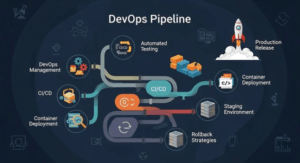
Module 14 – CI/CD Pipeline
Automate testing and deployment workflows. Integrate code updates safely and efficiently. Ship faster with modern DevOps practices.
What is pipeline?
An automated workflow for building and deploying apps.
What is CI?
Continuous Integration ensures code works after every update.
What is CD?
Continuous Deployment automatically pushes updates live.
Basic GitHub Actions
Automating testing and deployment with workflows.
Automatic deployment
Publishing updates without manual intervention.
Module 15 – Maintaining AI Products
Learn how to manage AI products long-term. Monitor usage, optimize cost, and update prompts. Scale your system as users grow.
Monitoring usage
Tracking performance and user behavior.
Reducing token cost
Optimizing prompts to lower AI API expenses.
Updating prompts
Improving AI responses over time.
Handling bugs
Fixing issues without affecting users.
User feedback cycle
Using feedback to improve product quality.
Scaling strategy
Expanding infrastructure as user demand grows.