Introduction.
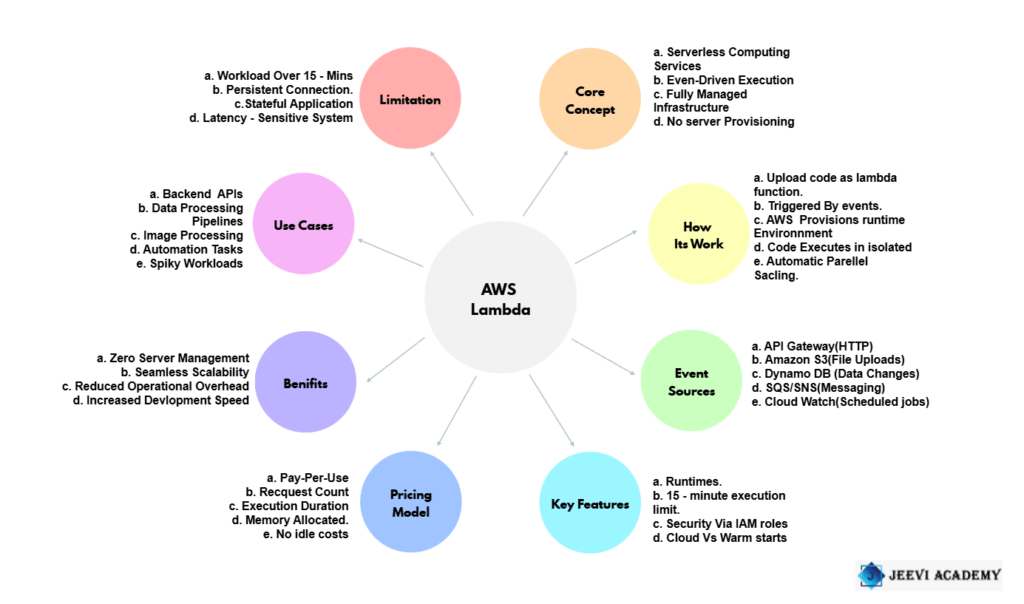
AWS Lambda is a serverless computing service. It is provided by Amazon Web Services. AWS Lambda removes server management. Developers do not provision servers. Infrastructure is fully managed by AWS. Serverless computing runs code on demand. AWS Lambda executes code automatically. Functions are triggered by events. Events come from AWS services. API Gateway triggers Lambda functions. Amazon S3 can trigger Lambda. DynamoDB streams trigger Lambda. AWS Lambda scales automatically. Scaling requires no configuration.
Each request runs independently. AWS Lambda supports multiple runtimes. Python is supported in AWS Lambda.
Node.js is supported in AWS Lambda. Java is supported in AWS Lambda. Code runs in isolated environments.
Execution is short-lived. Maximum execution time is limited.
AWS Lambda uses pay-per-use pricing. Billing is based on execution time. Billing is based on request count.
There are no idle server costs. Serverless reduces operational overhead. Serverless improves development speed.
AWS Lambda enables event-driven architecture. Applications respond to real-time events. AWS Lambda integrates with cloud services. Security is managed through IAM roles. Permissions control Lambda access.
AWS Lambda supports microservices. It is ideal for backend APIs. It is useful for automation tasks. It supports data processing workloads. Cold starts may introduce latency. Warm starts improve performance.
AWS Lambda increases application scalability.
It improves system reliability. It simplifies cloud architecture. Developers focus on business logic. Operations complexity is reduced. AWS Lambda supports modern applications. Serverless is a cloud computing model.
AWS Lambda is a key serverless service. It powers scalable cloud solutions.
What Is AWS Lambda?
AWS Lambda is a compute service that runs your code in response to events. You upload your code, define when it should run, and AWS handles everything else servers, scaling, availability, and maintenance.
You only pay for:
- The number of times your code runs
- The duration it runs
No idle costs. No server management.
What Does “Serverless” Really Mean?
“Serverless” does not mean there are no servers.
It means:
- You don’t provision or manage servers
- You don’t worry about OS updates or patching
- You don’t manage scaling or fault tolerance
AWS fully manages the infrastructure. You focus only on writing business logic.
How AWS Lambda Works (Step by Step)
Let’s walk through what happens behind the scenes.
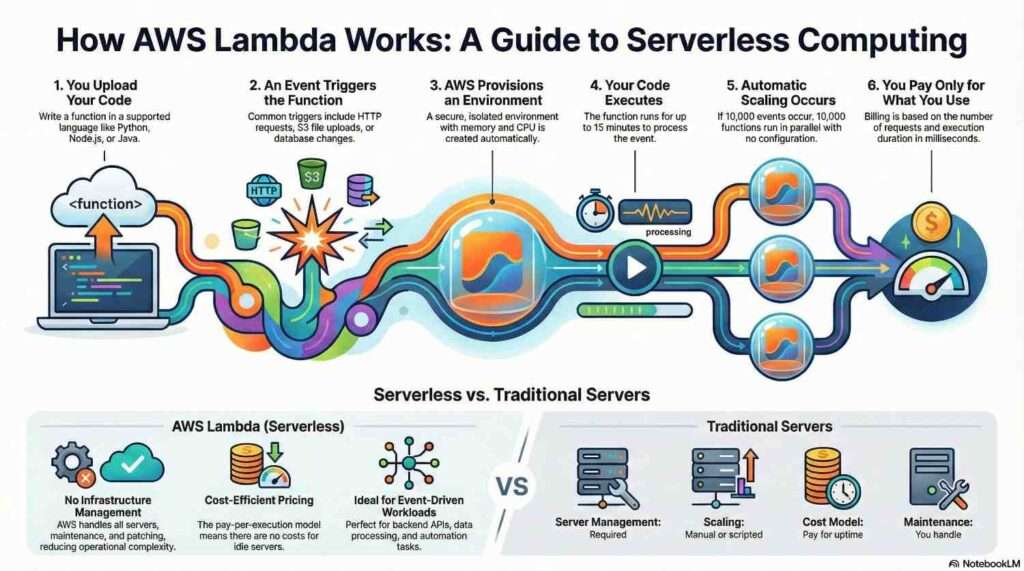
1. You Upload Your Code
You write a function in a supported language (such as Python, Node.js, Java, or Go) and upload it to AWS Lambda.
This code is called a Lambda function.
2. An Event Triggers the Function
AWS Lambda runs only when triggered by an event. Common event sources include:
- HTTP requests (via API Gateway)
- File uploads to Amazon S3
- Database changes in DynamoDB
- Messages from SQS or SNS
- Scheduled events (cron jobs)
No event = no execution.
3. AWS Provisions the Runtime Environment
When an event occurs, AWS:
- Creates a secure execution environment
- Loads your code
- Allocates memory and CPU automatically
This environment is isolated and short-lived.
4. Your Code Executes
Your function runs:
- Processes the event
- Performs its task
- Returns a response (if needed)
Execution can last from milliseconds up to 15 minutes.
5. Automatic Scaling Happens
If 1 event occurs → 1 function runs
If 10,000 events occur → 10,000 functions run (in parallel)
No configuration required. AWS Lambda scales automatically.
6. You Pay Only for Execution Time
Billing is based on:
- Number of requests
- Execution duration (measured in milliseconds)
- Memory allocated
If your function doesn’t run, you don’t pay.
What Is a Cold Start?
A cold start happens when AWS needs to create a new execution environment for your function.
Cold starts may add slight latency because AWS must:
- Allocate resources
- Initialize the runtime
- Load your code
Once created, the environment may be reused for future requests, resulting in warm starts, which are much faster.
Cold starts are usually noticeable only in latency-sensitive applications.
AWS Lambda vs Traditional Servers
| Feature | AWS Lambda | Traditional Servers |
|---|---|---|
| Server Management | None | Required |
| Scaling | Automatic | Manual or scripted |
| Cost Model | Pay per execution | Pay for uptime |
| Availability | Built-in | You manage |
| Maintenance | AWS handles | You handle |
Common Use Cases for AWS Lambda
AWS Lambda is ideal for:
- Backend APIs
- Event-driven systems
- Data processing pipelines
- File and image processing
- Scheduled jobs
- Automation tasks
It’s especially powerful when workloads are spiky or unpredictable.
When AWS Lambda May NOT Be Ideal
AWS Lambda is not always the best choice:
- Long-running workloads (over 15 minutes)
- Applications needing persistent connections
- Very low-latency systems sensitive to cold starts
- Complex, stateful applications
In such cases, containers or EC2 may be better options.
Key Benefits of AWS Lambda
- 🚀 No infrastructure management
- 📈 Automatic scaling
- 💰 Cost-efficient pricing
- 🔐 Built-in security and isolation
- ⚙️ Tight integration with AWS services
Final Thoughts
AWS Lambda changes how applications are built and deployed. Instead of thinking in terms of servers, you think in events and functions.
If your application can respond to events, scale automatically, and run in short bursts, AWS Lambda is a powerful and efficient solution.
Serverless isn’t magic it’s abstraction done right.
- For more information about AWS Lambda, you can refer to Jeevi’s page.