In today’s fast-paced development world, teams need automation, scalability, and reliability without managing servers. That’s where a serverless CI/CD pipeline on Amazon Web Services (AWS) becomes powerful.
In this guide, you’ll learn how to build a fully serverless CI/CD pipeline using AWS services, including AWS CodePipeline, AWS CodeBuild, AWS Lambda, Amazon S3, and AWS CloudFormation with best practices for security, scalability, and cost optimization.
Why Choose a Serverless CI/CD Pipeline on AWS?
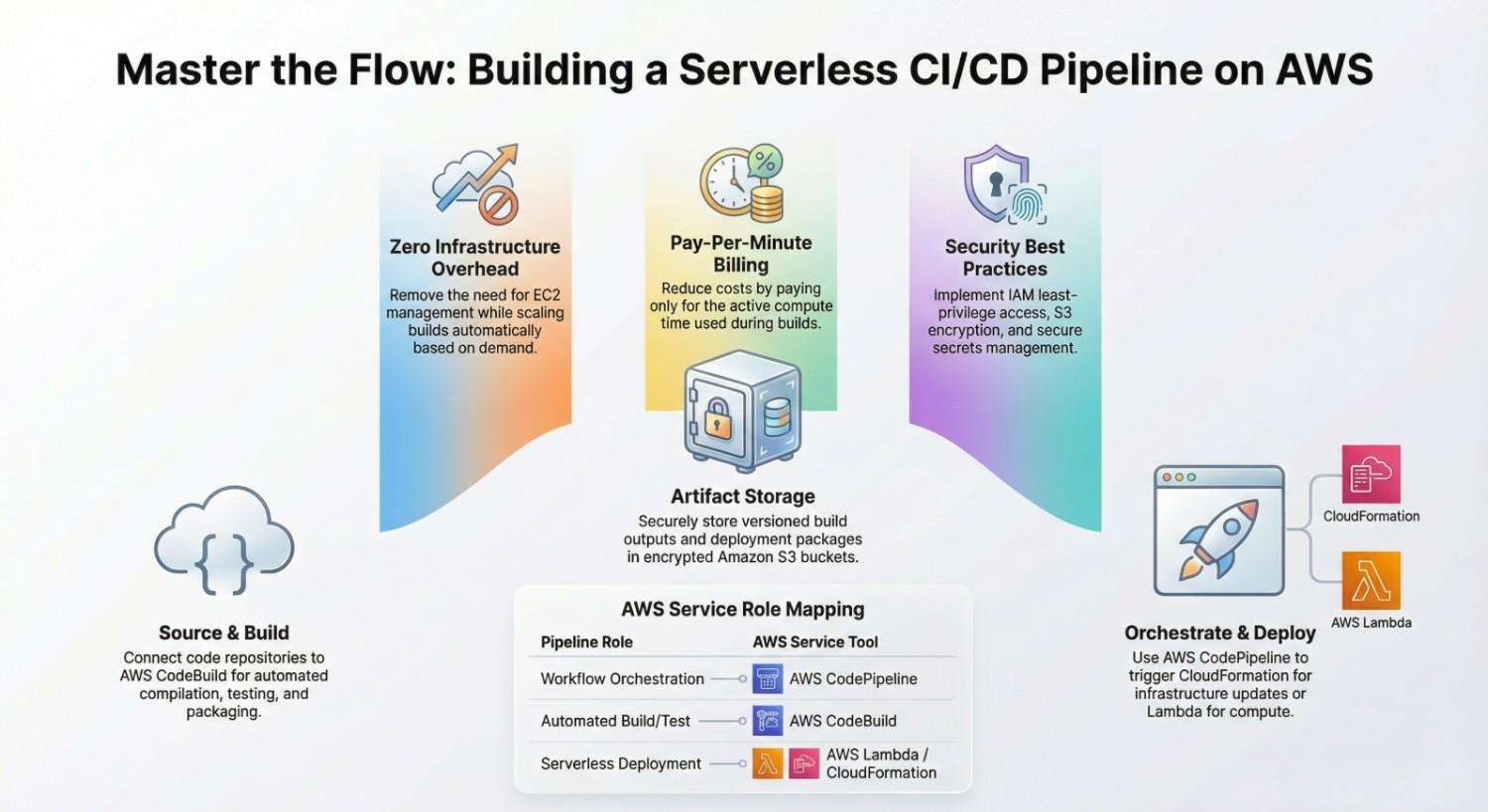
A serverless CI/CD pipeline eliminates infrastructure management and scales automatically. By leveraging native AWS DevOps tools, you can:
- Reduce operational overhead
- Pay only for what you use
- Improve deployment speed
- Enhance security with IAM roles
- Scale builds automatically
With services like AWS CodePipeline and AWS CodeBuild, AWS makes it easy to automate the entire software delivery lifecycle.
Architecture Overview of a Serverless CI/CD Pipeline
Here’s the high-level architecture:
- Source Stage – Code stored in GitHub or AWS CodeCommit
- Build Stage – Automated build and testing using CodeBuild
- Artifact Storage – Store build artifacts in Amazon S3
- Deploy Stage – Deploy using AWS Lambda or AWS CloudFormation
- Orchestration – Entire workflow managed by CodePipeline
Everything runs serverless no EC2 servers required.
Step-by-Step Guide to Building a Serverless CI/CD Pipeline on AWS
Step 1: Set Up Your Source Repository
You can connect:
- GitHub
- Bitbucket
- Or AWS CodeCommit
Push your application code (for example, a Node.js Lambda function).
Step 2: Create an S3 Bucket for Artifacts
Your pipeline needs artifact storage.
Create an Amazon S3 bucket to store:
- Build artifacts
- Deployment packages
- Versioned outputs
Enable:
- Versioning
- Encryption (SSE-S3 or SSE-KMS)
- Least-privilege IAM access
Step 3: Configure AWS CodeBuild
AWS CodeBuild is a fully managed build service that:
- Compiles source code
- Runs tests
- Produces deployable artifacts
Example buildspec.yml:
version: 0.2phases:
  install:
    runtime-versions:
      nodejs: 18
  build:
    commands:
      - npm install
      - npm run build
artifacts:
  files:
    - '**/*'
Key benefits of CodeBuild:
- Serverless scaling
- Pay-per-minute billing
- Secure IAM integration
Step 4: Create the Deployment Target (Lambda Example)
If deploying a serverless app, use:
- AWS Lambda for compute
- Amazon API Gateway for APIs
Package your Lambda function and configure deployment permissions.
Step 5: Automate Infrastructure with CloudFormation
Use Infrastructure as Code (IaC) to provision:
- Lambda functions
- IAM roles
- S3 buckets
- API Gateway
AWS CloudFormation enables repeatable deployments across environments.
Benefits:
- Version-controlled infrastructure
- Rollback support
- Multi-environment management
Step 6: Orchestrate with AWS CodePipeline
Now connect everything using AWS CodePipeline.
Your pipeline stages:
- Source
- Build
- Deploy
CodePipeline automatically:
- Detects source changes
- Triggers builds
- Deploys updates
No servers. No manual intervention.
Security Best Practices for AWS CI/CD
When building a serverless CI/CD pipeline:
1. Use IAM Least Privilege
Create dedicated IAM roles for:
- CodeBuild
- CodePipeline
- Lambda
2. Enable Encryption
- S3 bucket encryption
- KMS keys for artifacts
- Environment variable encryption
3. Store Secrets Securely
Use:
- AWS Secrets Manager
- AWS Systems Manager Parameter Store
Monitoring and Observability
Track pipeline health using:
- Amazon CloudWatch for logs and metrics
- CloudWatch Alarms
- AWS X-Ray for tracing
Monitor:
- Build failures
- Deployment errors
- Execution time
- Cost metrics
Cost Optimization Tips
A serverless CI/CD pipeline on AWS is cost-effective, but you can optimize further:
- Use smaller CodeBuild compute types
- Enable artifact lifecycle policies in S3
- Avoid unnecessary build triggers
- Use caching in CodeBuild
Serverless = pay only when pipelines run.
Multi-Environment CI/CD Strategy
For production-ready systems:
- Separate dev, staging, and prod pipelines
- Use parameterized CloudFormation templates
- Implement manual approval before production
This ensures safe, controlled deployments.
Advanced Enhancements
Want to level up?
- Add automated security scans
- Implement blue-green deployments
- Use feature flags
- Integrate container builds with Amazon ECR
- Add automated rollback strategies
You can also adopt GitOps patterns for infrastructure updates.
Final Thoughts
Building a serverless CI/CD pipeline on AWS allows teams to:
- Automate software delivery
- Improve deployment frequency
- Reduce infrastructure management
- Scale seamlessly
By combining:
You create a fully automated, secure, and scalable DevOps pipeline in the cloud.
If you’re building SaaS products, microservices, or serverless applications, AWS provides one of the most powerful ecosystems for CI/CD automation.
- If you want to explore DevOps, start your training here.