
Containerization has transformed modern DevOps by enabling developers to package applications with all their dependencies into portable units. Platforms like Docker allow applications to run consistently across development, testing, and production environments. However, while containers provide many advantages, they also introduce new security challenges.
For DevOps engineers, understanding container security basics is essential to protect applications, infrastructure, and sensitive data. This guide explains the key principles, best practices, and tools needed to secure containerized environments effectively.
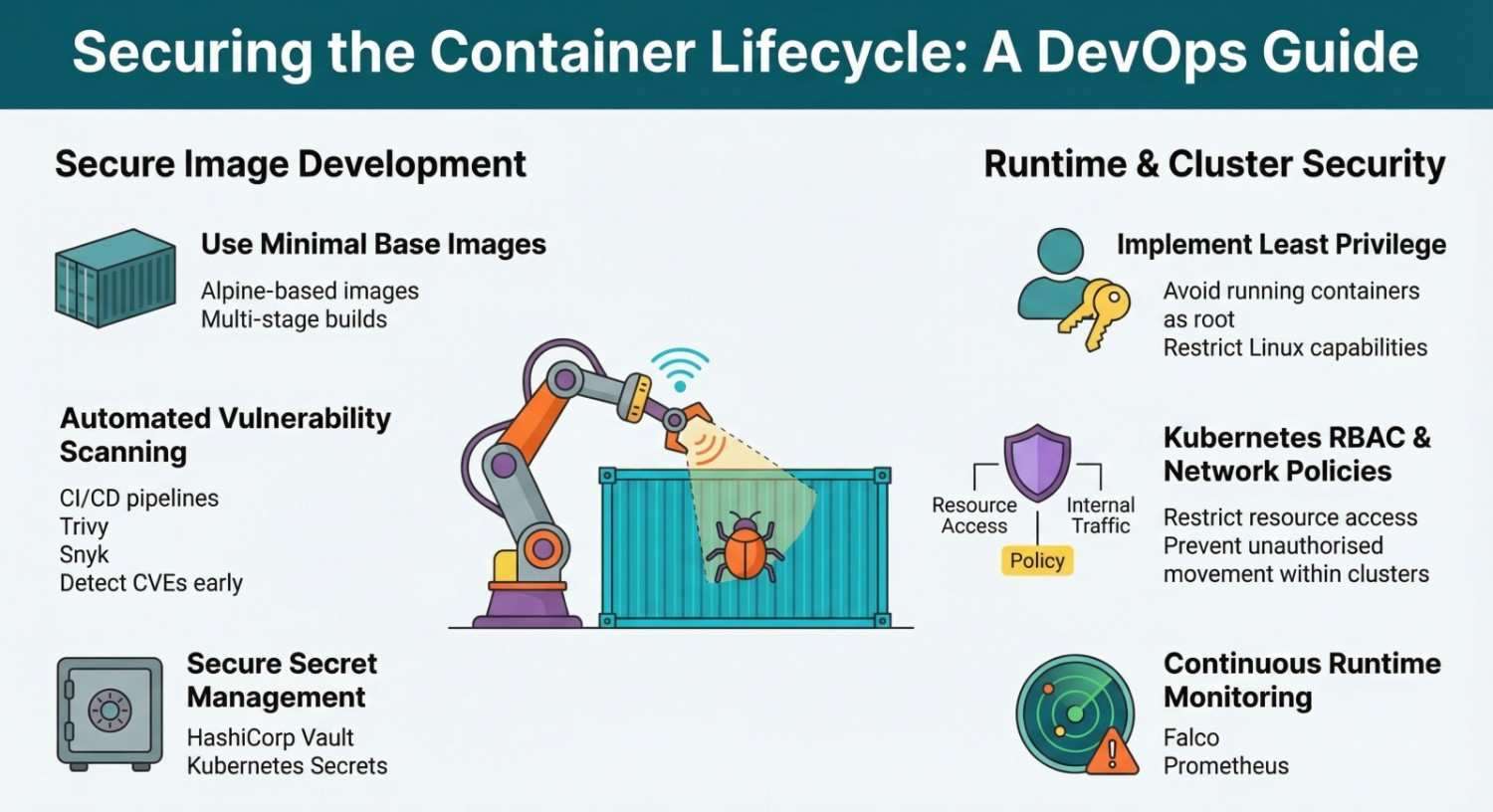
What is Container Security?
Container security refers to the practices, tools, and policies used to protect containerized applications and infrastructure throughout the container lifecycle.
This lifecycle includes:
- Building container images
- Storing images in registries
- Deploying containers
- Running containers in production
- Monitoring and maintaining containers
DevOps teams typically use container orchestration platforms such as Kubernetes to manage large-scale container deployments. Without proper security controls, vulnerabilities in containers can expose the entire infrastructure.
Why Container Security is Important
Containers share the host operating system kernel, which means a compromised container can potentially impact the host system.
Some common risks include:
- Vulnerable container images
- Misconfigured container permissions
- Exposed secrets
- Insecure container networking
- Unauthorized container access
By implementing strong DevOps container security practices, organizations can minimize these risks and maintain secure application deployments.
Key Container Security Risks
1. Vulnerable Container Images
Container images often include operating system libraries and packages. If these components contain vulnerabilities, attackers may exploit them.
For example, images pulled from public registries like Docker Hub may contain outdated software or hidden security issues.
Best Practices
- Use official and trusted base images
- Scan images for vulnerabilities
- Regularly update container images
- Avoid unnecessary packages in images
2. Insecure Container Configuration
Improper container configurations can expose applications to attackers.
Examples include:
- Running containers as root
- Privileged containers
- Open network ports
- Unrestricted file access
Best Practices
- Run containers with least privilege
- Avoid privileged containers
- Limit container capabilities
- Use read-only file systems where possible
3. Exposed Secrets and Credentials
Sensitive information such as API keys, database credentials, and tokens should never be stored directly in container images.
If secrets are hardcoded, attackers can easily extract them.
Best Practices
Use secure secret management tools such as:
- HashiCorp Vault
- Kubernetes Secrets
- Environment variable management systems
These tools allow DevOps teams to securely store and manage sensitive data.
Secure Container Image Building
A secure container starts with a properly built image.
Follow the Principle of Minimal Images
Minimal images reduce the attack surface.
For example:
- Use Alpine-based images
- Avoid installing unnecessary packages
- Remove build tools from production images
Multi-Stage Builds
Multi-stage builds in Docker help reduce the final image size and eliminate unnecessary build dependencies.
Example workflow:
- Build application in stage one
- Copy compiled files to production image
- Discard build environment
This approach reduces vulnerabilities and improves security.
Container Image Scanning
Image scanning tools detect vulnerabilities in container images before deployment.
Popular scanning tools include:
- Snyk
- Trivy
- Clair
These tools scan container images for:
- Known CVEs
- Outdated dependencies
- Misconfigurations
Integrating image scanning into CI/CD pipelines helps detect vulnerabilities early.
Runtime Container Security
Security doesn’t stop once the container is deployed. Runtime protection ensures containers behave as expected.
Key runtime security practices include:
Monitoring container activity
Use monitoring tools such as:
- Prometheus
- Grafana
These tools help track container metrics, detect anomalies, and trigger alerts.
Restrict container capabilities
Containers should only have access to the resources they require.
Best practices include:
- Limiting Linux capabilities
- Enabling security profiles
- Enforcing network policies
Kubernetes Security Best Practices
When running containers in orchestration platforms like Kubernetes, additional security layers are required.
Role-Based Access Control (RBAC)
RBAC restricts access to Kubernetes resources based on user roles.
Benefits include:
- Preventing unauthorized access
- Enforcing least privilege access
- Protecting cluster resources
Network Policies
Network policies define how pods communicate with each other.
They help:
- Restrict internal traffic
- Prevent unauthorized communication
- Improve cluster security
Pod Security Standards
Pod security policies ensure containers follow strict security rules.
For example:
- Disallow privileged containers
- Prevent host filesystem access
- Enforce non-root execution
Secure Container Registries
Container registries store container images used in deployments.
Using secure registries helps prevent malicious images from entering your environment.
Examples include:
- Docker Hub
- Amazon Elastic Container Registry
Security best practices for registries include:
- Enabling image signing
- Enforcing access control
- Scanning images before deployment
DevSecOps: Integrating Security into DevOps
DevSecOps integrates security practices directly into DevOps workflows.
Instead of adding security at the end, DevOps teams include security checks throughout the pipeline.
Typical DevSecOps pipeline stages include:
- Code scanning
- Container image scanning
- Infrastructure security checks
- Runtime monitoring
By embedding security into CI/CD pipelines, teams can detect vulnerabilities early and maintain secure deployments.
Container Security Tools Every DevOps Engineer Should Know
Here are some essential container security tools:
| Tool | Purpose |
|---|---|
| Trivy | Image vulnerability scanning |
| Snyk | Dependency and container security |
| Falco | Runtime threat detection |
| Clair | Static vulnerability scanning |
| HashiCorp Vault | Secure secret storage |
Using these tools improves overall DevOps container security posture.
Container Security Checklist
DevOps engineers should follow this basic security checklist:
- Use trusted base images
- Scan container images regularly
- Avoid running containers as root
- Protect secrets using secret managers
- Enable runtime monitoring
- Restrict container capabilities
- Implement Kubernetes RBAC
- Use secure container registries
Following these best practices significantly reduces security risks.
The Future of Container Security
As container adoption continues to grow, container security solutions are evolving rapidly. Emerging technologies such as AI-driven threat detection, automated vulnerability scanning, and zero-trust security models will play a major role in securing container environments.
DevOps engineers who prioritize container security will be better prepared to protect modern cloud-native applications.
Conclusion
Containerization has revolutionized application deployment, but security must remain a top priority. By understanding container vulnerabilities and implementing best practices, DevOps engineers can build secure and resilient container environments.
Tools like Docker and orchestration platforms like Kubernetes offer powerful capabilities but they must be configured and managed securely.
Adopting DevSecOps practices, scanning images regularly, protecting secrets, and monitoring runtime behavior are essential steps toward securing containerized applications.
Ultimately, container security is not a one-time task it is a continuous process of monitoring, updating, and improving security practices across the entire DevOps pipeline.