Introduction:
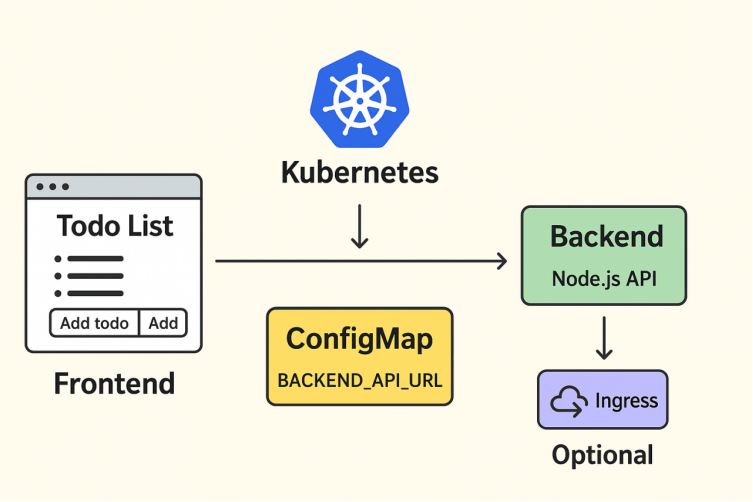
This documentation explains how to deploy a multi-tier Todo List Application on Kubernetes. The application has:
- Frontend: React/HTML served via Nginx
- Backend: Node.js REST API storing todos in memory
- ConfigMap: To configure frontend with backend API URL
- Optional Ingress: To route traffic from a domain to frontend/backend
Learning Objectives:
- Deploy multiple interdependent services
- Understand Service Discovery in Kubernetes
- Use ConfigMaps to pass configuration
- Optionally configure Ingress for external access

Kubernetes Frontend–Backend Architecture with Services.
This second image shows a 2D Kubernetes architecture diagram explaining how a Frontend and Backend application communicate inside a Kubernetes cluster.
Here is what the image represents:
1. Backend Deployment
- Runs inside a backend Pod.
- Handles API logic and database operations.
- Exposed using a Backend Service (ClusterIP) so other pods can access it.
2. Frontend Deployment
- Runs inside a frontend Pod.
- Contains UI files (React, Angular, Vue, etc.).
- Communicates with the backend using the backend service name.
3. Services
The image shows two service types:
- Frontend Service (NodePort or LoadBalancer) → Exposes app to users.
- Backend Service (ClusterIP) → Exposes backend only inside the cluster.
4. Communication Flow
- User → Frontend Service → Frontend Pod
- Frontend Pod → Backend Service → Backend Pod
This architecture ensures proper routing, isolation, and scalability.
Prerequisites.
List tools needed:
- Docker
- Kubernetes (Minikube or Kubeadm)
- kubectl
- Docker Hub account
How Service Discovery Works?
Service Discovery in Kubernetes allows different parts of your application (frontend and backend) to find each other automatically without using IP addresses.
Kubernetes gives every Service a stable DNS name, so even if Pods restart and their IPs change, communication still works.
Why Docker Images Are Needed?
Docker images are essential because they package your entire application code, dependencies, libraries, and runtime into a single, portable unit. This ensures the application runs exactly the same way in any environment.
Key Reasons Docker Images Are Needed:
1. Consistency Across All Environments
- Developers, testers, and servers run the exact same image.
- Removes the “works on my machine” problem.
2. Easy Deployment in Kubernetes
- Kubernetes pulls the Docker image from Docker Hub.
- Pods are created using that image.
- Ensures reproducible deployments.
3. Portable and Lightweight
- Images work on any system that supports Docker.
- No need to install Node.js, Python, Nginx, etc. manually.
4. Faster Scaling
- Kubernetes can create new Pods instantly using the same image.
- Extremely helpful during auto-scaling.
Why Service is Needed?
A Service in Kubernetes is required to give Pods a stable way to communicate, because Pod IPs keep changing when Pods restart. Services act as a permanent access point.
Create a directory for backend:
1.Command:
mkdir -p ~/todo-app/backendExplanation:
- mkdir = make directory
- -p = create parent folders if they don’t exist
- This creates a folder todo-app and inside it a backend folder.
Expected Output:

2.Command:
cd ~/todo-app/backendExplanation:
- cd = change directory
- Moves inside the backend folder where you will create your Node.js API.
Expected Output:

Create app.js file for backend:
Command:
nano app.jsPaste the backend code:
const express = require(‘express’); const cors = require(‘cors’); const app = express(); const port = 3000; let todos = []; app.use(cors()); app.use(express.json()); app.get(‘/api/todos’, (req, res) => { res.json(todos); }); app.post(‘/api/todos’, (req, res) => { todos.push(req.body); res.status(201).json(req.body); }); app.listen(port, () => { console.log(`Todo API listening at http://localhost:${port}`); });Explanation:
- Opens the Nano editor
- You will paste your backend Node.js code in this file.
Expected Output:

Create Dockerfile in the same folder:
Command:
nano DockerfilePaste:
FROM node:18 WORKDIR /app COPY app.js . RUN npm init -y && npm install express cors EXPOSE 3000 CMD [“node”, “app.js”]Explanation:
- Creates and opens a file named Dockerfile
- This tells Docker how to build your backend image.
Expected Output:

Build Docker image:
Command:
docker build -t youruser/todo-backend:v1 .Explanation:
- docker build = builds an image
- -t = gives the image a name/tag
- youruser/todo-backend:v1 = image name
- . = build from current folder
- Docker reads your Dockerfile and creates an image.
Expected Output:

Push docker image:
Command:
docker push youruser/todo-backend:v1Explanation:
- Uploads your image to Docker Hub
- Kubernetes can then download it.
Expected Output:

Conclusion
Deploying a multi-tier Todo List application on Kubernetes demonstrates the power and flexibility of container orchestration in managing complex, distributed applications. By separating the application into distinct tiers such as the frontend, backend, and database we achieve modularity, scalability, and maintainability. Kubernetes provides essential features like automatic scaling, self-healing, rolling updates, and service discovery, which simplify the deployment and management of multi-tier applications.
Through this process, developers and operators gain a deeper understanding of containerization, networking, and persistent storage management in a cloud-native environment. Ultimately, deploying a multi-tier application on Kubernetes not only enhances reliability and performance but also prepares teams to adopt modern DevOps practices, accelerating continuous delivery and improving overall application resilience.
- For more information about Kubernetes, you can refer to Jeevi’s page.