Deploying Prometheus and Grafana on Kubernetes

Deploying Prometheus and Grafana on Kubernetes

Introduction:

This document explains how to deploy Prometheus and Grafana on a Kubernetes cluster manually, without using Helm or other automation tools.


      • Prometheus collects metrics (like CPU usage, memory usage, and pod status) from your applications and Kubernetes components.

      • Grafana visualizes these metrics on dashboards, making it easy to monitor your cluster in real time.

     you will learn how to:


        1. Create a namespace to organize monitoring components.

        1. Deploy Prometheus with a ConfigMap, Deployment, and Service.

        1. Deploy Grafana, connect it to Prometheus, and access the UI.

        1. Deploy a sample NGINX application and monitor its metrics.

        1. Verify that metrics are collected and visualize them on Grafana dashboards.

      Prerequisites:

      Create a section for what must be ready before starting:


          • kubectl installed & configured

          • NGINX or another pod to monitor

          • Optional: jq installed for JSON processing

        What is Prometheus?


            • Prometheus is a monitoring system.

            • It collects metrics from Kubernetes components and applications.

            • Metrics include CPU, memory, network, pod health, etc.

            • Prometheus stores this data and provides APIs for querying.
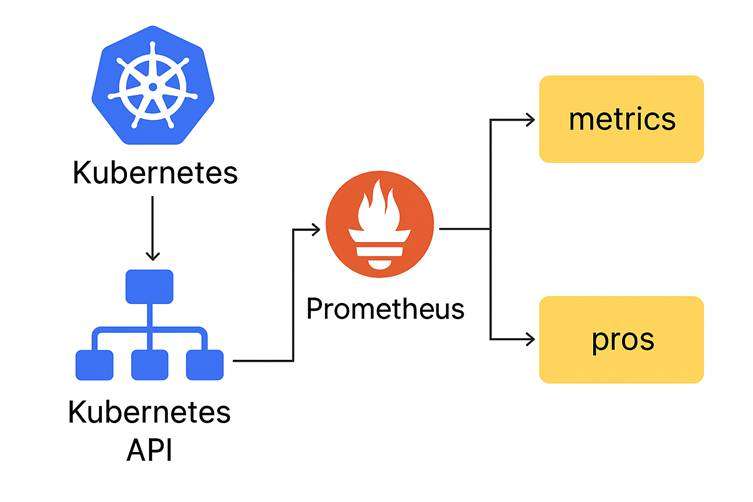
          Kubernetes → Prometheus → Metrics + Alerts


              • Prometheus collects and stores them

              • Prometheus sends data to dashboards

              • Prometheus triggers alerts when necessary

            What is Grafana?


                • Grafana is a visualization tool.

                • It shows Prometheus data in charts, graphs, dashboards.

                • Helps you understand cluster performance, pod behavior, and scaling

              Why Do We Need Monitoring in Kubernetes?


                  • Kubernetes is dynamic → pods are created/destroyed frequently.

                  • Applications may autoscale (HPA).

                  • You need metrics to know what is happening inside the cluster.

                  • Prometheus tracks metrics, Grafana visualizes them

                What is a Service in Kubernetes?


                    • A service gives stable access to pods.

                    • Even if pods die or change IPs, service stays same.

                    • Grafana service exposes port 3000 inside cluster.

                    • Prometheus service exposes port 9090.

                  What is HPA (Horizontal Pod Autoscaler)?

                  The Horizontal Pod Autoscaler (HPA) is a Kubernetes feature that automatically increases or decreases the number of pods in a Deployment based on real-time workload.

                  How HPA Uses Prometheus Metric?

                  HPA (Horizontal Pod Autoscaler) can automatically increase or decrease the number of pods in your Kubernetes Deployment.
                  To make the correct scaling decision, HPA needs metrics such as:


                      • CPU usage

                      • Memory usage

                      • Custom application metrics (request count, latency, errors, etc.)

                    Prometheus plays a major role when custom metrics are used

                    Create namespace:

                    Command:

                    kubectl create namespace monitoring

                    Explanation:


                        • kubectl → Kubernetes command-line tool

                        • create → We are creating a new resource

                        • namespace → Type of resource

                        • monitoring → Name of the new namespace

                        • This creates a separate area in Kubernetes to keep Prometheus & Grafana organized

                      Expected Output:

                      Create Prometheus ConfigMap:

                      1.Command:

                      nano prometheus-config.yaml

                      Paste this,

                      apiVersion: v1
                      kind: ConfigMap
                      metadata:
                      name: prometheus-config
                      namespace: monitoring
                      labels:
                      name: prometheus-config
                      data:
                      prometheus.yml: |
                      global:
                      scrape_interval: 15s
                      scrape_configs:
                      # Scrape Prometheus itself
                      - job_name: 'prometheus'
                      static_configs:
                      - targets: ['localhost:9090']

                      # Scrape all Kubernetes pods with annotation
                      - job_name: 'kubernetes-pods'
                      kubernetes_sd_configs:
                      - role: pod
                      relabel_configs:
                      - source_labels:
                      [__meta_kubernetes_pod_annotation_prometheus_io_scrape]
                      action: keep
                      regex: true
                      - source_labels:
                      [__meta_kubernetes_pod_annotation_prometheus_io_path]
                      action: replace
                      target_label: __metrics_path__
                      regex: (.*)
                      - source_labels: [__address__, __meta_kubernetes_pod_annotation_prometheus_io_port]
                      action: replace
                      target_label: __address__
                      regex: (.*):(\d+)
                      replacement: $1:$2

                      Explanation:


                          • nano = a text editor inside Linux.


                            • This command opens a new empty file called prometheus-config.yaml.

                            • You paste your Prometheus ConfigMap YAML inside this file.

                          Why we run it

                          To create Prometheus configuration (prometheus.yml) using a ConfigMap.

                          Expected Output:

                          2.Command:

                          kubectl apply -f prometheus-config.yaml

                          Explanation:


                              • apply → Create/update something using a YAML file

                              • -f → “from file”

                              • prometheus-config.yaml → This file contains the configuration

                              • Kubernetes will:


                                    • create a ConfigMap

                                    • store prometheus.yml inside it

                                    • Prometheus uses this config to scrape metrics

                              Expected Output:

                              Create Prometheus Deployment:

                              1.Command:

                              nano prometheus-deployment.yaml

                              Paste this,

                              apiVersion: apps/v1 
                              kind: Deployment
                              metadata:
                              name: prometheus-deployment
                              namespace: monitoring
                              labels:
                              app: prometheus
                              spec:
                              replicas: 1
                              selector:
                              matchLabels:
                              app: prometheus
                              template:
                              metadata:
                              labels:
                              app: prometheus
                              spec:
                              containers:
                              - name: prometheus
                              image: prom/prometheus:v2.52.0
                              args:
                              - "--
                              config.file=/etc/prometheus/prometheus.yml"
                              - "--storage.tsdb.path=/prometheus/"
                              ports:
                              - containerPort: 9090
                              volumeMounts:
                              - name: prometheus-config-volume
                              mountPath: /etc/prometheus/
                              volumes:
                              - name: prometheus-config-volume
                              configMap:
                              name: prometheus-config

                              Explanation:


                                  • Opens a new file named prometheus-deployment.yaml.

                                  • You paste the Prometheus Deployment YAML, which controls:


                                        • Prometheus container image

                                        • ports

                                        • volume mounts

                                        • replicas

                                  Why we run it

                                  To create the Kubernetes Deployment that runs Prometheus.

                                  Expected Output:

                                  2.Command:

                                  kubectl apply -f prometheus-deployment.yaml

                                  Explanation:


                                      • Creates the Deployment for Prometheus

                                      • Runs the prom/prometheus container

                                      • Mounts the ConfigMap into the container

                                      • Starts Prometheus on port 9090

                                      • Ensures 1 replica is always running

                                    Expected Output:

                                    Expose Prometheus:

                                    1.Command:

                                    nano prometheus-service.yaml

                                    Paste this,

                                    apiVersion: v1
                                    kind: Service
                                    metadata:
                                    name: prometheus-service
                                    namespace: monitoring
                                    labels:
                                    app: prometheus
                                    spec:
                                    type: NodePort
                                    ports:
                                    - port: 9090
                                    targetPort: 9090
                                    nodePort: 30090
                                    selector:
                                    app: prometheus

                                    Explanation:


                                        • Opens a file to create the Service manifest for Prometheus.

                                        • This defines how Prometheus is exposed (NodePort 30090).

                                      Why

                                      Without a Service → you cannot access Prometheus UI.

                                      Expected Output:

                                      2.Command:

                                      kubectl apply -f prometheus-service.yaml

                                      Explanation:


                                          • Creates a Service

                                          • Type = NodePort → accessible from outside (browser)

                                          • Exposes:


                                                • Cluster port 9090

                                                • NodePort 30090

                                            • Lets you open Prometheus UI using localhost:30090

                                          Expected Output:

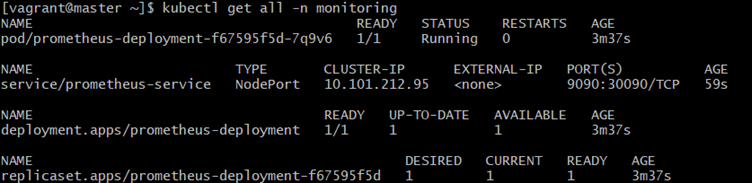
                                          Verify Prometheus:

                                          Command:

                                          kubectl get all -n monitoring

                                          Explanation:


                                              • get all → lists all objects

                                              • -n monitoring → inside the monitoring namespace

                                              • Helps confirm:


                                                    • pods running

                                                    • services created

                                                    • deployments working

                                              Expected Output:

                                              Port-forward Prometheus:

                                              1.Command:

                                              kubectl port-forward svc/prometheus-service -n monitoring 9090:9090

                                              Explanation:


                                                  • port-forward → exposes internal Kubernetes service locally

                                                  • svc/prometheus-service → forwarding the Prometheus service

                                                  • 9090:9090

                                                  • left = your laptop

                                                  • right = container

                                                Expected Output:

                                                2.Command:

                                                curl http://localhost:9090

                                                Explanation:


                                                    • curl calls a webpage from the Linux terminal.

                                                    • This checks if Prometheus is running on port 9090.

                                                  Meaning

                                                  If Prometheus works, you will get some HTML output.

                                                  Expected Output:

                                                  Grafana: create datasource ConfigMap:

                                                  1.Command:

                                                  nano grafana-datasource.yaml

                                                  Paste this,

                                                  apiVersion: v1
                                                  kind: ConfigMap
                                                  metadata:
                                                  name: grafana-datasource
                                                  namespace: monitoring
                                                  data:
                                                  datasource.yml: |
                                                  apiVersion: 1
                                                  datasources:
                                                  - name: Prometheus
                                                  type: prometheus
                                                  access: proxy
                                                  url: http://prometheus-service.monitoring.svc.cluster.local:9090
                                                  isDefault: true

                                                  Explanation:


                                                      • Opens a new YAML file to configure Grafana’s data source.

                                                      • This connects Grafana → Prometheus inside Kubernetes.

                                                    Why

                                                    Grafana needs Prometheus to fetch metrics.

                                                    Expected  Output:

                                                    2.Command:

                                                    kubectl apply -f grafana-datasource.yaml

                                                    Explanation:


                                                        • Creates a ConfigMap

                                                        • Pre-configures Grafana to connect to Prometheus

                                                        • No need to manually add data source later

                                                      Expected Output:

                                                       Create Grafana Deployment:

                                                      1.Command:

                                                      nano grafana-deployment.yaml

                                                      Paste this,

                                                      apiVersion: apps/v1
                                                      kind: Deployment
                                                      metadata:
                                                      name: grafana
                                                      namespace: monitoring
                                                      labels:
                                                      app: grafana
                                                      spec:
                                                      replicas: 1
                                                      selector:
                                                      matchLabels:
                                                      app: grafana
                                                      template:
                                                      metadata:
                                                      labels:
                                                      app: grafana
                                                      spec:
                                                      containers:
                                                      - name: grafana
                                                      image: grafana/grafana:10.2.0
                                                      ports:
                                                      - containerPort: 3000
                                                      env:
                                                      - name: GF_SECURITY_ADMIN_USER
                                                      value: admin
                                                      - name: GF_SECURITY_ADMIN_PASSWORD
                                                      value: admin123
                                                      volumeMounts:
                                                      - name: grafana-storage
                                                      mountPath: /var/lib/grafana
                                                      - name: grafana-datasource
                                                      mountPath: /etc/grafana/provisioning/datasources/
                                                      volumes:
                                                      - name: grafana-storage
                                                      emptyDir: {}
                                                      - name: grafana-datasource
                                                      configMap:
                                                      name: grafana-datasource

                                                      Explanation:


                                                          • Opens the Deployment file for Grafana.

                                                          • You paste the YAML to run Grafana container:


                                                                • container image

                                                                • admin password

                                                                • datasource configuration

                                                          Why

                                                          This command creates the Grafana workload inside Kubernetes.

                                                          Expected Output:

                                                          2.Command:

                                                          kubectl apply -f grafana-deployment.yaml

                                                          Explanation:


                                                              • Creates Deployment for Grafana

                                                              • Runs container on port 3000

                                                              • Sets admin/admin123 as login

                                                              • Automatically loads the datasource ConfigMap

                                                              • Creates storage (emptyDir)

                                                            Expected Output:

                                                            Create Grafana Service:

                                                            1.Command:

                                                            nano grafana-service.yaml

                                                            Paste this,

                                                            apiVersion: v1 
                                                            kind: Service
                                                            metadata:
                                                            name: grafana
                                                            namespace: monitoring
                                                            labels:
                                                            app: grafana
                                                            spec:
                                                            type: NodePort
                                                            ports:
                                                            - port: 3000
                                                            targetPort: 3000
                                                            nodePort: 30300
                                                            selector:
                                                            app: grafana

                                                            Explanation:


                                                                • Creates the Service file for Grafana.

                                                                • Exposes UI using NodePort 30300.

                                                              Expected Output:

                                                              2.Command:

                                                              kubectl apply -f grafana-service.yaml

                                                              Explanation:


                                                                  • Creates NodePort service

                                                                  • Exposes Grafana UI on:


                                                                        • Cluster port 3000

                                                                        • NodePort 30300

                                                                  Expected Output:

                                                                  Apply All Grafana Resources:

                                                                  1.Command:

                                                                  kubectl create deployment nginx --image=nginx -n monitoring

                                                                  Explanation:


                                                                      • Creates a Deployment named nginx

                                                                      • Runs official nginx image

                                                                      • Starts a web server pod

                                                                    Expected Output:

                                                                    2.Command:

                                                                    kubectl expose deployment nginx --port=80 -n monitoring

                                                                    Explanation:


                                                                        • Exposes nginx as a Service

                                                                        • Makes port 80 accessible inside the cluster

                                                                      Expected Output:

                                                                      3.Command:

                                                                      kubectl annotate pod -l app=nginx prometheus.io/scrape="true" prometheus.io/port="80" -n monitoring

                                                                      Explanation:


                                                                          • annotate → add metadata

                                                                          • -l app=nginx → select nginx pods

                                                                          • prometheus.io/scrape=”true” → tells Prometheus to scrape this pod

                                                                          • prometheus.io/port=”80″ → metrics port

                                                                        Prometheus will now automatically collect metrics from NGINX.

                                                                        Expected Output:

                                                                        Access Grafana:

                                                                        Port-Forward Command:

                                                                        Run on Master Node Terminal (ssh into master):

                                                                        kubectl port-forward svc/grafana -n monitoring 3000:3000

                                                                        Explanation:


                                                                            • Opens Grafana UI locally

                                                                            • This command creates a tunnel from your local machine to the Grafana pod.

                                                                            • localhost:3000 on your laptop will now connect to Grafana inside Kubernetes.

                                                                          Expected Output:

                                                                          Verify Scraping:

                                                                          Command:

                                                                          curl 'http://localhost:9090/api/v1/targets' | jq '.data.activeTargets[] | {scrapeUrl: .scrapeUrl, health: .health, labels: .labels}'

                                                                          Explanation:


                                                                              1. Calls Prometheus API endpoint /api/v1/targets

                                                                              1. Gets all the metrics targets Prometheus is scraping

                                                                              1. jq formats the output and shows:


                                                                                • scrapeUrl

                                                                                • health

                                                                                • target labels

                                                                              Why

                                                                              This is used to check:

                                                                              ✔ Is Prometheus scraping Nginx?
                                                                              ✔ Is Prometheus scraping Kubernetes Pods?
                                                                              ✔ Is Prometheus healthy?

                                                                              Expected Output:

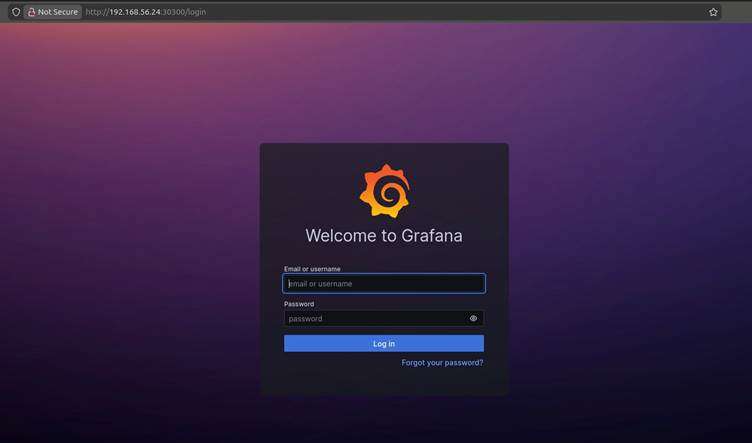
                                                                              Open Grafana UI:

                                                                              In your Windows browser:

                                                                              http://localhost:3000

                                                                              Explanation:

                                                                              This is Grafana UI URL.

                                                                              You open this in browser after running:

                                                                              kubectl port-forward svc/grafana -n monitoring 3000:3000

                                                                              Login


                                                                                  • username: admin

                                                                                  • password: admin123

                                                                                Expected Output:

                                                                                conclusion

                                                                                Deploying Prometheus and Grafana on Kubernetes is an essential step toward building a reliable, observable, and production-ready cluster. In this guide, we deployed both tools manually—ConfigMaps, Deployments, and Services—so you understand exactly how monitoring works behind the scenes without relying on Helm or automation tools.

                                                                                By the end of this setup:


                                                                                    • Prometheus continuously collects metrics from your Kubernetes components, pods, and applications.

                                                                                    • Grafana transforms those metrics into powerful dashboards that provide real-time visibility into cluster performance.

                                                                                    • NGINX was deployed as a sample application, and we confirmed that Prometheus successfully scraped its metrics.

                                                                                    • You accessed Grafana and verified the data flow end-to-end—from Kubernetes → Prometheus → Grafana.

                                                                                  for more information about kubernetes you can refer to jeevi’s page

                                                                                  pionish
                                                                                  pionish
                                                                                  Leave Comment
                                                                                  Share This Blog
                                                                                  Recent Posts
                                                                                  Get The Latest Updates

                                                                                  Subscribe To Our Newsletter

                                                                                  No spam, notifications only about our New Course updates.

                                                                                  Enroll Now
                                                                                  Enroll Now
                                                                                  Enquire Now