
If you’re new to AWS, few comparisons are as confusing or as important as EC2 vs ECS.
Both are core AWS compute services. Both run your applications. And yet, they represent two very different ways of thinking about infrastructure: servers vs containers.
This post is a beginner-friendly guide to:
- What EC2 and ECS actually are
- How servers differ from containers
- The real-world pros and cons of each
- When to use EC2 vs ECS (with examples)
By the end, you’ll have a clear mental model not just a checklist.
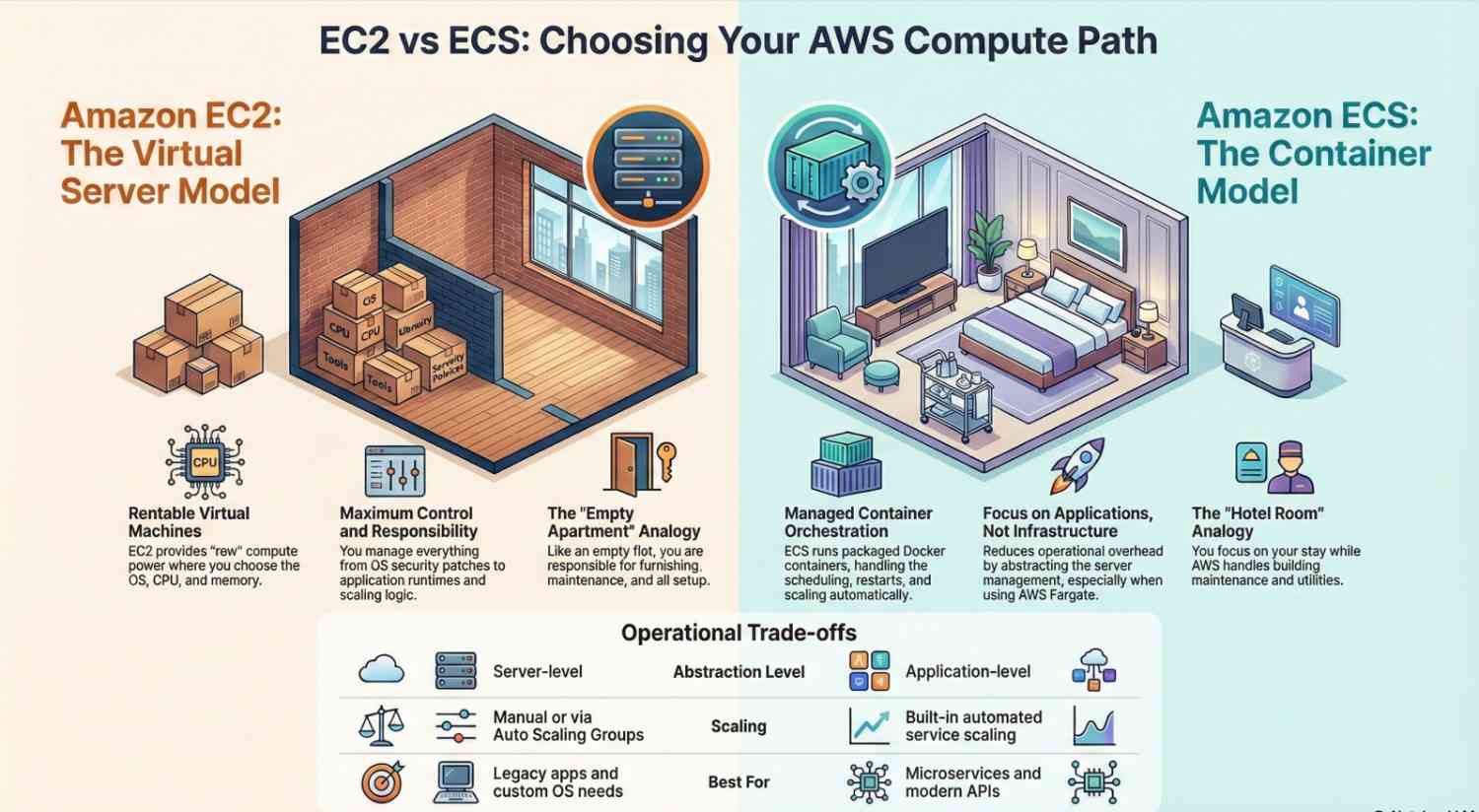
The Big Picture: Servers vs Containers
Before comparing EC2 vs ECS, let’s zoom out.
Traditional Servers (EC2)
You:
- Provision a virtual machine
- Install an operating system
- Configure runtimes, dependencies, security patches
- Deploy your app
- Maintain the server over time
This model gives you maximum control, but also maximum responsibility.
Containers (ECS)
You:
- Package your app + dependencies into a container
- Tell AWS how many copies to run
- Let the platform handle scheduling, restarts, and scaling
This model trades some control for speed, consistency, and automation.
EC2 is about managing servers.
ECS is about running containers.
What Is Amazon EC2? (Beginner Explanation)
Amazon EC2 (Elastic Compute Cloud) lets you rent virtual servers in the cloud.
With EC2, you choose:
- Instance type (CPU, memory)
- Operating system (Linux, Windows)
- Storage and networking
- Security settings
You are responsible for:
- OS updates
- Application runtime
- Process management
- Scaling logic
- Monitoring and recovery
Think of EC2 like:
Renting an empty apartment you decide how everything is set up and maintained.
Common EC2 Use Cases
- Legacy applications
- Custom system configurations
- Databases and stateful services
- Applications that don’t work well in containers
- Teams that want full OS-level control
What Is Amazon ECS? (Beginner Explanation)
Amazon ECS (Elastic Container Service) is AWS’s managed container orchestration platform.
Instead of managing servers directly, you:
- Package your app as a Docker container
- Define how it should run
- Let ECS handle placement, restarts, and scaling
ECS can run on:
- EC2 (you manage the servers)
- Fargate (AWS manages the servers)
Think of ECS like:
Booking hotel rooms you focus on your stay, not building maintenance.
Common ECS Use Cases
- Microservices
- APIs and web apps
- Background workers
- Batch processing
- Modern cloud-native workloads
EC2 vs ECS: Key Differences at a Glance
| Area | EC2 | ECS |
|---|---|---|
| Abstraction level | Server-level | Application-level |
| Deployment unit | VM | Container |
| Scaling | Manual / Auto Scaling Groups | Built-in service scaling |
| OS management | Your responsibility | Mostly abstracted |
| Operational overhead | High | Lower |
| Learning curve | Simpler conceptually | More concepts upfront |
When to Use EC2 (Servers)
Choose EC2 when:
1. You Need Full Control
If you require:
- Custom kernel modules
- Specific OS configurations
- Non-containerized software
EC2 is the better fit.
2. You’re Running Legacy Applications
Some applications:
- Expect a full server environment
- Are hard to containerize
- Depend on system-level state
Rewriting them for containers may not be worth it.
3. You Want the Simplest Mental Model
For beginners, EC2 can feel more intuitive:
“I have a server. I SSH into it. I run my app.”
That simplicity can be valuable early on.
4. You Have Low Change Frequency
If your app:
- Rarely changes
- Has predictable traffic
- Doesn’t need frequent scaling
EC2 is often sufficient.
When to Use ECS (Containers)
Choose ECS when:
1. You Want Faster Deployments
Containers:
- Start quickly
- Are easy to replace
- Enable zero-downtime deployments
ECS shines in CI/CD pipelines.
2. You’re Building Microservices
ECS is designed for:
- Many small services
- Independent scaling
- Isolated deployments
Trying to do this cleanly on EC2 alone is painful.
3. You Want Easier Scaling
With ECS:
- Scaling is declarative
- Services restart automatically
- Failed containers are replaced
No custom scripts required.
4. You Want Less Operational Overhead
ECS reduces the need to:
- SSH into servers
- Manually restart processes
- Debug environment drift
This is especially powerful for small teams.
Cost: EC2 vs ECS for Beginners
Here’s the important beginner takeaway:
ECS itself is free you pay for what runs underneath it.
Cost Scenarios
- ECS on EC2: Similar cost to EC2, but more efficient usage
- ECS on Fargate: Pay per CPU/memory used, no idle servers
For beginners:
- EC2 can be cheaper if you’re okay managing everything
- ECS + Fargate can be cheaper if you value time and simplicity
A Simple Mental Model (Very Important)
If you remember only this:
- EC2 = “I manage servers”
- ECS = “I run applications”
ECS doesn’t replace EC2 it uses it (or abstracts it away).
Real-World Example:
Using EC2
- Launch one EC2 instance
- Install Node.js
- Run your API with PM2
- Set up auto-scaling
- Manually handle failures
Using ECS
- Build a container
- Define a service
- Set desired count to 2
- ECS handles restarts and scaling
Both work ECS requires less ongoing effort.
Common Beginner Mistakes
Using EC2 When ECS Would Be Easier
Many beginners default to EC2 because it feels familiar and end up building container-like systems manually.
Jumping to ECS Without Understanding Containers
ECS assumes basic container knowledge. Skipping that step leads to confusion.
Treating ECS Like a Server
If you find yourself wanting to SSH into ECS tasks you’re doing it wrong.
EC2 vs ECS: Which Should Beginners Choose?
Choose EC2 if:
- You’re learning AWS fundamentals
- You want hands-on server experience
- Your app is simple or legacy
Choose ECS if:
- You want modern deployment practices
- You’re building APIs or microservices
- You want less infrastructure babysitting
There is no “wrong” choice only trade-offs.
Final Thoughts
The EC2 vs ECS debate isn’t about which service is better.
It’s about servers vs containers, and how much infrastructure you want to manage yourself.
Start with clarity, not trends:
- EC2 teaches you how servers work
- ECS teaches you how modern cloud applications run
Once you understand both, AWS becomes much easier to navigate.