
When building applications on Amazon Web Services (AWS), one of the most common architecture decisions is EC2 vs Lambda. Both are powerful compute services, but they solve different problems and are designed for different workloads.
If you’re designing a cloud-native application, migrating legacy systems, or optimizing cost and performance, understanding the difference between AWS EC2 and AWS Lambda is critical.
In this in-depth guide, we’ll cover:
- What is Amazon EC2?
- What is AWS Lambda?
- Key differences between EC2 and Lambda
- Cost comparison: EC2 vs Lambda
- Performance and scalability differences
- Security considerations
- Real-world use cases
- When to use EC2 vs Lambda
- Can you use EC2 and Lambda together?
Let’s dive in.
What Is Amazon EC2?
Amazon EC2 (Elastic Compute Cloud) is a web service that provides resizable virtual servers in the cloud.
In simple terms, EC2 allows you to rent virtual machines (VMs) where you have full control over:
- Operating system
- Installed software
- Runtime environment
- Networking configuration
- Storage
You choose instance types (CPU, memory, GPU optimized), configure scaling rules, and manage the infrastructure.
Key Features of Amazon EC2
- Full control over the operating system
- Customizable compute capacity
- Supports long-running applications
- Ideal for traditional server-based architectures
- Integration with AWS Auto Scaling
- Works with Elastic Load Balancing
EC2 Is Best For:
- Hosting web servers
- Running databases
- Large enterprise applications
- Applications requiring persistent state
- Custom runtime environments
- GPU-based workloads (ML, rendering)
With EC2, you manage the server even though it’s in the cloud.
What Is AWS Lambda?
AWS Lambda is a serverless compute service that lets you run code without provisioning or managing servers.
You upload your code, define triggers (such as HTTP requests, file uploads, or database updates), and Lambda runs your function automatically.
Key Features of AWS Lambda
- No server management
- Automatic scaling
- Pay only for execution time
- Event-driven architecture
- Built-in high availability
With Lambda, AWS manages:
- Infrastructure
- Scaling
- OS patching
- Availability
- Capacity provisioning
You focus purely on your code.
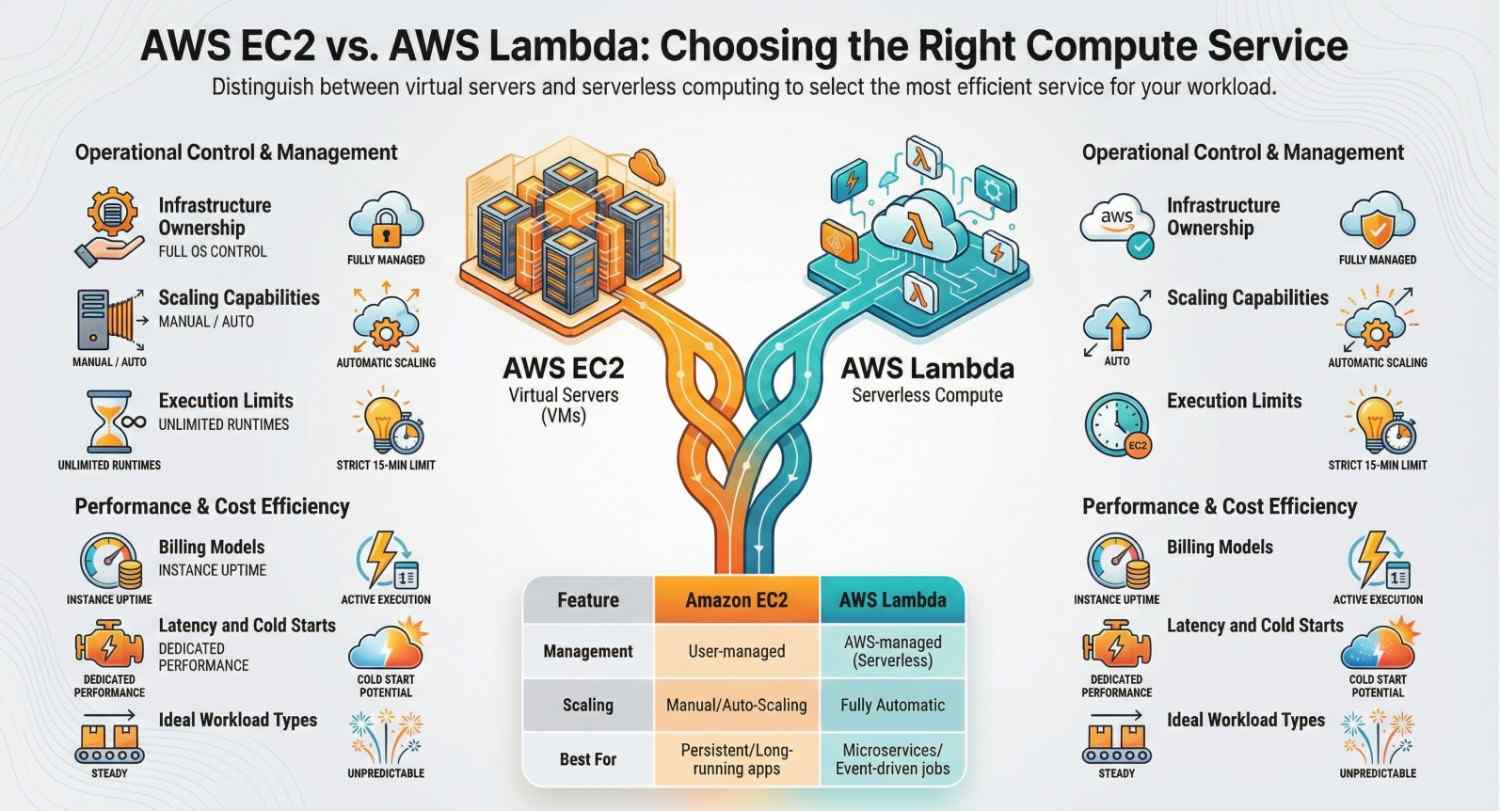
EC2 vs Lambda: Core Differences
Here’s a clear comparison of EC2 vs Lambda:
| Feature | Amazon EC2 | AWS Lambda |
|---|---|---|
| Infrastructure Management | You manage | AWS manages |
| Scaling | Manual or Auto Scaling | Fully automatic |
| Billing Model | Pay per instance uptime | Pay per execution time |
| Use Case | Long-running apps | Event-driven functions |
| Startup Time | Immediate (running instance) | Cold start possible |
| Max Execution Time | Unlimited | 15 minutes per invocation |
| OS Access | Full access | No OS access |
| Architecture | Traditional server-based | Serverless |
The biggest difference:
EC2 gives you control. Lambda gives you convenience.
EC2 vs Lambda: Cost Comparison
Cost is often the deciding factor when choosing between AWS EC2 and AWS Lambda.
Amazon EC2 Pricing Model
- Charged per second (or hour for some instance types)
- You pay whether the instance is fully utilized or idle
- Additional costs for storage (EBS), bandwidth, load balancers
EC2 can be cost-effective for:
- Steady workloads
- High CPU utilization
- Long-running services
AWS Lambda Pricing Model
- Charged per request
- Charged based on execution time (milliseconds)
- Charged based on allocated memory
Lambda is cost-effective for:
- Infrequent workloads
- Spiky traffic
- Event-driven processes
- Microservices
Example Scenario
If your application runs continuously 24/7, EC2 may be cheaper.
If your application runs occasionally (like processing uploaded files), Lambda will likely cost significantly less.
EC2 vs Lambda: Scalability
Scalability is where Lambda truly shines.
EC2 Scaling
With EC2, you configure:
- Auto Scaling groups
- Load balancers
- Health checks
- Capacity planning
Scaling requires configuration and monitoring.
Lambda Scaling
Lambda automatically:
- Scales up instantly with incoming requests
- Scales down to zero when idle
- Handles thousands of concurrent executions
No configuration required.
For unpredictable traffic, Lambda often wins.
EC2 vs Lambda: Performance Considerations
Cold Starts in Lambda
One drawback of AWS Lambda is cold start latency.
If a function hasn’t been invoked recently, AWS must initialize the runtime environment.
For:
- Real-time gaming
- High-frequency trading
- Ultra-low latency APIs
EC2 may be better.
EC2 Performance Benefits
- Dedicated CPU/memory
- No cold starts
- Better for consistent heavy workloads
- Suitable for stateful applications
Security Differences: EC2 vs Lambda
Both services integrate with:
- IAM (Identity and Access Management)
- VPC networking
- Encryption services
But the responsibility model differs.
EC2 Security Responsibility
You manage:
- OS patching
- Firewall rules
- Vulnerability management
- Server hardening
Lambda Security Responsibility
AWS manages:
- OS updates
- Infrastructure patching
- Underlying server security
Lambda reduces operational security overhead.
When Should You Use Amazon EC2?
Choose Amazon EC2 if you need:
- Full control over the operating system
- Custom software installations
- Long-running processes
- Stateful applications
- GPU-intensive workloads
- Legacy application migration
EC2 is ideal for:
- Enterprise ERP systems
- Monolithic applications
- Database servers
- Containers (with ECS or Kubernetes)
When Should You Use AWS Lambda?
Choose AWS Lambda if you need:
- Event-driven execution
- Automatic scaling
- Minimal infrastructure management
- Microservices architecture
- API backends
- Background processing jobs
Lambda is ideal for:
- File processing (S3 triggers)
- Real-time data transformation
- Chatbots
- Scheduled tasks
- Serverless APIs
Can You Use EC2 and Lambda Together?
Absolutely.
Many modern cloud architectures combine both.
Example hybrid architecture:
- EC2 runs core backend services
- Lambda processes asynchronous jobs
- Lambda handles traffic spikes
- EC2 handles persistent workloads
This approach gives you flexibility and cost optimization.
Real-World Use Case Comparison
E-Commerce Website
- Product catalog server → EC2
- Image resizing → Lambda
- Payment event processing → Lambda
- Recommendation engine → EC2
SaaS Application
- Core API → EC2 or containers
- Email notifications → Lambda
- Data export jobs → Lambda
- Background cron tasks → Lambda
EC2 vs Lambda: Decision Framework
Ask yourself:
1. Is the workload continuous?
→ Yes → EC2
→ No → Lambda
2. Do you need OS-level control?
→ Yes → EC2
3. Is traffic unpredictable?
→ Yes → Lambda
4. Is this event-driven?
→ Yes → Lambda
5. Is it stateful and long-running?
→ Yes → EC2
Pros and Cons Summary
Amazon EC2
Pros
- Full control
- Flexible configurations
- No execution time limits
- Good for steady workloads
Cons
- Requires management
- Higher operational overhead
- Can waste resources if idle
AWS Lambda
Pros
- Serverless
- Auto-scaling
- Pay-per-use
- Minimal maintenance
Cons
- 15-minute execution limit
- Cold start latency
- Less customization
- Not ideal for heavy continuous workloads
The Bottom Line: EC2 vs Lambda
The debate of EC2 vs Lambda is not about which is better it’s about which is appropriate.
Use Amazon EC2 when:
- You need control
- Your app runs continuously
- You’re migrating legacy systems
- You need GPU or custom OS environments
Use AWS Lambda when:
- You want serverless simplicity
- Workloads are event-driven
- Traffic is unpredictable
- You want to minimize operational overhead
In modern cloud architecture, the smartest solution is often a combination of both.
Final Thoughts
Choosing between EC2 vs Lambda is one of the most important architectural decisions in AWS.
If you value:
- Control → EC2
- Simplicity → Lambda
- Predictable workloads → EC2
- Event-driven microservices → Lambda
Understanding their differences in cost, scalability, performance, and management overhead will help you build efficient, cost-optimized, and scalable cloud systems.
- If you want to explore AWS, start your traning here.