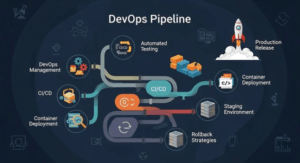
Adopting continuous testing in a DevOps environment is crucial for ensuring that software is reliable, secure, and high-quality throughout the development lifecycle. Continuous testing (CT) is the practice of running automated tests continuously as part of the CI/CD pipeline to catch defects early and ensure rapid feedback for developers. Here’s a step-by-step guide on how to successfully integrate continuous testing into a DevOps workflow.
Understand the Role of Continuous Testing in DevOps.
Continuous testing plays a pivotal role in DevOps by ensuring software quality throughout the development lifecycle. It involves running automated tests continuously to provide fast feedback on code changes, which helps catch defects early. By integrating tests into the CI/CD pipeline, continuous testing ensures that each code commit is validated against a suite of tests, preventing errors from reaching production. This practice supports the Shift Left Testing approach, where testing is done early in development rather than waiting for later stages. It accelerates release cycles, enhances collaboration between teams, and reduces the risk of defects. Ultimately, continuous testing helps maintain high-quality, secure, and reliable software in a DevOps environment, aligning with the need for rapid, iterative deployments.

Define Testing Objectives and Scope.
Defining testing objectives and scope is a crucial first step in establishing a robust testing strategy, particularly in a DevOps environment. Testing objectives refer to the overall goals you aim to achieve through testing, such as ensuring the functionality, performance, security, and reliability of your application. These objectives guide the selection of testing types, tools, and the resources needed for successful execution. For example, your primary objective might be to catch critical bugs early in the development process or to ensure that performance metrics meet user expectations.
The scope of testing outlines the specific areas, features, and functionality that will be tested, as well as the boundaries of the testing process. It helps determine what will and won’t be covered during testing, setting clear expectations for the team. The scope includes different levels of testing such as unit tests, integration tests, system tests, and end-to-end tests, each targeting a specific aspect of the application. It also identifies which environments (e.g., development, staging, production) and systems (e.g., APIs, databases) will be involved.
A well-defined scope helps prioritize testing efforts, allocate resources effectively, and ensure that all critical aspects of the application are thoroughly tested. Additionally, it helps teams avoid scope creep by clearly specifying which features are in and out of the testing process. Aligning objectives and scope with business goals ensures that testing directly contributes to improving software quality and meeting user needs.
Integrate Automated Testing Tools.
Integrating automated testing tools into your DevOps pipeline is essential for achieving continuous testing and improving the efficiency of your testing processes. Automated testing tools streamline repetitive testing tasks, such as regression, performance, and integration tests, ensuring that these tasks can be executed consistently with every code change. Commonly used tools like Selenium for UI testing, JUnit for unit tests, Cypress for end-to-end tests, and Postman for API testing can be integrated into the CI/CD pipeline to execute tests automatically. These tools help save time, reduce human error, and provide fast feedback to developers, enabling quicker identification of bugs.
To integrate these tools, configure them within your CI/CD pipeline using platforms like Jenkins, GitLab CI, or CircleCI, ensuring that automated tests run on every commit, pull request, or deployment. Additionally, leveraging mocking and stubbing frameworks, such as Mockito or WireMock, can help simulate dependencies and isolate test environments. For scalability, you can use cloud-based solutions like AWS Device Farm or Sauce Labs to run automated tests on different devices and browsers. Integrating these tools helps maintain code quality while accelerating software delivery by providing continuous validation of code changes, increasing overall test coverage and reliability.
Set Up a Continuous Integration/Continuous Deployment (CI/CD) Pipeline.
Setting up a Continuous Integration/Continuous Deployment (CI/CD) pipeline is crucial for automating the process of integrating code changes, testing, and deploying software. The first step is to choose a CI/CD tool like Jenkins, GitLab CI, CircleCI, or Travis CI, which will handle automating workflows. The pipeline begins with the Continuous Integration phase, where developers push their code to a shared repository, triggering the build process. In this phase, the code is automatically compiled, unit tests are executed, and static code analysis is performed to catch early issues.
Next, the Continuous Testing phase follows, where additional tests, such as integration, regression, and performance tests, are executed to ensure the new code doesn’t introduce defects. If all tests pass successfully, the Continuous Deployment phase can be triggered. During deployment, the code is automatically pushed to the staging or production environment. To ensure smooth deployment, you can incorporate tools like Docker for containerization, Kubernetes for orchestration, and Terraform for infrastructure management.
The pipeline should also include feedback mechanisms, notifying developers of build or test failures through channels like Slack or email. Security checks, such as vulnerability scanning, can be added as part of the pipeline to implement DevSecOps practices. By automating these steps, the CI/CD pipeline ensures faster, more reliable releases, reduces manual intervention, and allows teams to focus on writing code while maintaining high-quality software.

Shift Left Testing Approach.
The Shift Left Testing approach is a key concept in modern DevOps that emphasizes bringing testing activities earlier into the software development lifecycle. Traditionally, testing occurs late in the process, after coding and integration, but the Shift Left approach advocates for testing to begin as soon as possible—ideally, during the coding phase. This proactive strategy helps detect and address defects early, reducing the cost and effort required to fix them. It encourages developers to write unit tests and validate code as they develop, ensuring immediate feedback on their changes.
Incorporating Shift Left Testing also means focusing on unit testing, static code analysis, and build verification at the very beginning, ensuring that bugs and vulnerabilities are caught before they propagate into later stages. With the use of automation tools like JUnit, SonarQube, or ESLint, developers can continuously run tests on their code as they write it, providing continuous feedback. Furthermore, it enhances collaboration between developers, testers, and operations teams, leading to shared responsibility for quality.
By detecting and resolving issues early, Shift Left Testing helps improve software quality, accelerates release cycles, and reduces the overall risk of bugs appearing in production. This shift encourages a more collaborative, quality-focused approach to development, with the goal of delivering more stable, secure, and higher-quality software with fewer delays.
Implement Different Levels of Testing.
- Unit Testing: Verify individual units of code. This is done by developers as they write code, ensuring that each unit works as expected.
- Integration Testing: Ensure that different components or systems work together. This testing can involve database connections, API integrations, and microservices communication.
- Regression Testing: Verify that new code changes haven’t broken existing functionality. Run these tests frequently to ensure the integrity of the software as it evolves.
- End-to-End Testing: Simulate real-world user interactions and ensure the entire application is functioning as expected from a user’s perspective.
Create a Test Data Management Strategy.
Creating a robust Test Data Management (TDM) strategy is essential for ensuring the quality and reliability of tests in any DevOps environment. Test data is critical because it drives the tests, ensuring that applications behave as expected under various scenarios. A well-defined TDM strategy ensures that data used for testing is accurate, relevant, and consistent across different testing environments. The first step in TDM is identifying the types of test data needed, such as realistic production data, edge case data, or data to test performance. It’s essential to ensure that the data mimics real-world scenarios to accurately validate application behavior.
Next, decide how to create or obtain the test data. Synthetic data generation tools or data masking techniques can be used to generate realistic but anonymized data, ensuring compliance with privacy regulations. For sensitive data, data obfuscation techniques can be applied to ensure that no personally identifiable information (PII) is exposed.
Additionally, the strategy must address data consistency. Ensuring the data is reproducible and stable across different test environments, such as development, staging, or production, is crucial for reliable testing. Automating data creation and destruction, through Infrastructure as Code (IaC) tools like Terraform or Ansible, allows for quick provisioning and teardown of test environments.
Finally, data versioning should be implemented, allowing teams to track and manage changes in test data. This ensures that the data used in tests aligns with the current application version, enabling continuous, accurate testing. By implementing a comprehensive test data management strategy, teams can ensure that testing is thorough, relevant, and compliant with legal requirements while maintaining consistency and reducing data-related issues in the development lifecycle.
Monitor and Analyze Test Results.
Monitoring and analyzing test results is a crucial aspect of ensuring quality in a DevOps environment. After automated tests are executed as part of the CI/CD pipeline, it’s essential to track the results and analyze them to gain insights into the health of the application and the efficiency of the testing process. Real-time monitoring tools, such as Prometheus or Grafana, can provide an overview of test results, alerting teams to failures and enabling fast response times. These tools help visualize metrics like pass/fail rates, test execution times, and trends over time, allowing teams to identify patterns and performance bottlenecks.
Test reporting tools like Allure, JUnit, or TestNG generate detailed reports that include test logs, error messages, and stack traces. These reports offer a deep dive into test failures, helping developers quickly understand why a test failed and where issues lie in the codebase. Automated alerts via Slack, email, or SMS ensure that the right people are notified immediately when critical tests fail, minimizing downtime and enabling rapid issue resolution.
In addition, it’s important to conduct trend analysis to monitor test results over time. By tracking metrics such as mean time to recovery (MTTR), test coverage, and test execution frequency, teams can gauge the effectiveness of their testing practices. Root cause analysis (RCA) of recurring failures helps improve the test suite, refine testing strategies, and identify areas for automation improvement.
By continuously monitoring and analyzing test results, DevOps teams can make data-driven decisions to improve test quality, ensure software reliability, and optimize the efficiency of their testing pipelines. This leads to faster and more reliable releases while minimizing the risk of defects in production.
Focus on Fast Feedback and Quick Iterations.
One of the main benefits of continuous testing is quick feedback. Ensure that test execution is fast and that results are readily available to the development team. To achieve this, prioritize testing critical paths, and consider running full regression tests only on specific changes or on a nightly basis rather than on every commit.
Implement Parallel Test Execution.
Implementing parallel test execution is a powerful strategy for accelerating the testing process in a DevOps pipeline. It involves running multiple tests simultaneously, rather than sequentially, to reduce overall test execution time. Tools like Selenium Grid, Docker, and Kubernetes facilitate parallel testing by distributing tests across multiple machines or containers. This allows for the execution of different test cases on various environments, devices, or browsers at the same time. By doing so, teams can quickly identify issues, especially in large and complex applications with extensive test suites. Additionally, parallel execution enhances scalability, enabling faster feedback for developers and more efficient resource utilization. The result is reduced testing time and faster delivery cycles without compromising test coverage.
Integrate Test Results with Developer Workflow.
Integrating test results into the developer workflow is essential for fostering a culture of continuous improvement and ensuring rapid feedback in a DevOps environment. By automatically sharing test results with developers as part of the CI/CD pipeline, you enable them to receive immediate insights into their code’s behavior. Tools like Jenkins, GitLab CI, or CircleCI can be configured to trigger notifications through Slack, email, or Microsoft Teams when tests pass or fail, providing real-time visibility. This helps developers quickly identify issues and address them before moving forward with new code changes.
Test results can also be integrated directly into the version control system, such as linking test status to GitHub pull requests or GitLab merge requests. This allows developers to see if their changes pass automated tests before they are merged, ensuring code quality is maintained. Test reports generated by tools like JUnit or TestNG can be displayed in dashboards that highlight critical issues and trends, offering detailed logs and error messages for deeper investigation.
Moreover, having test results in the developer workflow helps prioritize tasks, especially when addressing recurring failures or performance bottlenecks. It empowers developers to take ownership of test quality, reducing the dependency on QA teams and streamlining collaboration. By integrating test results seamlessly into the workflow, DevOps teams ensure faster development cycles, higher code quality, and a more efficient debugging process. This continuous feedback loop encourages better code practices and maintains the integrity of the overall software.
Maintain Test Automation and Continuous Improvement.
Maintaining test automation and continuous improvement is essential to ensure the longevity, relevance, and effectiveness of the automated testing process in a DevOps pipeline. As software evolves, the test automation suite must also evolve to remain aligned with new features, architectures, and functionalities. Regular reviews of test cases help identify redundant or obsolete tests, and test refactoring ensures that the test suite remains efficient and manageable. This includes eliminating flaky tests, improving test coverage, and ensuring that tests are executing reliably across different environments.
Additionally, continuous improvement involves analyzing test results, gathering feedback from developers and testers, and iterating on the testing processes. Test failure analysis helps identify common issues in the codebase, allowing teams to address underlying problems and improve overall code quality. Tools like SonarQube for static analysis or Test Impact Analysis (TIA) can help prioritize the most critical tests to run, optimizing the testing pipeline.
To stay ahead, teams should regularly update their automation tools and frameworks to leverage new features, bug fixes, or performance improvements. This also involves incorporating new types of tests as needed, such as security testing and performance testing, into the automation pipeline. By nurturing a culture of continuous improvement, teams ensure that their automated testing efforts remain aligned with business goals, reducing manual effort, minimizing errors, and accelerating the overall software delivery cycle. This ongoing optimization of test automation increases the reliability and quality of the software over time.

Create a Continuous Testing Culture.
Creating a continuous testing culture is fundamental to ensuring quality is embedded throughout the entire DevOps lifecycle. It starts with fostering a shared responsibility for quality across all teams—developers, testers, and operations—where everyone is accountable for maintaining high standards. In a continuous testing culture, testing is no longer just the responsibility of QA; instead, it becomes an integral part of every stage of development, from planning to production. Developers are encouraged to write unit tests as they code, perform peer reviews to identify potential defects early, and continuously run tests as part of the CI/CD pipeline.
Collaboration is key to this culture, with frequent feedback loops through automated testing and clear communication channels such as Slack, JIRA, or Confluence, ensuring that all team members are aware of the test results. Test-driven development (TDD) and behavior-driven development (BDD) practices can further support this culture by emphasizing the importance of writing tests before code, aligning development with business requirements, and ensuring that features are built with quality in mind from the start.
In addition, continuous improvement is encouraged by regularly reviewing test results, identifying trends, and addressing recurring issues, while optimizing the test suite for better coverage and efficiency. Teams also embrace tools that enable faster feedback and help reduce bottlenecks, such as automated test execution, parallel testing, and integrated reporting systems. By prioritizing automation and feedback, this culture ensures that defects are caught early, delivery cycles are shorter, and software quality consistently improves. Ultimately, a continuous testing culture leads to higher-quality software, faster releases, and a more collaborative, proactive development environment.
Conclusion.
Adopting continuous testing in a DevOps environment is essential for maintaining high-quality software and ensuring fast, reliable delivery. By integrating automated tests early in the development process, creating robust test pipelines, and providing quick feedback, teams can detect and resolve defects early, reduce risks, and increase the speed of releases. Continuous testing, when done right, enhances collaboration, improves software quality, and accelerates the delivery cycle—key goals for any DevOps team.