
In today’s digital landscape, website security is no longer optional it’s essential. Whether you run a small business site, blog, or e-commerce store, hackers are constantly scanning for vulnerabilities. A single breach can result in lost data, damaged reputation, and even lower search engine rankings.
This step-by-step guide will walk you through how to protect your website from hackers using proven cybersecurity practices while also improving your SEO performance.
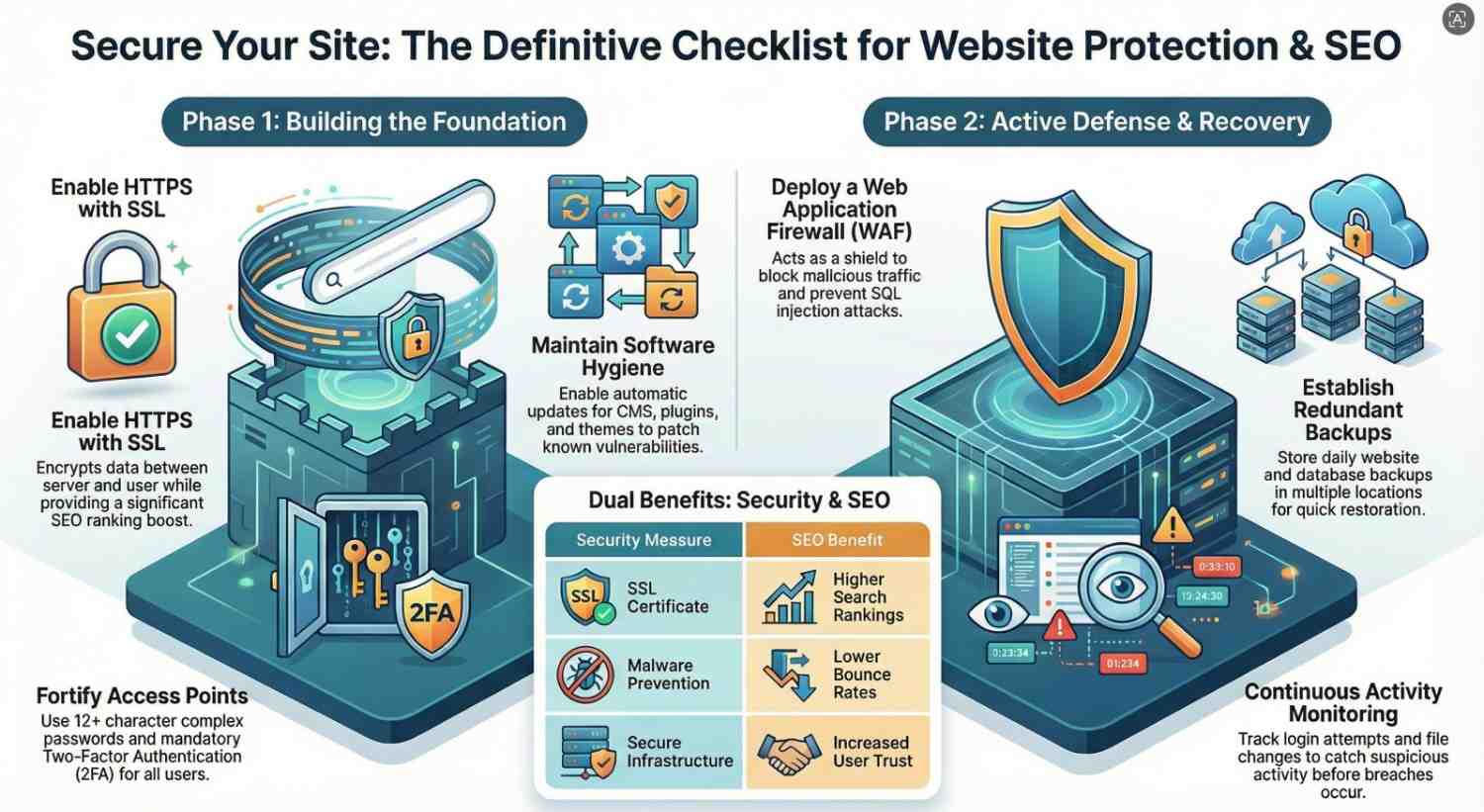
Why Website Security Matters for SEO
Before diving into the steps, it’s important to understand the connection between cybersecurity and SEO.
Search engines prioritize safe browsing experiences. If your site is compromised:
- It may be flagged as unsafe
- Rankings can drop significantly
- Visitors may see warning messages
- Traffic and conversions can decline
Using proper website security measures helps protect both your users and your search engine visibility.
Step 1: Use HTTPS and Install an SSL Certificate
One of the most basic yet critical steps in website protection is enabling HTTPS.
Why it matters:
- Encrypts data between the server and users
- Builds trust with visitors
- Improves SEO rankings
How to do it:
- Purchase or install a free SSL certificate
- Redirect all HTTP traffic to HTTPS
- Ensure all internal links use HTTPS
Step 2: Keep Your Software Updated
Outdated software is one of the most common entry points for hackers.
What to update:
- Content Management Systems (CMS)
- Plugins and themes
- Server software
Best practices:
- Enable automatic updates when possible
- Remove unused plugins or themes
- Regularly check for vulnerabilities
Hackers often exploit known issues in outdated systems, so staying updated is crucial.
Step 3: Use Strong Passwords and Authentication
Weak passwords are easy targets for brute force attacks.
Tips for strong security:
- Use complex passwords (12+ characters)
- Avoid using the same password across accounts
- Change passwords regularly
Enable Two-Factor Authentication (2FA)
2FA adds an extra layer of protection by requiring a second verification step.
Step 4: Install a Web Application Firewall (WAF)
A Web Application Firewall acts as a shield between your website and incoming traffic.
Benefits:
- Blocks malicious traffic
- Prevents SQL injections and cross-site scripting (XSS)
- Filters bots and spam
Popular options:
- Cloud-based WAF services
- Hosting provider security layers
This is one of the most effective ways to prevent hacking attempts before they reach your site.
Step 5: Regularly Back Up Your Website
Backups are your safety net in case something goes wrong.
What to include:
- Website files
- Databases
- Configurations
Backup strategy:
- Daily or weekly backups
- Store backups in multiple locations
- Use automated backup tools
If your website is hacked, backups allow you to restore it quickly with minimal damage.
Step 6: Secure Your Hosting Environment
Your hosting provider plays a major role in website security.
Look for hosting features:
- Malware scanning
- DDoS protection
- Secure server infrastructure
- Regular security updates
Additional tips:
- Use reputable hosting providers
- Avoid cheap, unsecured hosting services
- Isolate websites if hosting multiple domains
Step 7: Protect Against Malware
Malware can infect your website and harm both users and SEO rankings.
Signs of malware:
- Sudden drop in traffic
- Unauthorized redirects
- Suspicious files or scripts
Prevention methods:
- Install security plugins or tools
- Scan your website regularly
- Remove suspicious code immediately
Step 8: Limit User Access and Permissions
Not everyone needs full access to your website.
Best practices:
- Assign roles based on necessity
- Remove inactive users
- Restrict admin privileges
Limiting access reduces the chances of insider threats or accidental security breaches.
Step 9: Protect Against Brute Force Attacks
Brute force attacks attempt to guess login credentials repeatedly.
How to prevent them:
- Limit login attempts
- Use CAPTCHA on login pages
- Hide or change default login URLs
These simple steps can significantly reduce unauthorized access attempts.
Step 10: Monitor Your Website Activity
Constant monitoring helps detect suspicious activity early.
What to monitor:
- Login attempts
- File changes
- Traffic spikes
Tools to use:
- Security plugins
- Server logs
- Website monitoring services
Early detection can prevent a small issue from becoming a major breach.
Step 11: Secure File Uploads and Forms
Forms and file uploads can be exploited if not properly secured.
Tips:
- Validate file types
- Limit file sizes
- Scan uploaded files for malware
Ensure that user inputs are sanitized to prevent injection attacks.
Step 12: Implement Content Security Policies (CSP)
A Content Security Policy helps prevent certain types of attacks like XSS.
Benefits:
- Controls resources that can be loaded
- Blocks malicious scripts
- Enhances browser security
This is a more advanced step but highly effective for improving website security.
Step 13: Disable Directory Listing
Directory listing allows users to see files on your server.
Why disable it:
- Prevents hackers from discovering sensitive files
- Reduces attack surface
How:
- Modify server configuration settings
- Use security plugins
Step 14: Use Secure FTP (SFTP)
When transferring files, avoid using unsecured methods.
Why SFTP:
- Encrypts file transfers
- Protects login credentials
Always use secure protocols when accessing your website files.
Step 15: Educate Your Team
Human error is one of the biggest security risks.
Training topics:
- Phishing awareness
- Password management
- Safe browsing practices
A well-informed team is your first line of defense against cyber threats.
Bonus: SEO Benefits of Website Security
Improving your website security doesn’t just protect your data it also boosts your SEO.
Key benefits:
- Higher search rankings
- Increased user trust
- Lower bounce rates
- Better conversion rates
Search engines favor secure, trustworthy websites, making cybersecurity a key part of your SEO strategy.
Final Thoughts
Protecting your website from hackers requires a proactive approach. By following these step-by-step cybersecurity practices, you can significantly reduce risks and create a safer online experience for your users.
Start with the basics like HTTPS and strong passwords, then gradually implement advanced security measures like firewalls and monitoring tools.
Remember: website security is not a one-time task it’s an ongoing process.
Quick Website Security Checklist
- Install SSL certificate (HTTPS)
- Keep software updated
- Use strong passwords and 2FA
- Set up a Web Application Firewall
- Perform regular backups
- Scan for malware
- Limit user access
- Monitor activity
- Secure forms and uploads
By combining strong cybersecurity practices with SEO optimization, you not only protect your website but also improve your visibility and credibility online.