
Modern startups can’t afford slow, manual infrastructure setups. Clicking around a cloud dashboard might work once but it quickly becomes messy, error-prone, and impossible to scale.
That’s where Infrastructure as Code (IaC) with Terraform comes in.
In this in-depth tutorial, you’ll learn how to provision, manage, and scale infrastructure using Terraform, even if you’re starting from scratch.
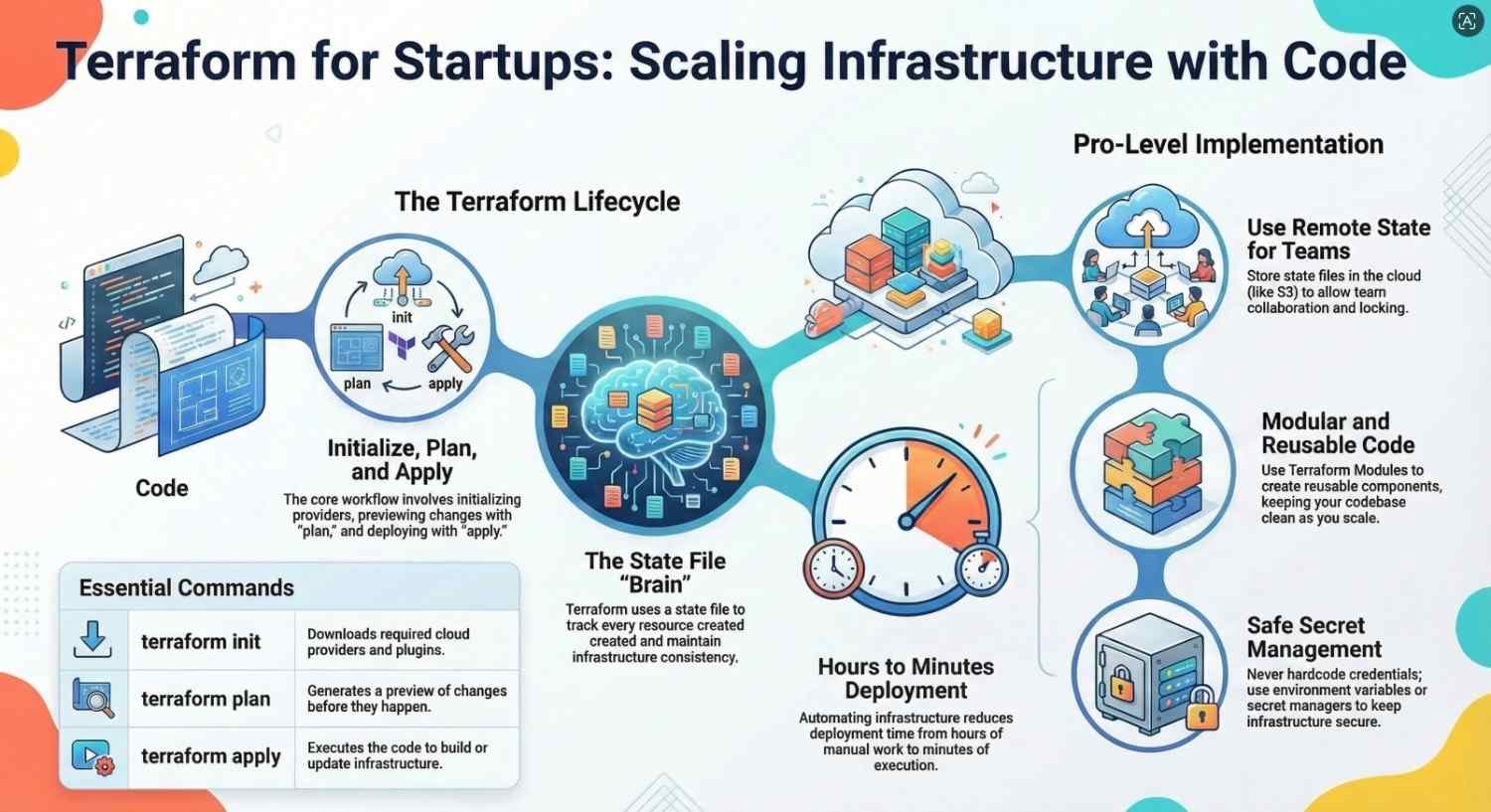
What is Infrastructure as Code (IaC)?
Infrastructure as Code (IaC) is the practice of managing infrastructure using code instead of manual processes.
Instead of:
- Clicking buttons in AWS
- Manually creating servers
You write code like:
resource “aws_instance” “app_server” { ami = “ami-123456” instance_type = “t2.micro” }Benefits:
- Repeatable infrastructure
- Version control
- Faster deployments
- Reduced human error
What is Terraform?
Terraform is an open-source IaC tool that lets you define and provision infrastructure across multiple cloud providers.
Why startups love Terraform:
- Cloud-agnostic (AWS, GCP, Azure)
- Easy to learn
- Huge community support
- Scales with your company
Terraform Core Concepts (Simple Explanation)
1. Providers
Plugins that connect Terraform to platforms.
Example:
provider “aws” { region = “us-east-1” }2. Resources
The actual infrastructure (servers, databases, networks).
Example:
resource “aws_instance” “web” { instance_type = “t2.micro” }3. Variables
Make your code reusable.
variable “instance_type” { default = “t2.micro” }4. Outputs
Display useful info after deployment.
output “ip” { value = aws_instance.web.public_ip }5. State File
Tracks what Terraform created.
Important:
- Stored in
terraform.tfstate - Never edit manually
- Use remote storage in production
Step-by-Step Terraform Tutorial
Step 1: Install Terraform
Download Terraform from the official website and verify:
terraform -vStep 2: Create Your First Terraform Project
mkdir terraform-demo cd terraform-demo touch main.tfStep 3: Configure AWS Provider
provider “aws” { region = “us-east-1” }Step 4: Create Your First Resource
resource “aws_instance” “example” { ami = “ami-0abcdef1234567890” instance_type = “t2.micro” tags = { Name = “Terraform-Server” } }Step 5: Initialize Terraform
terraform initThis downloads required providers.
Step 6: Plan Your Infrastructure
terraform planWhat it does:
- Shows what will be created
- Helps avoid mistakes
Step 7: Apply Changes
terraform applyType yes → Your infrastructure is created
Step 8: Destroy Resources (Important)
terraform destroyAlways clean up to avoid cloud costs.
Managing Secrets Safely
❌ Don’t do this:
access_key = “ABC123”✅ Do this:
- Use environment variables
- Use secret managers
- Use
.tfvarsfiles (excluded from Git)
Terraform Project Structure (Best Practices)
terraform-project/
main.tf
variables.tf
outputs.tf
terraform.tfvars
modules/
Using Terraform Modules
Modules are reusable components.
Example:
module “vpc” { source = “./modules/vpc” }Why use modules:
- Clean code
- Reusability
- Easier scaling
Remote State (Critical for Teams)
Keywords: Terraform remote state, S3 backend Terraform
Store state remotely (e.g., AWS S3):
terraform { backend “s3” { bucket = “my-terraform-state” key = “state.tfstate” region = “us-east-1” } }Benefits:
- Team collaboration
- State locking
- Better security
Terraform Workflow (Real-World)
Typical workflow:
- Write code
- Run
terraform fmt - Run
terraform validate - Run
terraform plan - Run
terraform apply
CI/CD with Terraform
Integrate Terraform into CI/CD:
- GitHub Actions
- GitLab CI
- Jenkins
Pipeline example:
- On PR → run
plan - On merge → run
apply
Cost Optimization Tips
- Use smaller instances
- Destroy unused resources
- Use auto-scaling
- Tag resources for tracking
Common Terraform Mistakes
1. Not Using Remote State
Leads to conflicts in teams.
2. Hardcoding Values
Breaks reusability.
3. Ignoring terraform plan
Can cause unexpected changes.
4. Storing Secrets in Code
Major security risk.
5. Overcomplicating Early
Keep it simple for startups.
When to Use Terraform in Startups
Use Terraform when:
- You deploy frequently
- You want reproducibility
- You plan to scale
Avoid overuse when:
- You’re experimenting quickly
- Infrastructure is temporary
Pro Tips for Beginners
- Start small (one resource)
- Learn by doing
- Use modules early
- Always review
plan - Version control everything
Real Startup Example
A startup uses Terraform to:
- Deploy EC2 instances
- Set up load balancers
- Create databases
- Manage networking
Result:
- Deployments reduced from hours → minutes
- Zero manual errors
- Easy scaling
What to Learn Next
After Terraform basics:
- Advanced modules
- Multi-environment setups
- Kubernetes with Terraform
- Policy as Code (OPA)
- Terraform Cloud
Final Thoughts
Terraform is one of the most powerful tools in modern DevOps.
With Infrastructure as Code:
- You move faster
- You reduce risk
- You scale confidently
For startups, this is not optional it’s a competitive advantage.
Start simple, stay consistent, and automate everything you can.
- If you want to explore DevOps, start your training here