Introduction:
This project sets up a local Kubernetes cluster using Vagrant and Ubuntu 22.04 for learning and testing.
It automatically provisions virtual machines and installs all Kubernetes and container runtime tools.
The setup provides a reproducible, isolated, and hands-on environment for practicing DevOps and Kubernetes concepts.

Prerequisites:
Before starting this setup, ensure you have the following installed on your system:
- VirtualBox (for running virtual machines)
- Vagrant (for managing VM provisioning)
- Git (to clone repositories)
Vagrantfile:
This Vagrantfile is used to create a two-node Kubernetes cluster using Vagrant and VirtualBox.
It automatically provisions one master node and one worker node, both running Ubuntu 22.04.
Nodes:
- Master Node (master.dev.com)
- Worker Node (worker1.dev.com)
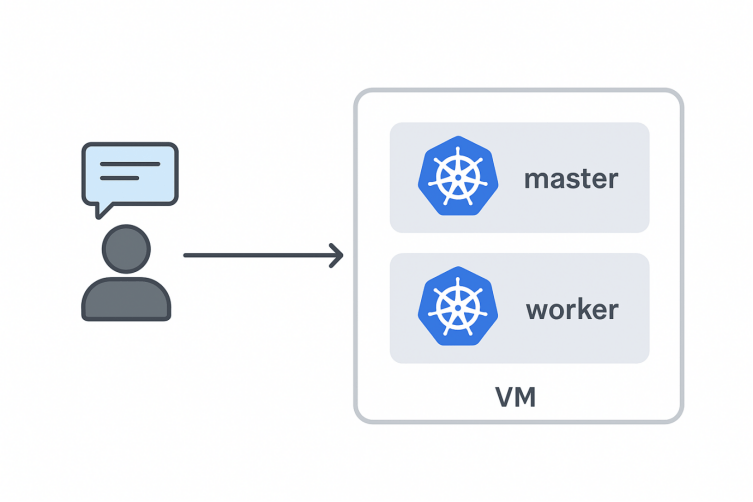
Kubernetes Cluster Setup :
Setup Project and Start Vagrant Nodes
Step 1: Create a Vagrantfile
- Open a terminal.
- Create a new folder for your lab
Command:
mkdir k8s-cluster
Expected output:
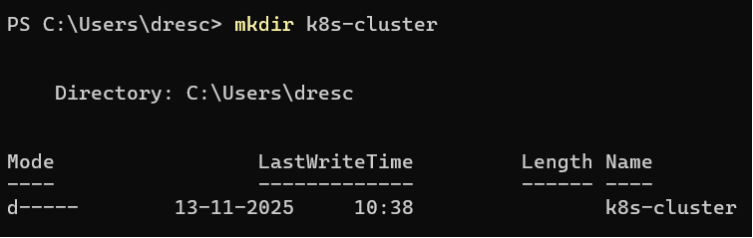
Command:
cd k8s-lab
Expected output:

Step-2: Create a Vagrantfile manually using a text editor
Steps for Windows (Notepad example):
- Open Notepad (or any text editor).
- Copy your lab-specific Vagrantfile content (the one with master + worker nodes and Kubernetes provisioning).
- Save the file in the folder k8s-cluster with the name:
Vagrantfile
4.Create a file called Vagrantfile in k8s-cluster folder. Paste this
Vagrant.configure(“2”) do |config|
config.vm.box = “generic/ubuntu2204”
# Master node
config.vm.define “master” do |master|
master.vm.hostname = “master”
master.vm.network “private_network”, ip: “192.168.56.10”
master.vm.provider “virtualbox” do |vb|
vb.memory = “2048”
vb.cpus = 2
end
end
# Worker node
config.vm.define “worker” do |worker|
worker.vm.hostname = “worker”
worker.vm.network “private_network”, ip: “192.168.56.11”
worker.vm.provider “virtualbox” do |vb|
vb.memory = “2048”
vb.cpus = 2
end
end
end
Step 3: Bring Up the Vagrant VMs
vagrant up will start and provision both your VMs (master and worker).
Vagrant reads the Vagrantfile and sets up Ubuntu 22.04 on both nodes with the resources you defined.
Command:
Vagrant up
Expected Output:

Step 4: SSH into the Master Node
- SSH into the master node to run Kubernetes commands.
- Once inside, you are operating on the master node’s terminal.
Command:
Vagrant ssh master
Expected Output:

Master Node – Kubernetes Prerequisite Setup
Step 1: Disable Swap on Master
- Temporarily disables all swap spaces on the system.
- swapoff is the command to turn off swap
- Why used: Kubernetes nodes must not have swap enabled, otherwise kubelet will refuse to start
- Command:
sudo swapoff -a
Explanation:
- swapoff is the command to turn off swap.
- -a means “all”, so it disables all swap partitions and swap files listed in /etc/fstab.
Expected output:

2.Command:
sudo sed -i ‘/swap/d’ /etc/fstab
Explanation:
- sed is a stream editor used to modify text files.
- -i means “edit the file in place”.
- ‘/swap/d’ tells sed to delete any line containing the word swap.
- /etc/fstab is the file that contains the list of filesystems to mount at boot, including swap.
Expected Output:

3.Command
sudo systemctl disable –now [email protected] || true
Explanation:
- systemctl is the command to manage systemd services.
- disable prevents the service from starting at boot.
- –now also stops the service immediately.
- [email protected] is the service managing a compressed swap device in RAM (zram).
- 2>/dev/null redirects any error messages to /dev/null, i.e., hides them.
- || true ensures the command never fails, even if the service doesn’t exist.
- Why used: Some Ubuntu systems use zram to provide swap in memory. This must also be disabled for Kubernetes
Expected Output:

Step 2: Install Base Packages
These are commonly used for preparing a Linux system (Ubuntu/Debian) for Kubernetes or general server setup
1.Command:
sudo apt-get update -y
Explanation:
- sudo → run the command with root privileges.
- apt-get update → fetches the latest list of available packages and versions from the repositories.
- -y → automatically answers “yes” to any prompts (though for update it usually doesn’t ask).
- Why used: Ensures that when you install software, you get the latest available versions.
Expected output:

2.Command:
sudo apt-get install -y apt-transport-https ca-certificates curl wget gnupg lsb-release net-tools iproute2 bash-completion conntrack
Explanation:
- apt-transport-https → Lets apt fetch packages securely over HTTPS.
- ca-certificates → Provides trusted certificates for secure connections.
- curl → Command-line tool to download or transfer data.
- wget → Another tool to download files from the internet.
Expected Output:

Step 3: Install Containerd and Kubernetes Components
we install containerd and configure it as a systemd service, preparing the system for Kubernetes components.”

I) Install Containerd:
1.command:
VERSION=”2.0.0″
Explanation:
- Sets a variable VERSION to 2.0.0 so it can be reused in the download URLs.
- Makes updating to a different version easier.
Expected output:

2.Command:
Expected Output:

3.Command:
sudo tar Cxzvf /usr/local containerd-${VERSION}-linux-amd64.tar.gz
Expected Output:

4.Command:
sudo wget -q -P /usr/local/lib/systemd/system https://raw.githubusercontent.com/containerd/containerd/main/containerd.service
Expected Output:

5.command:
Sudo systemctl daemon-reload && sudo systemctl enable –now containerd
Expected Output:

Conclusion.
Setting up a Kubernetes cluster using Vagrant and Ubuntu 22.04 provides a practical, flexible, and reproducible environment for learning, development, and testing. By automating virtual machine provisioning with Vagrant and leveraging Ubuntu’s stability and compatibility with Kubernetes tools, users can create a lightweight yet realistic multi-node cluster. This approach simplifies experimentation with cluster operations, networking, deployments, and scaling without the need for dedicated hardware or cloud resources. Overall, the combination of Vagrant and Ubuntu 22.04 offers an efficient and accessible pathway to understanding Kubernetes concepts and building hands-on skills that translate directly to production-grade environments.