
In modern software development, pipelines are the backbone of delivery. Whether you’re working with CI/CD systems, data workflows, or automated testing pipelines, performance directly impacts developer productivity, deployment frequency, and overall system reliability. Slow pipelines can frustrate teams, delay releases, and increase operational costs.
This guide explores practical, real-world strategies to optimize pipeline performance and achieve faster, more efficient builds. Whether you’re just starting or refining an existing setup, these tips will help you identify bottlenecks and implement meaningful improvements.
Why Pipeline Performance Matters
Before diving into optimization techniques, it’s important to understand why pipeline speed is critical:
- Developer productivity: Faster builds mean quicker feedback loops.
- Reduced context switching: Developers stay focused when pipelines complete quickly.
- Higher deployment frequency: Speed enables continuous delivery.
- Cost efficiency: Less compute time equals lower infrastructure costs.
- Improved reliability: Efficient pipelines often have fewer failure points.
A slow pipeline isn’t just a technical issue it’s a business bottleneck.
Step 1: Identify Bottlenecks
Optimization starts with visibility. You can’t fix what you can’t measure.
Key actions:
- Analyze build logs and execution times.
- Break down pipeline stages (build, test, deploy).
- Track metrics like:
- Total pipeline duration
- Time per stage
- Queue/wait time
- Failure rates
Tip:
Use built-in pipeline analytics or monitoring tools to visualize performance trends over time.
Step 2: Parallelize Wherever Possible
One of the easiest ways to speed up pipelines is to run tasks concurrently instead of sequentially.
Examples:
- Run unit tests in parallel across multiple environments.
- Split test suites into smaller chunks.
- Execute independent build steps simultaneously.
Best practices:
- Identify tasks with no dependencies.
- Use parallel job runners or containers.
- Balance load to avoid resource contention.
Parallelization can reduce pipeline time dramatically without changing the core logic.
Step 3: Optimize Build Times
Build stages are often the biggest time consumers.
Techniques:
- Incremental builds: Only rebuild what has changed.
- Dependency caching: Store and reuse dependencies instead of reinstalling them every time.
- Smaller builds: Break monolithic builds into modular components.
Example improvements:
- Cache package manager dependencies (e.g., npm, pip, Maven).
- Avoid unnecessary rebuilds of unchanged components.
Step 4: Use Caching Strategically
Caching is one of the most effective ways to reduce redundant work.
What to cache:
- Dependencies
- Build artifacts
- Docker layers
- Compiled binaries
Tips:
- Use cache keys intelligently (based on file hashes).
- Avoid stale caches by setting expiration rules.
- Ensure cache hits are consistent across environments.
A well-implemented cache can cut build times by more than half.
Step 5: Optimize Test Execution
Testing is critical, but it’s also a major contributor to slow pipelines.
Strategies:
- Test prioritization: Run critical tests first.
- Test splitting: Divide tests into parallel groups.
- Skip unnecessary tests:
- Run full test suites only on main branches.
- Use selective testing for pull requests.
Advanced approach:
- Implement test impact analysis to run only tests affected by code changes.
Step 6: Reduce Pipeline Complexity
Overly complex pipelines are harder to maintain and slower to execute.
Simplify by:
- Removing redundant steps.
- Consolidating similar tasks.
- Eliminating outdated scripts or tools.
Rule of thumb:
If a step doesn’t add clear value, reconsider its necessity.
Step 7: Optimize Resource Allocation
Sometimes pipelines are slow simply because they lack sufficient resources.
Consider:
- Increasing CPU or memory for build agents.
- Using dedicated runners instead of shared ones.
- Scaling infrastructure dynamically during peak loads.
Warning:
Throwing resources at the problem isn’t always efficient combine this with other optimizations.
Step 8: Use Efficient Containerization
Containers are widely used in pipelines, but poorly optimized images can slow things down.
Tips:
- Use lightweight base images (e.g., Alpine-based images).
- Minimize image layers.
- Cache Docker layers effectively.
- Avoid rebuilding images unnecessarily.
Bonus:
Pre-build and store commonly used images for faster reuse.
Step 9: Implement Pipeline Trigger Optimization
Not every code change needs to trigger a full pipeline.
Optimize triggers:
- Run pipelines only on relevant branches.
- Use path-based triggers (e.g., only run backend tests when backend code changes).
- Avoid duplicate builds from multiple triggers.
This reduces unnecessary pipeline executions and saves time and resources.
Step 10: Improve Artifact Management
Artifacts are essential, but mishandling them can slow down pipelines.
Best practices:
- Store only necessary artifacts.
- Compress large files.
- Clean up old or unused artifacts regularly.
- Use efficient storage solutions.
Step 11: Monitor and Continuously Improve
Pipeline optimization is not a one-time effort it’s ongoing.
Track metrics like:
- Build duration trends
- Success vs failure rates
- Resource usage
- Queue times
Feedback loop:
- Regularly review pipeline performance.
- Gather developer feedback.
- Iterate and refine continuously.
Common Pitfalls to Avoid
Even with the best intentions, teams often fall into these traps:
1. Over-optimization
Spending too much time optimizing minor gains instead of focusing on major bottlenecks.
2. Ignoring developer experience
A pipeline that is fast but difficult to use can still hurt productivity.
3. Lack of documentation
Unclear pipelines make troubleshooting harder and slower.
4. Not testing changes
Always validate pipeline optimizations to avoid breaking workflows.
Real-World Example
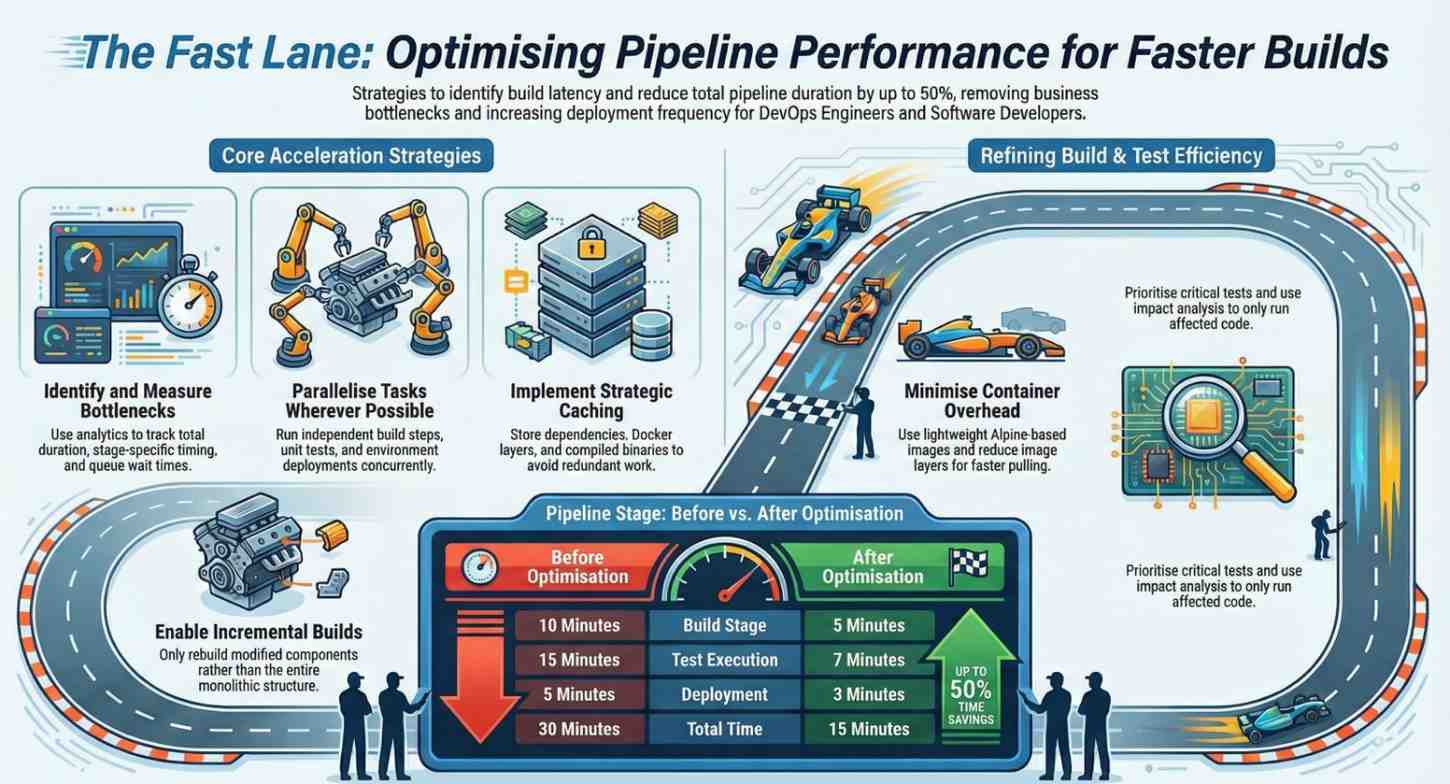
Imagine a pipeline that takes 30 minutes to complete:
- Build: 10 minutes
- Tests: 15 minutes
- Deployment: 5 minutes
After optimization:
- Parallelized tests → reduced to 7 minutes
- Dependency caching → build reduced to 5 minutes
- Optimized deployment → reduced to 3 minutes
Final pipeline time:
15 minutes (50% improvement)
This kind of improvement significantly enhances developer velocity and team morale.
Final Thoughts
Optimizing pipeline performance is about working smarter, not harder. By identifying bottlenecks, leveraging parallelization, implementing caching, and continuously monitoring performance, you can drastically reduce build times and improve overall efficiency.
Start small pick one or two areas to optimize, measure the impact, and iterate. Over time, these incremental improvements will compound into a high-performance pipeline that supports rapid, reliable software delivery.
- If you want to explore DevOps, start your training here.