
Networking.
Networking in Linux is one of the most powerful and flexible aspects of the operating system, providing users with complete control over how systems communicate with each other. Linux was designed from the ground up as a multi-user, networked system, and its networking capabilities are deeply integrated into the kernel and user-space utilities. The networking stack in Linux supports a wide variety of protocols, including TCP/IP, UDP, ICMP, and many others, enabling everything from simple local communication to large-scale internet connectivity. The foundation of networking in Linux begins with network interfaces, which can be physical, such as Ethernet and Wi-Fi cards, or virtual, like loopback and bridge interfaces. Each interface is represented by a name such as eth0, wlan0, or lo, and can be managed through command-line utilities like ip, ifconfig, and nmcli.
The ip command, part of the iproute2 package, is now the standard tool for managing network interfaces, routing tables, and tunnels, replacing the older ifconfig utility. Using commands like ip addr, ip link, and ip route, users can configure IP addresses, enable or disable interfaces, and manipulate routing information. Linux networking also relies on configuration files stored in directories such as /etc/network/ or /etc/sysconfig/network-scripts/, depending on the distribution. These files determine how network interfaces are initialized during boot. The NetworkManager service simplifies configuration for desktop environments, while servers often use manual configuration for greater control.
Routing in Linux is handled through a kernel routing table that determines how packets are forwarded between networks. Static routes can be added manually, or dynamic routing protocols can be implemented using software like quagga or bird. The ping and traceroute commands are commonly used to test connectivity and trace packet paths. Linux also includes the netstat and ss tools to monitor sockets and network connections in real time. Advanced users can manipulate packet filtering and network address translation (NAT) using iptables or the modern nftables framework, which provides robust firewall and packet-mangling capabilities.
For network troubleshooting, Linux provides many diagnostic tools. The tcpdump utility allows users to capture and analyze network traffic, while nmap can scan networks and detect open ports. The ethtool command provides detailed information about Ethernet interfaces, including speed and duplex settings. System administrators often use the /proc/net directory and the ip monitor command to observe live changes in the networking stack. Virtual networking is another powerful feature, enabling the creation of bridges, tunnels, and virtual interfaces used in virtualization platforms like KVM or Docker. Linux networking also supports VLANs (Virtual Local Area Networks) through the vconfig command or the ip link add link option, allowing network segmentation and better traffic management.
In server environments, Linux is often used to host web, mail, and file servers, where networking performance and reliability are critical. Services like Apache, Nginx, and Samba rely on the underlying network configuration to deliver content efficiently. The kernel provides advanced options for performance tuning, such as adjusting TCP window sizes, queue disciplines, and socket buffers. The /etc/hosts and /etc/resolv.conf files control local hostname resolution and DNS configuration, respectively. Security is a key part of networking, and Linux offers tools like firewalld, ufw, and SELinux to enforce network-level access control. Additionally, VPN solutions like OpenVPN and WireGuard allow secure remote connections over encrypted tunnels.
Overall, networking in Linux is a vast and powerful subsystem that provides users, administrators, and developers with complete control and flexibility. Whether it’s configuring a simple LAN connection, building a complex routing setup, hosting servers, or securing a network, Linux provides all the tools necessary to manage it effectively. Its open-source nature allows for constant evolution, integration with emerging technologies, and adaptation to modern networking challenges. The combination of kernel-level robustness, command-line versatility, and support for modern networking protocols makes Linux an indispensable platform for both networking professionals and everyday users alike.
ping: Pinggoogle.comto check your internet connectivity.ifconfigorip: Display your system’s IP address.netstat: List all listening ports on your system.ssh: Connect to a remote server (if available) or try connecting tolocalhost.




scp: Copy a file from your local machine to a remote server (or vice versa).wget: Download a file from the internet (e.g.,wget https://example.com/file.zip).curl: Fetch the HTML content of a website (e.g.,curl https://example.com).nslookup: Find the IP address ofgoogle.com.


dig: Query the DNS records ofgoogle.com.traceroute: Trace the route togoogle.com.



User and Group Management.
User and group management in Linux is a fundamental aspect of system administration, ensuring secure and organized access control for multiple users sharing the same system. Linux is a multi-user operating system, meaning multiple users can operate simultaneously without interfering with one another’s files or processes. Each user in Linux is assigned a unique user ID (UID) and a default group ID (GID) that determine their permissions and ownership across the file system. Users are categorized into three types: the root user, regular users, and system users. The root user, also known as the superuser, has unrestricted access to all commands and files, allowing complete control over the system. Regular users are created for individuals who need to perform day-to-day operations, while system users are created by the operating system or specific applications to run background services securely.
Linux stores user information in the /etc/passwd file, which contains details such as the username, UID, GID, home directory, and default shell. For enhanced security, encrypted passwords are stored separately in the /etc/shadow file, accessible only by the root user. Group information is maintained in the /etc/group file, which lists group names, group IDs, and their members. Commands like cat, less, or grep can be used to view and filter this information. To create a new user, administrators use the useradd command, followed by passwd to assign a password. The usermod command allows modification of user attributes, such as home directory or shell, while userdel removes users from the system. Similarly, groups can be managed using groupadd, groupmod, and groupdel. The id command displays a user’s UID, GID, and group memberships, helping administrators verify permissions easily.
Each user in Linux has a home directory, usually located under /home/username, which serves as their personal workspace. The default shell assigned to a user, such as /bin/bash or /bin/zsh, provides an interface for executing commands. When a user logs in, the system loads environment variables from configuration files like .bash_profile and .bashrc. Group management in Linux is equally important because groups simplify permission management for multiple users. By assigning users to specific groups, administrators can control access to shared files and directories without having to set individual permissions for each user. A single user can belong to multiple groups, and these memberships can be viewed or modified using the groups and gpasswd commands.
File and directory permissions in Linux are tightly integrated with the user and group system. Every file has three types of permissions read (r), write (w), and execute (x) assigned separately for the file owner, group, and others. The chmod command is used to modify these permissions, either symbolically (using letters) or numerically (using octal values). Ownership can be changed using the chown and chgrp commands. For example, chown alice:developers file.txt assigns “alice” as the owner and “developers” as the group. Proper management of these permissions ensures that users can only access files they are authorized to, maintaining system security and integrity. The root user can override any restrictions, but best practices recommend minimizing root usage to prevent accidental damage or security breaches.
Linux also supports special permission types like SUID (Set User ID), SGID (Set Group ID), and the sticky bit, which provide advanced control over how files and directories are accessed. The SUID permission allows users to execute a file with the privileges of the file owner, while SGID applies similar behavior for group ownership. The sticky bit, commonly used on directories like /tmp, ensures that only the file’s owner can delete it, even if others have write access to the directory. These special permissions are crucial in shared environments where multiple users interact with the same resources. In modern Linux systems, administrators can also integrate centralized authentication through services like LDAP or NIS, allowing consistent user and group management across networks.
User and group management in Linux provides the foundation for system security, resource organization, and efficient collaboration. By properly creating, assigning, and managing users and groups, administrators can control who can access what, preventing unauthorized access and data loss. The flexibility of Linux’s permission model, combined with tools for automation and scripting, enables fine-grained control over every aspect of user management. Whether on personal systems or enterprise servers, understanding user and group management is essential for maintaining a stable, secure, and well-organized Linux environment.
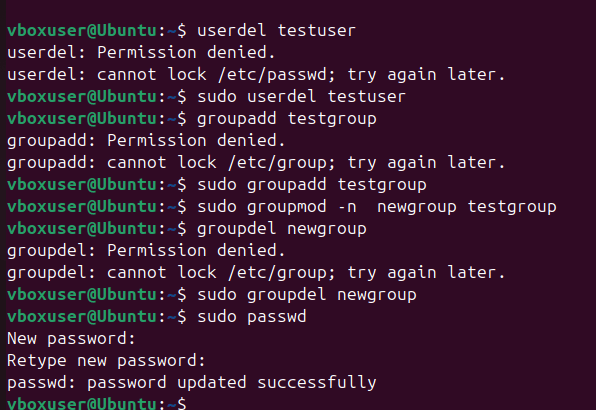
useradd: Create a new user namedtestuser.usermod: Addtestuserto thesudogroup.userdel: Delete thetestuseraccount.groupadd: Create a new group namedtestgroup.groupmod: Renametestgrouptonewgroup.groupdel: Delete thenewgroup.passwd: Change the password for your current user.

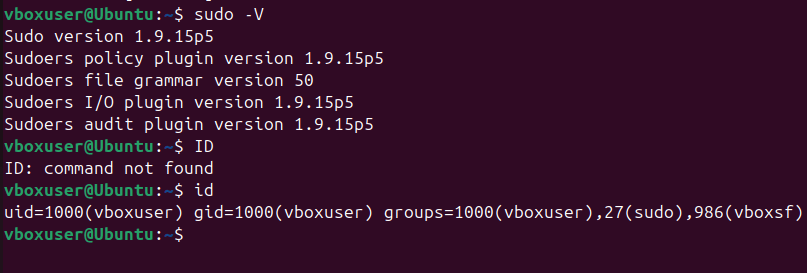
su: Switch to therootuser (if permitted).sudo: Run a command with superuser privileges (e.g.,sudo ls /root).id: Display your user and group information.

Advanced Tasks.
1. tar: Create a compressed archive of the practice directory.
tar -cvzf practice.tar.gz practice/

2. cron: Schedule a task to run a script every day at 8 AM.
crontab -e
# Add: 0 8 * * * /path/to/script.sh

3. systemctl: Check the status of the sshd service.
systemctl status sshd

Bonus Task.
Create a script that automates the following:
Creates a directory.
Creates a file inside the directory.
Adds some text to the file.
Displays the file content.
Deletes the directory and its contents.
Use awk and grep together to extract specific information from a log file (e.g., /var/log/syslog).

Conclusion.
In conclusion, mastering Linux commands is an essential skill for every developer who wants to improve productivity, efficiency, and control over their development environment. The Linux command line offers unmatched flexibility, allowing developers to automate repetitive tasks, manage files, monitor system performance, and interact directly with code and servers. Tools like grep, awk, sed, git, curl, and docker empower developers to handle complex workflows with simple yet powerful commands. By becoming comfortable with these utilities, developers can streamline debugging, version control, and deployment processes, making software development faster and more reliable. Ultimately, proficiency in Linux commands not only enhances technical capability but also builds a deeper understanding of how software interacts with the system a crucial advantage in today’s fast-paced, DevOps-driven world.
- For more information about Linux, you can refer to Jeevi’s page.