

User Interface (UI) and User Experience (UX) design play a critical role in the success of any website, mobile app, or digital product. A well-designed interface improves user satisfaction, increases engagement, and helps businesses achieve their goals.
However, many designers especially beginners make common UI/UX design mistakes that negatively impact usability and user experience. Even small design errors can frustrate users and cause them to leave your website or app.
In this guide, we’ll explore the most common UI/UX design mistakes to avoid and provide practical tips to improve your designs.
Why UI/UX Design Is Important
Before diving into the mistakes, it’s important to understand why UI/UX design matters.
Good UI/UX design helps to:
- Improve user satisfaction
- Increase website engagement
- Reduce bounce rates
- Improve conversions
- Make digital products easier to use
When designers focus on user-centered design, they create products that are intuitive and enjoyable.
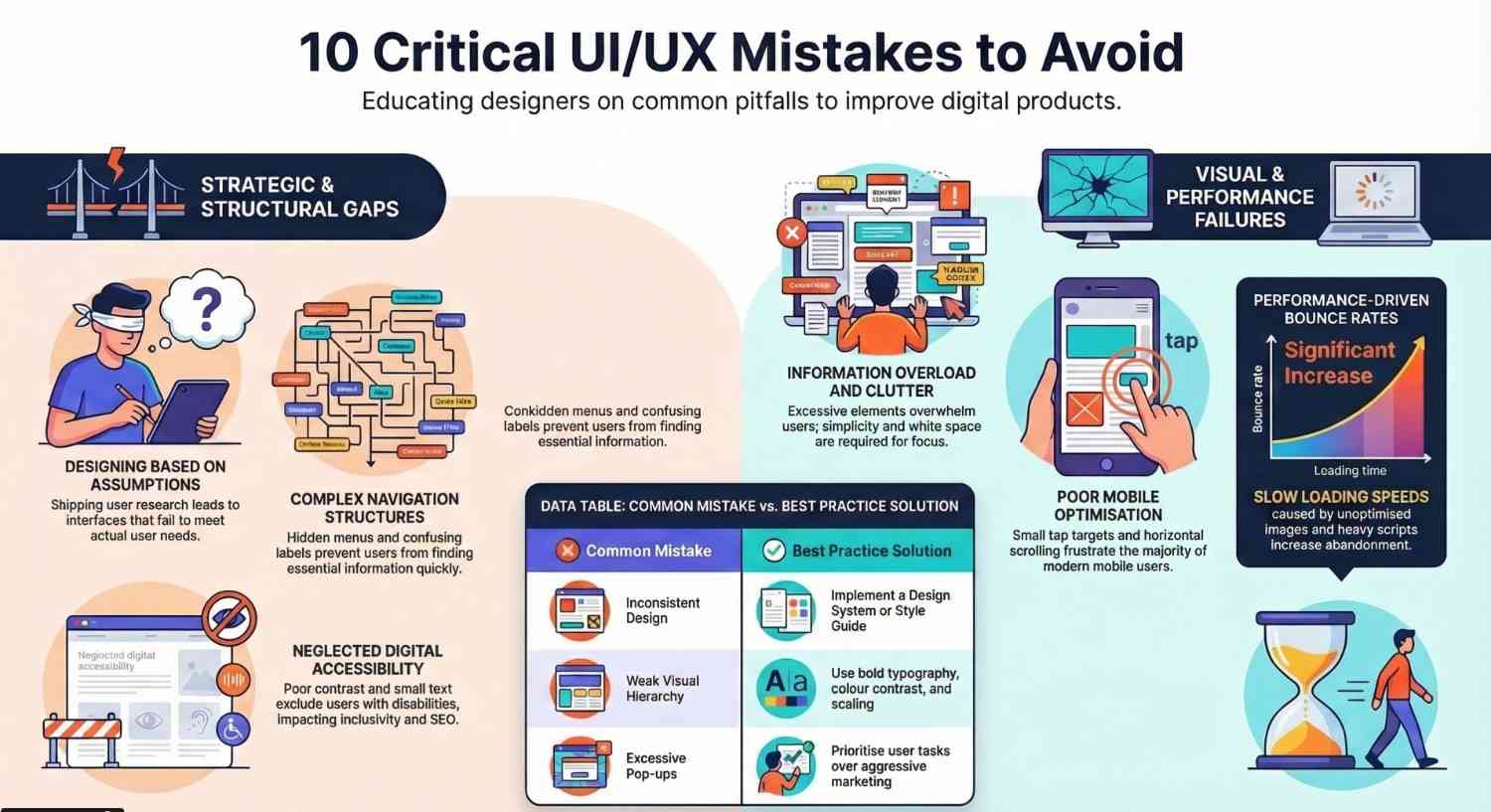
1. Ignoring User Research
One of the biggest UX design mistakes is designing without understanding the users.
Many designers create interfaces based on assumptions rather than actual user needs.
Why This Is a Problem
Without user research, your design may not match user expectations. This can lead to confusion and poor usability.
How to Avoid This Mistake
Conduct proper UX research, such as:
- User interviews
- Surveys
- Usability testing
- Competitor analysis
Understanding your users helps you design better experiences.
2. Poor Navigation Structure
Navigation plays a major role in user experience design. If users cannot find what they need quickly, they will leave the website.
Common Navigation Problems
- Too many menu items
- Confusing menu labels
- Hidden navigation elements
- Complex site structure
Best Practice
Keep navigation simple and intuitive. Use clear labels and organize content logically.
A good navigation system improves website usability and accessibility.
3. Cluttered User Interface
Another common UI design mistake is adding too many elements to the screen.
Cluttered interfaces overwhelm users and make it harder to focus on important content.
Signs of a Cluttered Design
- Too many buttons
- Too much text
- Excessive colors and graphics
- No clear visual hierarchy
Solution
Follow the principle of simplicity in UI design.
Use:
- White space
- Clear typography
- Minimal design elements
Simple interfaces improve user experience and readability.
4. Inconsistent Design Elements
Consistency is a key principle of UI design.
When different pages use different styles, colors, or button designs, users become confused.
Examples of Inconsistency
- Different button styles
- Changing typography
- Inconsistent icon styles
- Different spacing across pages
Best Practice
Use a design system or style guide to maintain consistency across your product.
Consistency makes interfaces easier to understand and improves usability.
5. Poor Mobile Responsiveness
Today, most users access websites using smartphones. If your design is not mobile-friendly, you risk losing a large number of users.
Common Mobile UX Mistakes
- Small buttons that are hard to tap
- Text that is difficult to read
- Horizontal scrolling
- Unresponsive layouts
Solution
Use responsive design techniques to ensure your interface works well on all devices.
Mobile-first design is now an essential part of modern UX design.
6. Slow Loading Speed
Performance is a critical part of user experience. Slow websites frustrate users and increase bounce rates.
Causes of Slow Loading
- Large images
- Too many animations
- Poor code optimization
- Heavy scripts
How to Improve Performance
- Optimize images
- Use lightweight design elements
- Minimize unnecessary scripts
Faster websites provide a better UX and higher user satisfaction.
7. Weak Visual Hierarchy
Visual hierarchy helps users understand where to focus their attention.
Without proper hierarchy, users struggle to find important information.
Signs of Poor Hierarchy
- All elements look the same
- No emphasis on key content
- Confusing layout structure
Solution
Use design principles like:
- Larger headings
- Bold typography
- Color contrast
- Spacing and alignment
Good visual hierarchy improves content readability and usability.
8. Too Many Pop-Ups
Pop-ups can be useful for marketing, but too many pop-ups damage the user experience.
Users often find excessive pop-ups annoying.
Common Pop-Up Issues
- Multiple pop-ups appearing immediately
- Hard-to-close pop-ups
- Interrupting user tasks
Best Practice
Use pop-ups carefully and ensure they provide value to the user.
Good UX design prioritizes user experience over aggressive marketing.
9. Lack of Accessibility
Accessibility is an essential part of inclusive UI/UX design.
Many websites fail to support users with disabilities.
Accessibility Problems
- Poor color contrast
- Missing alt text for images
- Small text sizes
- Difficult navigation for screen readers
Solution
Follow accessibility guidelines to make your design usable for everyone.
Accessible design improves both usability and SEO.
10. Ignoring User Feedback
User feedback is one of the most valuable sources for improving UX design.
Ignoring feedback prevents designers from identifying real usability problems.
How to Collect Feedback
- User reviews
- Usability testing
- Surveys
- Analytics tools
Listening to users helps you continuously improve the user experience design process.
Tips to Improve Your UI/UX Design
To avoid common UI/UX mistakes, designers should follow these best practices:
- Focus on user-centered design
- Keep interfaces simple and intuitive
- Maintain consistency across the product
- Test designs with real users
- Use responsive design principles
- Follow accessibility guidelines
Continuous improvement is essential for creating great user experiences.
Final Thoughts
UI/UX design is more than just making things look good it’s about creating meaningful and enjoyable experiences for users.
By avoiding these common UI/UX design mistakes, designers can build products that are intuitive, accessible, and effective.
Remember that great design comes from understanding users, testing ideas, and continuously improving your work.
Whether you are a beginner or an experienced designer, focusing on usability, simplicity, and user needs will help you create better digital experiences.
Investing time in improving your UI/UX skills will not only improve your designs but also make your products more successful.
Design with the user in mind, and your UI/UX will always stand out.
- If you want to explore UI/UX design, click here and start learning today.




