

UI/UX design has quickly become one of the most in-demand skills in the digital world. From mobile apps and websites to software dashboards and e-commerce platforms, every digital product today relies on thoughtful user interface (UI) and user experience (UX) design. For beginners, however, entering the field of UI/UX design can feel confusing, overwhelming, and even intimidating.
You might be wondering where to start, what skills to learn first, or which tools actually matter. With so many tutorials, courses, and design trends available online, it’s easy to feel lost. Many aspiring designers struggle not because they lack creativity, but because they don’t have a clear learning roadmap to guide their journey.
UI/UX design is not just about making things look beautiful. It’s about solving real user problems, improving usability, and creating experiences that feel simple, intuitive, and meaningful. A well-designed interface can turn a first-time visitor into a loyal user, while a poor user experience can drive people away in seconds.
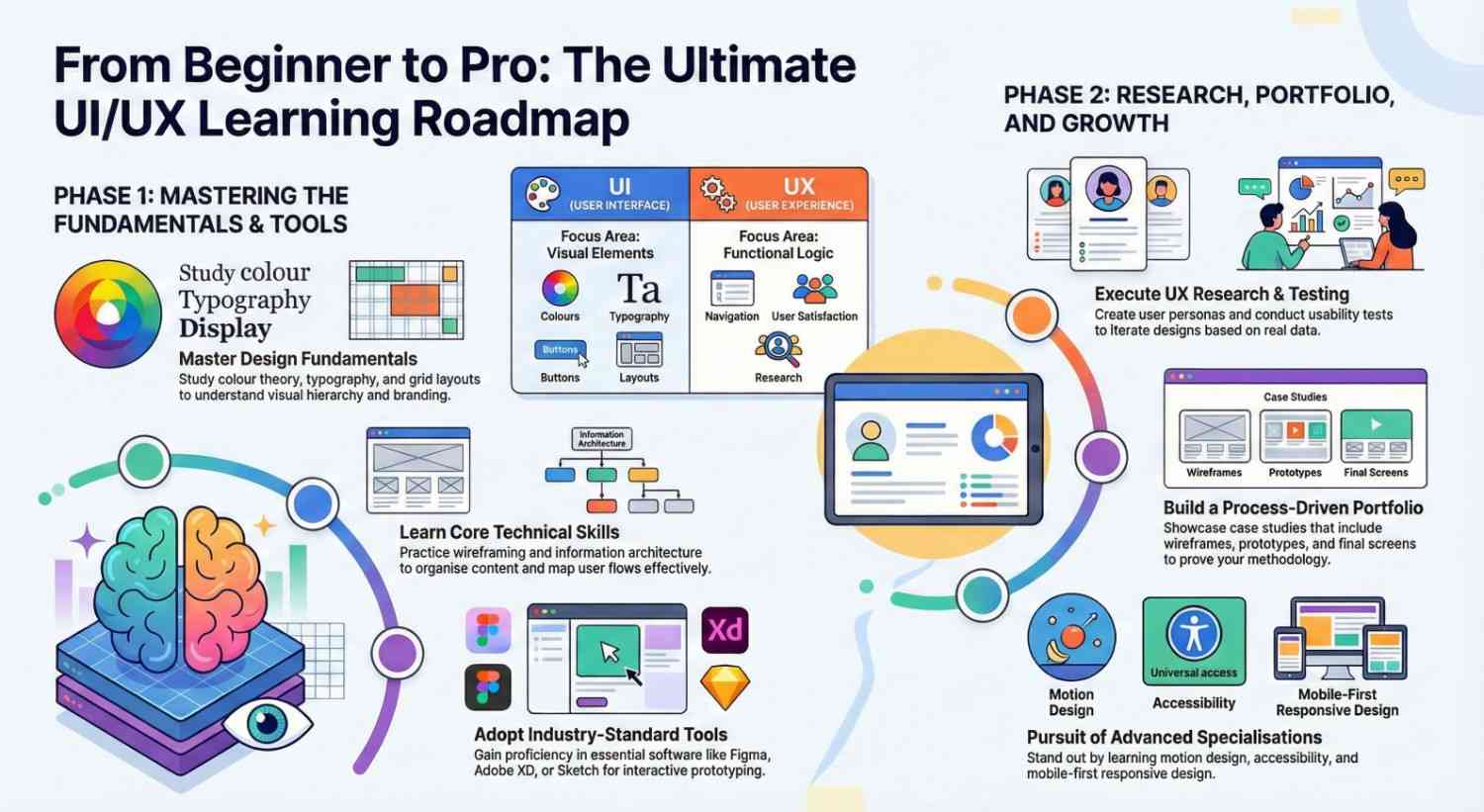
For beginners, understanding the balance between UI and UX is crucial. UI focuses on visual elements such as colors, typography, buttons, and layouts. UX, on the other hand, concentrates on how users interact with a product and how they feel while using it. Together, UI and UX form the foundation of successful digital design.
This step-by-step learning roadmap is created specifically for beginners who want to enter the world of UI/UX design with confidence. Whether you are a student, career switcher, freelancer, or self-taught designer, this guide will help you build the right skills in the right order.
Instead of jumping randomly between tools and trends, you will learn how to start with design fundamentals, move into user research, master essential UI/UX tools, and gradually build real-world projects. The goal is not speed, but clarity and consistency.
By following this roadmap, you’ll understand what to learn, why it matters, and how each skill connects to the bigger picture of user-centered design. You’ll also gain insight into industry expectations and how beginners can grow into professional UI/UX designers.
If you’ve ever looked at a beautifully designed app and wondered how it was created, this guide is for you. If you want a practical, structured approach to learning UI/UX design without feeling overwhelmed, you’re in the right place.
What is UI/UX Design?
Before we dive in, let’s clarify the terms:
- UI (User Interface) Design: Focuses on the visual elements of a product colors, typography, buttons, layouts.
- UX (User Experience) Design: Focuses on the overall experience of using the product ease of navigation, user satisfaction, and functionality.
Keyword focus: UI/UX design for beginners, UX principles, UI design basics
Step 1: Understand the Basics of Design
Before creating anything, you need to learn design fundamentals:
- Color Theory: Understand how colors affect emotions and usability.
- Typography: Learn how font choice impacts readability and branding.
- Layout & Grids: Master spacing, alignment, and hierarchy.
- Design Principles: Balance, contrast, and consistency are key.
Recommended resources:
- “The Design of Everyday Things” by Don Norman
- Free courses on UI/UX design for beginners on platforms like Coursera, Udemy, or Interaction Design Foundation.
Step 2: Learn the Core UI/UX Skills
Every beginner designer should focus on these core skills:
- Wireframing: Sketch low-fidelity layouts to map user flows.
- Prototyping: Build interactive prototypes to test ideas quickly.
- User Research: Conduct surveys, interviews, and usability tests.
- Information Architecture (IA): Organize content so users find information easily.
Keyword focus: wireframing, prototyping tools, UX research for beginners
Step 3: Master the Right Tools
In the world of UI/UX, tools are your best friends. Start with beginner-friendly software:
- Figma: Cloud-based design tool for UI design and prototyping.
- Adobe XD: Great for designing and testing interactive prototypes.
- Sketch: Popular among Mac users for UI design.
- Miro: Perfect for brainstorming and collaborative wireframing.
Keyword focus: best UI UX tools, Figma for beginners, Adobe XD tutorial
Step 4: Learn UX Research & Testing
A good UX designer understands the user. Focus on:
- User Personas: Create profiles representing your target audience.
- User Flows: Map the steps a user takes to complete a task.
- Usability Testing: Observe users interacting with your design to find pain points.
- Feedback Loops: Iterate your design based on real user data.
Keyword focus: UX research methods, usability testing for beginners, user personas in UX
Step 5: Build a Portfolio
Your portfolio is your ticket to landing UI/UX jobs. Focus on quality over quantity:
- Showcase case studies explaining your design process.
- Include before-and-after designs to highlight improvements.
- Show wireframes, prototypes, and final screens.
Keyword focus: UI UX portfolio tips, beginner UX projects, design case studies
Step 6: Keep Learning & Stay Updated
UI/UX design is constantly evolving. Keep your skills sharp:
- Follow blogs like Smashing Magazine, UX Collective, and Nielsen Norman Group.
- Join UI/UX communities on Reddit, LinkedIn, or Discord.
- Learn about emerging trends: dark mode design, microinteractions, AI in design.
Keyword focus: UI UX trends 2026, design community for beginners, continuous learning in UX
Step 7: Optional Advanced Skills
Once you’ve mastered the basics, explore advanced areas:
- Motion Design & Microinteractions
- Accessibility & Inclusive Design
- Mobile-First & Responsive Design
- Design Systems & Component Libraries
These skills help you stand out and tackle complex design challenges.
Keyword focus: advanced UX design, mobile UX design, accessibility in UI UX
Step 8: Take Action
Learning UI/UX is one thing; applying it is another. Try this roadmap:
- Start with one project per week, even a small redesign.
- Share your work on Dribbble, Behance, or LinkedIn.
- Ask for feedback from mentors or peers.
- Iterate, learn, and improve constantly.
Keyword focus: UI UX projects for beginners, practice UX design, learning roadmap for UI UX
Final Thoughts
Starting your UI/UX design journey may feel overwhelming at first, but following a structured step-by-step roadmap makes it manageable and fun. Focus on learning fundamentals, mastering tools, practicing design, and staying updated. Over time, you’ll develop the skills to create designs that are not only beautiful but also highly functional.
Remember: Design is a journey, not a destination so stay curious, keep experimenting, and enjoy the process!
- Explore Jeevi’s Page for detailed resources.
- This tutorial is only the first step learn UIUX hands-on with our complete course and take your skills to the next level.




