
Introduction.
AWS Lambda has revolutionized the way developers think about cloud computing. It allows you to run code without provisioning or managing servers. This serverless approach means you can focus entirely on writing functions instead of worrying about infrastructure. For beginners, hobbyists, and even experienced developers, Lambda opens a world of possibilities.
One of the most attractive aspects of AWS Lambda is its free tier. The free tier lets you explore and experiment without incurring costs. Imagine running thousands of function invocations every month for free. You can deploy microservices, automate workflows, or process data streams without touching a single server. This is especially helpful for startups and small projects with limited budgets. Even for personal projects, the free tier can cover a surprising amount of usage.
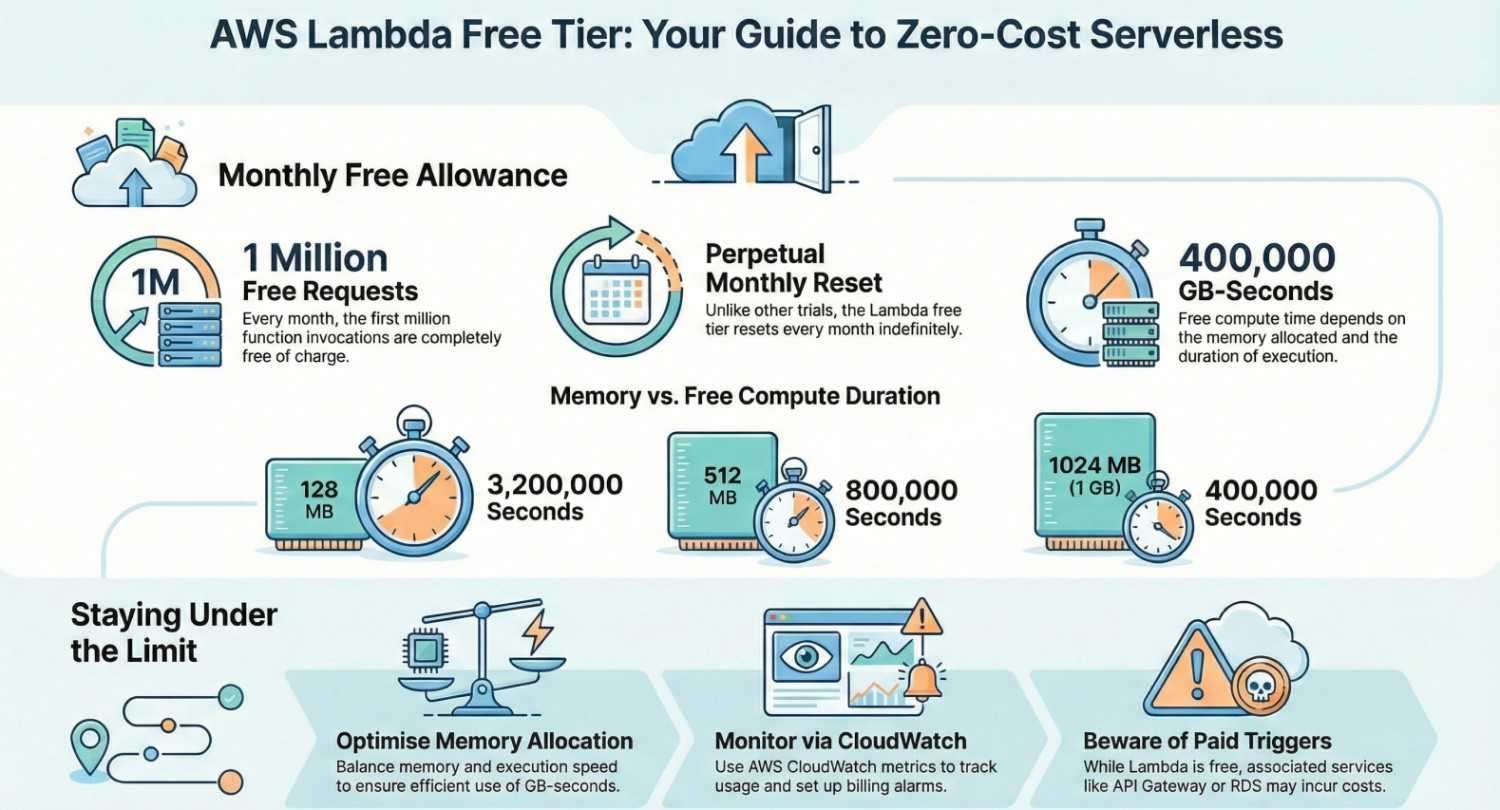
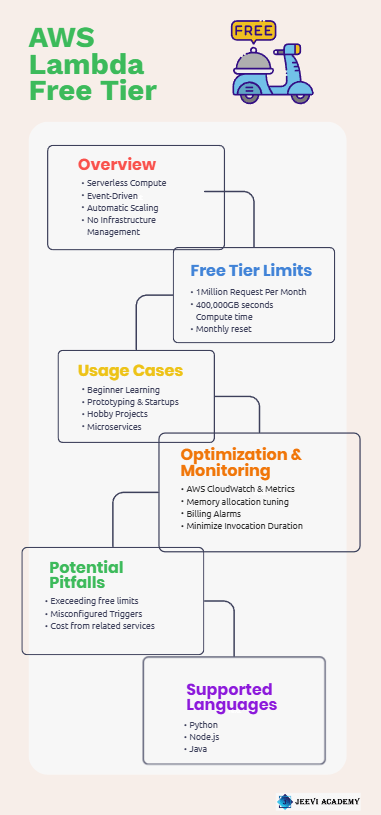
AWS offers 1 million free requests per month. On top of that, you get 400,000 GB-seconds of compute time each month. That means you can execute your functions with moderate memory and duration requirements entirely free. The free tier resets every month, allowing continuous experimentation. Many developers underestimate the power of Lambda’s free tier. Even complex workflows can often run within the free limits if optimized properly.
The event-driven nature of Lambda allows it to scale automatically. Whether it’s processing images uploaded to S3 or handling API requests, Lambda adjusts to demand. You only pay for what you use beyond the free tier.
This “pay-as-you-go” model makes it cost-efficient for low-traffic applications. Beginners can learn serverless architecture without the fear of unexpected bills. Hobby projects can run continuously without cost interruptions.
Startups can prototype faster, testing new ideas in real-world environments. Education and experimentation become much more accessible. AWS Lambda supports multiple programming languages, including Python, Node.js, and Java. This makes it flexible for developers with different skill sets. The free tier is not just a trial; it’s a long-term opportunity for learning. With proper monitoring, usage rarely exceeds the free limits unintentionally.
AWS CloudWatch provides metrics to track function invocations and execution time. Optimizing memory allocation ensures efficient use of GB-seconds. Developers can combine Lambda with other free-tier AWS services. For instance, API Gateway, DynamoDB, and S3 can create a fully serverless application at little to no cost.
The combination of automation, scalability, and affordability is compelling. Even large-scale learning projects can often remain within free tier constraints. Experimenting with real-world scenarios becomes practical and risk-free.
Developers gain hands-on experience with serverless architecture. The Lambda free tier encourages creativity and innovation. It removes the barrier of infrastructure management. You can focus entirely on code and application logic.
This blog will explore all aspects of the Lambda free tier. We’ll explain limits, usage tips, and potential pitfalls.
Practical examples will show how far the free tier can go. You’ll learn how to monitor, optimize, and scale functions efficiently. By the end, you’ll understand how to make the most of AWS Lambda’s free offering. Whether for learning, prototyping, or hobby projects, the free tier is a valuable resource. It’s the perfect gateway into serverless computing. So, let’s dive deep into AWS Lambda free tier and discover everything you need to know.
Section 1: What is AWS Lambda?
- Define AWS Lambda in simple terms: “Lambda lets you run code without managing servers.”
- Key points:
- Event-driven compute service
- Supports multiple languages (Python, Node.js, Java, etc.)
- Automatically scales based on requests
Section 2: AWS Lambda Free Tier Explained
- Breakdown of free tier limits:
- 1 million requests per month
- 400,000 GB-seconds of compute time per month
- Explain requests: Each time a function is invoked counts as one request.
- Explain GB-seconds:
- Example: 512 MB function running for 2 seconds → 1 GB-second = 0.5 × 2 = 1 GB-second
- Emphasize: Free tier resets every month, forever.
Tip: Include a small table for clarity:
| Metric | Free Tier Limit |
|---|---|
| Requests | 1 million/month |
| Compute Time | 400,000 GB-seconds/month |
| Duration & Memory | Depends on your configuration |
Section 3: Who Should Use the Free Tier
- Beginners learning serverless architecture
- Developers testing microservices
- Hobby projects, side projects, or prototypes
- Small-scale applications with low traffic
Section 4: How to Stay Within Free Tier
- Keep functions short and lightweight
- Monitor usage with AWS CloudWatch
- Avoid unnecessary invocations (e.g., scheduled functions that run too often)
- Optimize memory allocation to reduce GB-seconds
Section 5: Common Pitfalls
- Exceeding 1 million requests or 400,000 GB-seconds → billing starts
- Misconfigured triggers causing unintended function invocations
- Using Lambda with paid services like RDS or API Gateway may generate costs
Section 6: Practical Examples
- Simple hello-world function in Python or Node.js
- Event-driven examples:
- Responding to S3 uploads
- Processing DynamoDB streams
- Cost estimation: Show how far free tier can go for a small app
Section 7: Monitoring & Optimization Tips
- Use AWS Lambda metrics in CloudWatch
- Set up billing alarms for early warnings
- Memory vs execution time trade-offs
Conclusion.
- Recap the value: Free tier = great for learning and small projects
- Encourage experimentation
- Mention AWS’s other free tier offerings (API Gateway, S3, DynamoDB) for a fully serverless stack
For more information about AWS Lambda, you can refer to Jeevi’s page.
This tutorial is just the beginning learn AWS hands-on in our complete course. Upgrade your skills with AWS.




