

Serverless architectures have transformed how modern applications are built and scaled. With services like AWS Lambda, developers can focus on writing code without worrying about infrastructure. But this shift introduces a new challenge: how do you effectively monitor and debug a distributed, event-driven system with no traditional servers?
That’s where centralized logging comes in. By consolidating logs from all your serverless components into a single place such as Amazon CloudWatch Logs you gain visibility, improve debugging, and enhance operational efficiency.
In this guide, we’ll explore how to implement centralized logging for serverless applications using CloudWatch Logs, along with best practices and real-world patterns.
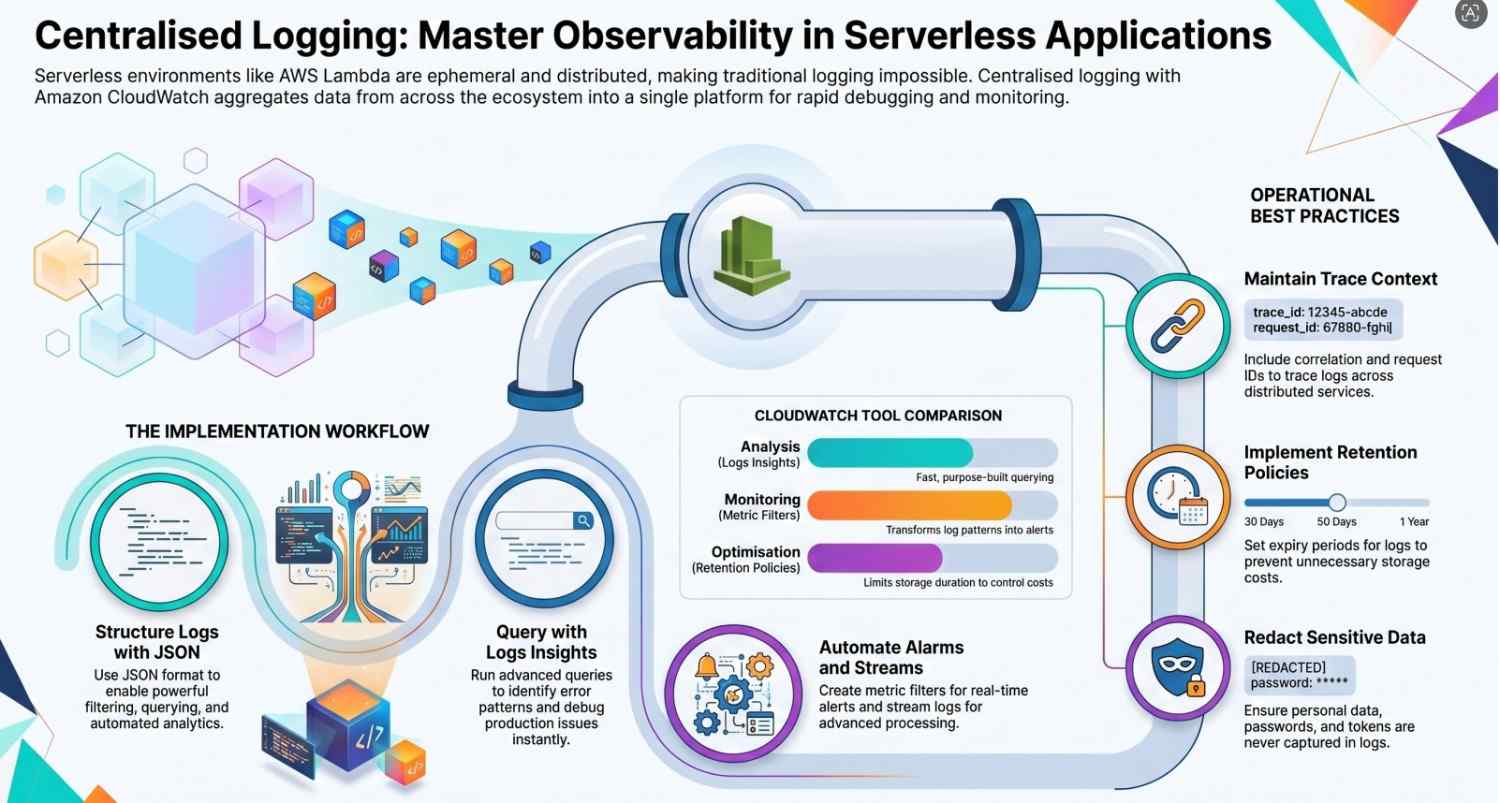
Why Centralized Logging Matters in Serverless
In traditional applications, logs are often stored on a single machine or a predictable cluster. In serverless, things are different:
- Functions are ephemeral (short-lived)
- Execution environments scale dynamically
- Logs are scattered across multiple services
For example, a simple workflow might include:
- API calls via Amazon API Gateway
- Processing through Lambda
- Queue handling with Amazon SQS
- Event routing via Amazon EventBridge
Without centralized logging, tracking a single request across these services becomes difficult.
Centralized logging solves this by:
- Aggregating logs in one place
- Enabling search and filtering
- Supporting alerting and automation
- Improving debugging speed
What is Amazon CloudWatch Logs?
Amazon CloudWatch Logs is a fully managed logging service that allows you to collect, monitor, and analyze logs from AWS resources and applications.
Key capabilities include:
- Real-time log ingestion
- Log grouping and organization
- Powerful querying with Logs Insights
- Metric extraction and alarms
- Integration with other AWS services
Every Lambda function automatically sends logs to CloudWatch Logs, making it the default choice for serverless logging.
Architecture Overview
A typical centralized logging architecture for serverless applications looks like this:
- Log Sources
- Lambda functions
- API Gateway access logs
- SQS message processing logs
- Custom application logs
- Log Aggregation
- Logs are sent to CloudWatch Log Groups
- Processing & Analysis
- CloudWatch Logs Insights for querying
- Metric filters for alerting
- Monitoring & Alerts
- CloudWatch Alarms
- Notifications via SNS
Step 1: Enable Logging in Lambda Functions
By default, AWS Lambda sends logs to CloudWatch Logs. You just need to use proper logging in your code.
Example (Node.js):
exports.handler = async (event) => { console.log(“Incoming event:”, JSON.stringify(event)); try { // Business logic here return { statusCode: 200, body: “Success” }; } catch (error) { console.error(“Error occurred:”, error); throw error; } };Each function creates a log group like:
/aws/lambda/function-nameStep 2: Structure Your Logs
Unstructured logs are hard to query. Instead, use JSON structured logging.
Example:
{ “level”: “error”, “message”: “Payment failed”, “userId”: “12345”, “timestamp”: “2026-04-26T10:00:00Z” }Benefits:
- Easier querying
- Better filtering
- Supports analytics
Step 3: Use Log Groups and Naming Conventions
Organize logs using clear naming conventions:
/aws/lambda/auth-service/aws/lambda/payment-service/aws/api-gateway/access-logs
This helps:
- Identify services quickly
- Apply retention policies
- Manage permissions
Step 4: Query Logs with CloudWatch Logs Insights
CloudWatch Logs Insights allows you to run powerful queries.
Example Query:
fields @timestamp, message | filter level = “error” | sort @timestamp desc | limit 20Use cases:
- Debugging production issues
- Identifying error patterns
- Performance analysis
Step 5: Create Metrics and Alerts
You can convert logs into metrics using metric filters.
Example:
- Count occurrences of “ERROR”
- Trigger alert when threshold exceeds
This integrates with CloudWatch Alarms to notify teams via email or Slack.
Step 6: Centralize Logs Across Services
Beyond Lambda, you can centralize logs from:
- Amazon API Gateway (access logs)
- Amazon SQS (processing logs)
- Amazon EventBridge (event logs)
This creates a unified observability layer.
Step 7: Implement Log Retention Policies
By default, logs are stored indefinitely, which can increase costs.
Best practice:
- Set retention periods (e.g., 7, 30, 90 days)
- Archive older logs if needed
Step 8: Use Subscription Filters for Advanced Processing
CloudWatch Logs supports subscription filters to stream logs to:
- Amazon Kinesis
- AWS Lambda
Use cases:
- Real-time analytics
- Sending logs to external systems (e.g., ELK stack)
Best Practices for Centralized Logging
1. Use Structured Logging
Always log in JSON format for better querying.
2. Include Context
Add:
- Request ID
- User ID
- Correlation ID
3. Avoid Logging Sensitive Data
Never log:
- Passwords
- Tokens
- Personal data
4. Use Log Levels
- INFO
- WARN
- ERROR
- DEBUG
5. Monitor Costs
Logging can grow quickly optimize retention and verbosity.
Common Challenges and Solutions
Challenge: High Log Volume
Solution: Reduce verbosity and filter logs.
Challenge: Hard-to-Trace Requests
Solution: Use correlation IDs across services.
Challenge: Debugging Distributed Systems
Solution: Combine logs with tracing tools like AWS X-Ray.
Real-World Use Case
Imagine an e-commerce system:
- User places order via API Gateway
- Lambda processes request
- Order is queued in SQS
- Another Lambda processes payment
If something fails:
- Logs from all components are in CloudWatch
- You can trace the issue using request IDs
- Alerts notify the team instantly
Benefits of Centralized Logging
- Faster debugging
- Improved system reliability
- Better observability
- Scalable monitoring
- Cost control
Conclusion
Centralized logging is essential for managing modern serverless applications. By using Amazon CloudWatch Logs, you can bring together logs from across your AWS ecosystem into a single, powerful platform.
When combined with services like AWS Lambda, Amazon API Gateway, and Amazon SQS, CloudWatch Logs enables full visibility into your system.
The key is not just collecting logs but structuring, analyzing, and acting on them effectively.
- If you want to explore AWS services click here




