
Choosing the right DevOps tools can make or break your engineering productivity. With hundreds of options across CI/CD, containerization, infrastructure as code, monitoring, and security, teams often struggle with tool overload.
In this guide, you’ll learn a practical framework to evaluate and select the best DevOps toolchain for your team whether you’re a startup, scaling SaaS company, or enterprise organization.
Why Choosing the Right DevOps Tools Matters
The right DevOps stack helps you:
- Accelerate CI/CD pipelines
- Improve deployment frequency
- Reduce change failure rate
- Enhance automation and collaboration
- Strengthen DevSecOps practices
The wrong tools?
They create silos, slow delivery, increase costs, and frustrate engineers.
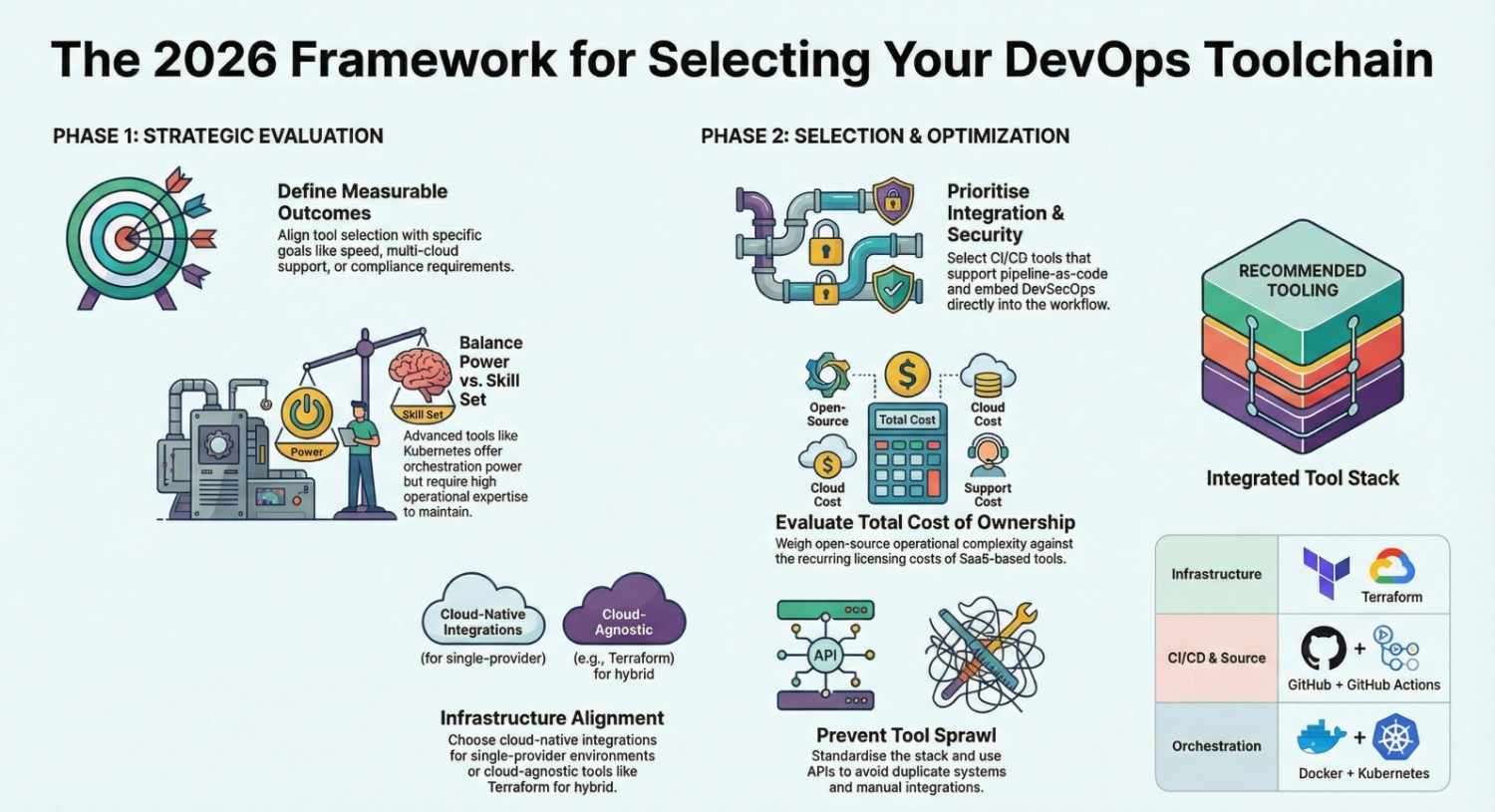
Step 1: Define Your DevOps Goals
Before comparing tools like Jenkins or GitHub Actions, clarify:
- Are you optimizing for speed, security, or scalability?
- Do you need multi-cloud support?
- Is compliance (SOC2, HIPAA, ISO) required?
- What is your current deployment frequency?
Your tool selection should support measurable outcomes like:
- Faster build times
- Automated infrastructure provisioning
- Better monitoring & observability
- Reduced manual operations
Step 2: Evaluate Your Team’s Skill Set
A powerful DevOps tool is useless if your team cannot maintain it.
For example:
- Kubernetes offers advanced orchestration but requires operational expertise.
- Docker is easier for teams starting with containerization.
- Terraform is ideal if your engineers are comfortable with infrastructure as code.
Ask:
- Do we have in-house DevOps engineers?
- Will we need dedicated platform engineers?
- How steep is the learning curve?
Tip: Simpler tools often deliver faster ROI for smaller teams.
Step 3: Consider Your Infrastructure Environment
Your environment heavily influences tool choice.
Cloud-Native Teams
If you run workloads on Amazon Web Services, look for native integrations.
For example:
- AWS CloudFormation for infrastructure provisioning
- Cloud-native CI/CD services
- Managed Kubernetes services
Multi-Cloud or Hybrid Teams
Choose tools that are:
- Cloud-agnostic
- API-driven
- Infrastructure-as-code friendly
This is where tools like Terraform shine.
Step 4: Evaluate CI/CD Capabilities
Your CI/CD pipeline is the backbone of DevOps automation.
Popular options include:
When comparing CI/CD tools, look for:
- Pipeline-as-code support
- Parallel builds
- Auto-scaling runners
- Security scanning integration
- Container-native workflows
SEO keyword focus: best CI/CD tools, CI/CD pipeline tools, DevOps automation tools.
Step 5: Prioritize Monitoring & Observability
DevOps doesn’t stop at deployment.
To maintain high availability, you need strong monitoring tools and observability platforms.
Common choices:
- Prometheus for metrics collection
- Grafana for dashboards
- Datadog for full-stack monitoring
Evaluate:
- Real-time alerting
- Log aggregation
- APM (Application Performance Monitoring)
- Incident management integration
SEO keyword focus: DevOps monitoring tools, observability tools, cloud monitoring solutions.
Step 6: Security & DevSecOps Integration
Security must be embedded into your DevOps toolchain.
Look for:
- Static code analysis (e.g., SonarQube)
- Container vulnerability scanning
- Secrets management
- Policy-as-code
Modern DevOps is incomplete without DevSecOps tools integrated into CI/CD pipelines.
Step 7: Consider Cost & Scalability
Evaluate:
- Open-source vs commercial tools
- Licensing models
- Cost per user or per build minute
- Infrastructure overhead
- Long-term scaling costs
Open-source tools like Kubernetes reduce licensing fees but may increase operational complexity.
SaaS tools reduce maintenance but increase recurring costs.
Balance total cost of ownership (TCO) with operational simplicity.
Step 8: Avoid DevOps Tool Sprawl
One of the biggest mistakes teams make is adopting too many tools.
Symptoms of tool sprawl:
- Multiple CI/CD platforms
- Duplicate monitoring systems
- Manual integrations
- Poor documentation
Instead:
- Standardize your DevOps stack
- Choose tools that integrate well
- Automate everything through APIs
- Document your architecture
A smaller, well-integrated DevOps toolchain often outperforms a large fragmented one.
Example DevOps Toolchain (Reference Architecture)
Here’s a common modern stack:
- Source Control: GitHub
- CI/CD: GitHub Actions
- Containers: Docker
- Orchestration: Kubernetes
- Infrastructure as Code: Terraform
- Monitoring: Prometheus + Grafana
- Security: SonarQube
This is just one example your needs may differ.
Key Questions to Ask Before Finalizing Tools
- Does this tool integrate with our existing stack?
- Can it scale with our projected growth?
- Is it developer-friendly?
- What’s the operational overhead?
- Does it support automation and infrastructure as code?
- How strong is the community or vendor support?
Final Thoughts: Choose Strategy Over Trends
Don’t choose DevOps tools because they’re popular.
Choose them because they:
- Align with your architecture
- Support your DevOps culture
- Improve deployment automation
- Reduce operational risk
- Enable long-term scalability
The best DevOps toolchain is not the most complex one it’s the one your team can confidently operate and continuously improve.
- If you want to explore DevOps, start your training here.