
If you’re preparing for an AWS certification or just getting started with cloud computing, the AWS Free Tier is one of the best ways to gain real, hands-on experience without spending money. But many learners either underuse it or accidentally incur charges.
This guide will show you how to maximize learning, avoid unnecessary costs, and build real-world skills using the free tier.
What is AWS Free Tier?
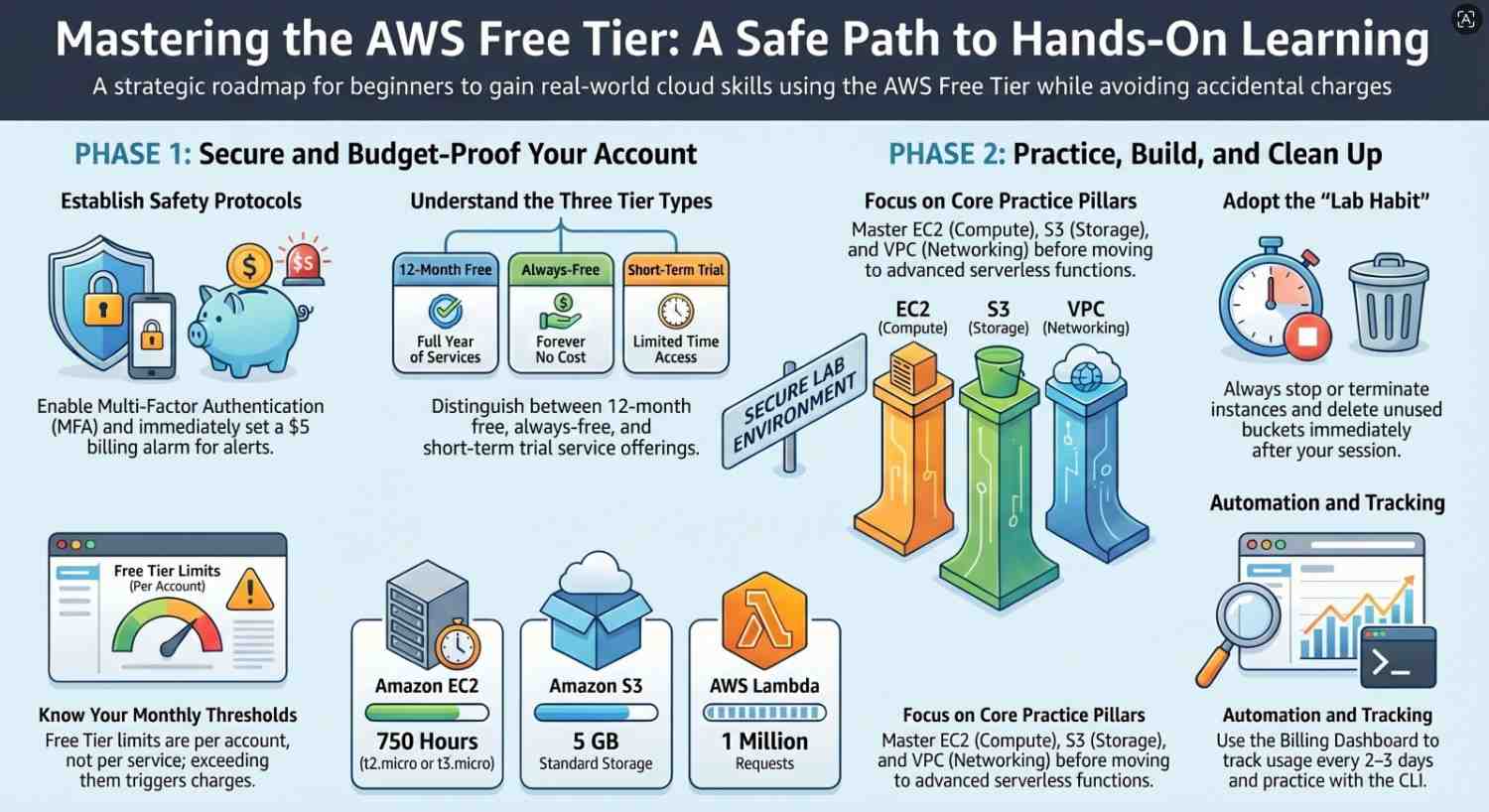
The AWS Free Tier is a collection of services offered by Amazon Web Services that allows you to use certain resources for free within defined limits.
It includes three types:
- 12-month free services (e.g., EC2, S3)
- Always-free services (e.g., Lambda, DynamoDB with limits)
- Short-term trials (limited-time free access)
The key is not just to “use” it but to use it strategically for learning.
Why AWS Free Tier is Perfect for Practice
Unlike theoretical learning, AWS requires hands-on exposure. The Free Tier allows you to:
- Build real infrastructure
- Experiment safely
- Prepare for certifications like AWS Certified Cloud Practitioner
- Simulate real-world scenarios
Step 1: Set Up Your AWS Account the Right Way
Before you start:
- Use a dedicated email ID
- Add a billing alarm immediately
- Enable MFA (Multi-Factor Authentication)
Go to Billing Dashboard:
- Set a budget (e.g., $5 alert)
- Enable email notifications
This ensures you never get surprised by charges.
Step 2: Understand Free Tier Limits (Very Important)
Here are some common limits:
- Amazon EC2: 750 hours/month (t2.micro or t3.micro)
- Amazon S3: 5 GB storage
- AWS Lambda: 1 million requests/month
- Amazon RDS: 750 hours/month
⚠️ Important:
- Free Tier is per account, not per service
- Exceeding limits = charges
Step 3: Start With Core Services (Beginner Practice Path)
Focus on the most important services first:
1. Compute – EC2
Practice:
- Launch a virtual server
- Connect via SSH
- Install a web server (Apache/Nginx)
Skills learned:
- Instance types
- Security groups
- Key pairs
2. Storage – S3
Practice:
- Create buckets
- Upload files
- Host a static website
Skills learned:
- Object storage
- Permissions
- Public access settings
3. Networking – VPC
Practice:
- Create your own Amazon VPC
- Configure subnets and route tables
Skills learned:
- Networking basics
- Public vs private subnets
4. Serverless – Lambda
Practice:
- Write a simple function
- Trigger via API Gateway
Skills learned:
- Event-driven architecture
- Serverless computing
Step 4: Follow Hands-On Mini Projects
Instead of random practice, use project-based learning.
Project 1: Host a Static Website
Use:
Steps:
- Upload HTML/CSS files
- Enable static hosting
- Make it public
Project 2: Deploy a Web App
Use:
Steps:
- Launch EC2
- Install Node.js or Python
- Deploy app
Project 3: Serverless API
Use:
- AWS Lambda + API Gateway
Steps:
- Create function
- Connect endpoint
- Test with browser/Postman
Step 5: Avoid Common Mistakes (Save Money!)
Many beginners accidentally get billed. Avoid these:
Not Stopping EC2 Instances
- Always stop instances when not in use
Leaving Resources Running
- Delete unused:
- Load balancers
- Elastic IPs
- Snapshots
Using Wrong Instance Types
- Stick to free-tier eligible (t2.micro/t3.micro)
Ignoring Region Differences
- Free tier applies globally, but resources vary by region
Step 6: Use Automation Tools
Practice automation early:
- AWS CLI
- CloudFormation (Infrastructure as Code)
Benefits:
- Saves time
- Important for advanced certifications
- Real-world relevance
Step 7: Track Your Usage Regularly
Go to:
- Billing Dashboard → “Free Tier Usage”
Monitor:
- EC2 hours
- S3 storage
- Lambda requests
Make it a habit to check every 2–3 days.
Step 8: Clean Up Resources After Practice
Always:
- Terminate EC2 instances
- Delete S3 buckets
- Remove unused databases
Think of AWS like a lab:
“Use it, learn it, clean it.”
Step 9: Map Practice to Certification Topics
Align your practice with exam syllabus:
For AWS Certified Cloud Practitioner:
- Focus on basics (S3, EC2, pricing)
For AWS Certified Solutions Architect – Associate:
- Focus on architecture, VPC, scaling
Step 10: Build a Practice Routine
Example weekly plan:
- Day 1–2: Learn EC2 + practice
- Day 3: S3 project
- Day 4: Lambda basics
- Day 5: VPC networking
- Day 6: Mini project
- Day 7: Review + cleanup
Consistency matters more than intensity.
Pro Tips to Maximize AWS Free Tier
- Use one service at a time
- Document what you learn
- Take screenshots for revision
- Break things intentionally (best way to learn!)
- Rebuild from scratch
Real-World Skills You’ll Gain
By using AWS Free Tier effectively, you’ll learn:
- Cloud architecture basics
- Deployment strategies
- Security fundamentals
- Cost optimization
These are exactly what employers expect.
Final Thoughts
The AWS Free Tier is not just a free resource it’s a powerful learning environment.
If used correctly, it can:
- Replace expensive labs
- Give real-world experience
- Help you confidently clear AWS certifications
But the difference lies in how you use it:
Don’t just explore build, break, and rebuild.
- Ready to explore AWS? Click here to get started!




