

AWS certification exams are designed to test not just your knowledge but your judgment. Many candidates walk into the exam confident, only to be tripped up by tricky wording, subtle service differences, or multiple “correct” answers where only one is best.
In this guide, we’ll break down 10 of the most confusing AWS exam question patterns, explain why they trip people up, and show you how to approach them with confidence.
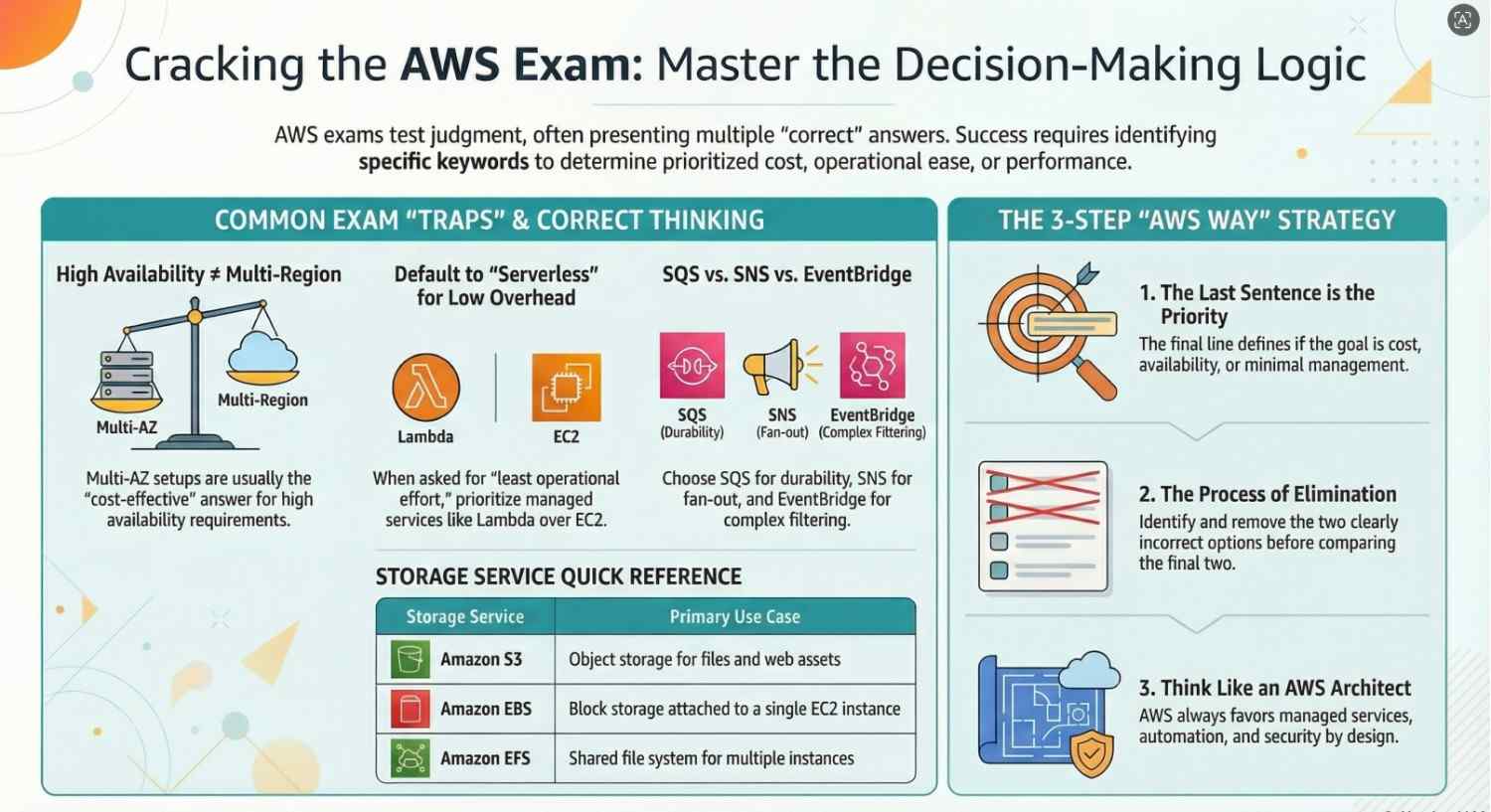
1. “Highly Available and Cost-Effective” — The Trade-Off Trap
Why it’s confusing:
AWS loves combining requirements like high availability and low cost. These goals often conflict.
Example Question Pattern:
A company needs a highly available architecture for a web app with minimal cost.
Common Mistake:
Choosing the most robust (and expensive) solution like multi-region deployment.
Correct Thinking:
- High availability doesn’t always mean multi-region.
- A multi-AZ setup is usually sufficient and more cost-effective.
Answer Strategy:
Look for:
- Auto Scaling Groups
- Application Load Balancer
- Multi-AZ deployment
2. “Least Operational Overhead” — Go Serverless
Why it’s confusing:
Many answers work, but AWS prefers managed services.
Example Question Pattern:
Process files uploaded to storage with minimal management effort.
Common Mistake:
Choosing EC2 instead of serverless.
Correct Thinking:
- AWS prioritizes managed and serverless solutions.
Best Answer Likely Includes:
3. “Eventually Consistent vs Strongly Consistent”
Why it’s confusing:
Storage consistency models are subtle but critical.
Example Question Pattern:
An application requires immediate consistency after writes.
Common Mistake:
Choosing services with eventual consistency.
Correct Thinking:
- Amazon S3 now provides strong read-after-write consistency.
- DynamoDB can be configured for strong consistency.
Exam Tip:
Always read carefully: “immediate” = strong consistency required.
4. “Decoupling Components” — SQS vs SNS vs EventBridge
Why it’s confusing:
All three services enable communication between systems.
Key Differences:
Common Trap:
Mixing up when to use each.
Answer Strategy:
- Need message durability → SQS
- Need fan-out → SNS
- Need complex event filtering → EventBridge
5. “Scaling Automatically” — Not All Scaling Is Equal
Why it’s confusing:
Multiple services support scaling differently.
Example Question Pattern:
Handle unpredictable traffic spikes automatically.
Correct Thinking:
Exam Trick:
If “no management” is mentioned → choose fully managed scaling (Lambda, DynamoDB on-demand)
6. “Secure Access” — IAM vs Resource Policies
Why it’s confusing:
Permissions can be applied in multiple ways.
Common Mistake:
Overcomplicating access control.
Correct Thinking:
- IAM roles → for users/services
- Resource policies → for cross-account access
Tip:
If question mentions cross-account, think resource-based policies.
7. “Data Transfer Costs” — The Hidden Killer
Why it’s confusing:
AWS pricing is not always intuitive.
Common Mistake:
Ignoring data transfer charges.
Key Insights:
- Same AZ → free
- Cross-AZ → charged
- Internet egress → charged
Exam Strategy:
If cost optimization is mentioned, minimize cross-region or internet traffic.
8. “Backup vs Disaster Recovery”
Why it’s confusing:
These are often used interchangeably but are different.
Correct Thinking:
- Backup → data recovery
- Disaster Recovery → full system recovery
Common Options:
- Pilot Light
- Warm Standby
- Multi-site active-active
Exam Tip:
Match solution to RTO (Recovery Time Objective) and RPO (Recovery Point Objective).
9. “Storage Options” S3 vs EBS vs EFS
Why it’s confusing:
All are storage services, but serve different use cases.
Quick Breakdown:
- S3 → Object storage
- EBS → Block storage (attached to EC2)
- EFS → Shared file system
Common Trap:
Choosing EBS when shared access is required.
10. “Read the LAST Sentence Carefully”
Why it’s confusing:
AWS questions often hide the real requirement at the end.
Example:
“…Which solution is MOST cost-effective?”
Common Mistake:
Selecting a correct but expensive solution.
Golden Rule:
The last line defines the priority:
- Cost-effective
- Highly available
- Low latency
- Minimal management
Final Strategy to Crack Confusing AWS Questions
Instead of memorizing answers, train your thinking:
1. Identify Keywords
- Cost-effective
- Highly available
- Serverless
- Fault-tolerant
2. Eliminate Wrong Answers
Usually, 2 options are clearly incorrect.
3. Compare the Final Two
Ask:
- Which is simpler?
- Which requires less maintenance?
- Which aligns with AWS best practices?
4. Think “AWS Way”
AWS prefers:
- Managed services
- Automation
- Scalability
- Security by design
Final Thoughts
AWS exams are less about memorization and more about decision-making in real-world scenarios. The more you practice identifying patterns like these, the easier it becomes to eliminate confusion and choose the best answer confidently.
If you’re preparing for an AWS certification, focus on:
- Hands-on practice
- Understanding service use cases
- Learning AWS architecture principles
Master these, and even the most confusing questions will start to feel predictable.
Pro Tip:
Next time you practice, don’t just check the correct answer ask why the other options are wrong. That’s where real learning happens.
- Ready to pass your AWS exam? Click here to begin.




