

In 2026, choosing the right CI/CD tool can directly impact your DevOps velocity, infrastructure costs, and developer productivity.
Two of the most popular DevOps automation tools today are Jenkins and GitHub Actions. But which one is better for modern teams?
This in-depth Jenkins vs GitHub Actions comparison (2026 edition) breaks down:
- Features
- Pricing
- Performance
- Scalability
- Security
- Enterprise readiness
- Best use cases
Let’s dive in.
What is Jenkins?
Jenkins is an open-source automation server launched in 2011. It’s one of the earliest and most widely adopted CI/CD tools in DevOps.
Why Jenkins is Popular
- 1,800+ plugins
- Highly customizable pipelines
- Large community support
- Fully self-hosted control
- Works with almost any tech stack
Jenkins is often considered the “Swiss Army knife” of CI/CD” due to its flexibility.
What is GitHub Actions?
GitHub Actions is GitHub’s native CI/CD platform, deeply integrated with GitHub repositories.
It allows developers to automate:
- Build pipelines
- Tests
- Deployments
- Releases
- Security scans
All directly inside GitHub.
Since its launch, it has become a leading cloud CI/CD solution for startups and enterprises.
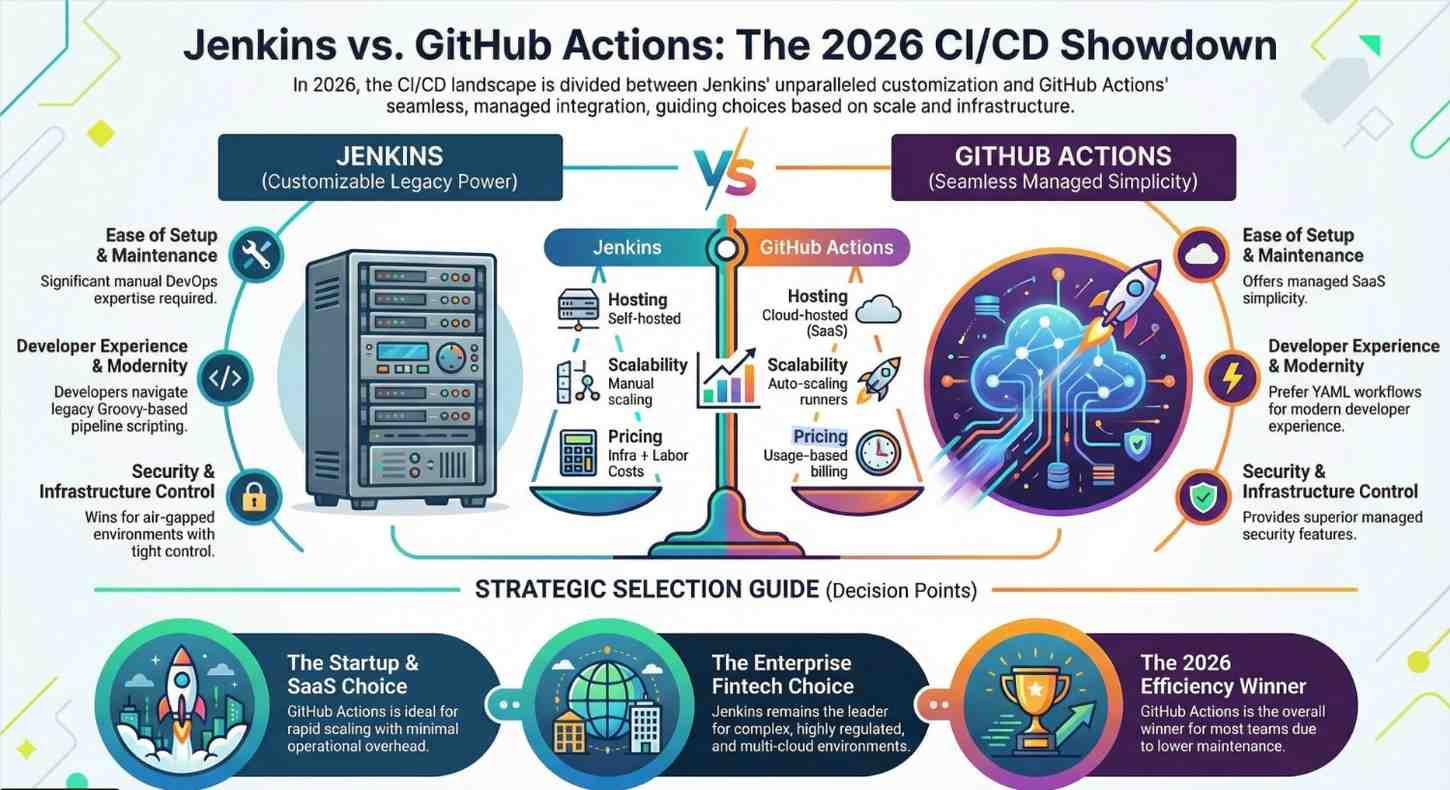
Jenkins vs GitHub Actions: Feature Comparison (2026)
| Feature | Jenkins | GitHub Actions |
|---|---|---|
| Hosting | Self-hosted | Cloud-hosted (SaaS) + Self-hosted runners |
| Setup Complexity | High | Low |
| Maintenance | Manual | Managed by GitHub |
| Plugin Ecosystem | 1800+ plugins | Marketplace integrations |
| Scalability | Manual scaling | Auto-scaling |
| UI/UX | Traditional | Modern, GitHub-native |
| Pricing Model | Free (infra cost applies) | Usage-based pricing |
| Best For | Enterprises with custom infra | GitHub-centric teams |
Ease of Setup & Maintenance
Jenkins
Setting up Jenkins requires:
- Provisioning servers
- Managing updates
- Handling plugin compatibility
- Scaling build agents manually
While powerful, it demands DevOps expertise.
GitHub Actions
With GitHub Actions:
- CI/CD works immediately inside your repo
- No infrastructure to maintain
- YAML workflows are simple
- Runners scale automatically
For startups and small teams, GitHub Actions drastically reduces operational overhead.
Winner (Ease of Use 2026): GitHub Actions
Performance & Scalability
Jenkins Performance
Jenkins performance depends entirely on:
- Your server configuration
- Build agents
- Infrastructure management
It can scale massively but requires engineering effort.
Large enterprises still rely on Jenkins for complex, multi-cloud pipelines.
GitHub Actions Performance
GitHub Actions provides:
- Hosted runners
- Parallel job execution
- Matrix builds
- Auto-scaling
However, heavy workloads may increase usage costs.
Winner (Scalability 2026): Depends on scale
- Enterprise-level customization → Jenkins
- Fast scaling without ops overhead → GitHub Actions
Security & Compliance
Jenkins Security
Pros:
- Full infrastructure control
- Air-gapped environments possible
Cons:
- Plugin vulnerabilities
- Manual patching required
GitHub Actions Security
Pros:
- GitHub-managed updates
- Built-in secrets management
- OIDC integration
- Supply chain security features
For teams already using GitHub, security integration is seamless.
Winner (Security 2026): GitHub Actions for managed security, Jenkins for full control environments
Pricing Comparison (2026)
Jenkins Cost
- Free software
- Infrastructure costs (servers, storage, networking)
- Maintenance engineering time
Hidden costs include DevOps hours.
GitHub Actions Pricing
- Free tier available
- Usage-based billing
- Charges per runner minute
For low-to-medium workloads, GitHub Actions is often cheaper overall.
For large-scale enterprise builds, Jenkins may reduce long-term compute costs.
Developer Experience
Jenkins Developer Experience
- Requires pipeline scripting
- Groovy-based pipelines
- UI feels legacy
- Debugging can be complex
GitHub Actions Developer Experience
- YAML-based workflows
- Native GitHub integration
- PR-triggered automation
- Marketplace templates
Developers prefer GitHub Actions for modern workflows.
Winner (Developer Experience 2026): GitHub Actions
Enterprise Readiness
Jenkins is better if:
- You need extreme customization
- You operate in regulated environments
- You require hybrid/multi-cloud pipelines
- You have a dedicated DevOps team
GitHub Actions is better if:
- You are GitHub-native
- You want fast CI/CD setup
- You prefer SaaS automation
- You are a startup scaling rapidly
Real-World Use Case Scenarios
Startup in 2026
- Small team
- Limited DevOps budget
- GitHub-based code
GitHub Actions wins.
Enterprise Fintech Company
- Strict compliance
- On-prem infra
- Multi-cloud deployments
Jenkins wins.
SaaS Scale-Up
- Heavy automation
- Kubernetes deployments
- GitHub repos
GitHub Actions with self-hosted runners is ideal.
Pros and Cons Summary
Jenkins Pros
- Full control
- Mature ecosystem
- Highly customizable
- Open source
Jenkins Cons
- High maintenance
- Steeper learning curve
- Plugin management overhead
GitHub Actions Pros
- Easy setup
- GitHub-native
- Managed infrastructure
- Faster developer onboarding
GitHub Actions Cons
- Usage-based pricing
- Vendor lock-in
- Limited deep customization compared to Jenkins
CI/CD Trends in 2026
In 2026, we’re seeing:
- Shift toward managed CI/CD
- Rise of platform engineering
- GitOps adoption
- Cloud-native automation
Modern DevOps teams prefer low-maintenance CI/CD tools, giving GitHub Actions strong momentum.
Final Verdict: Which CI/CD Tool Wins in 2026?
Overall Winner (For Most Teams): GitHub Actions
Why?
- Faster setup
- Lower operational overhead
- Better developer experience
- Strong security integration
- Ideal for GitHub-based workflows
Enterprise Customization Winner: Jenkins
If you need maximum flexibility and full infrastructure control, Jenkins still dominates in highly complex enterprise environments.
Conclusion
The Jenkins vs GitHub Actions comparison in 2026 isn’t about which tool is “better” it’s about which tool fits your organization.
- Want control and customization? → Jenkins
- Want speed, simplicity, and modern DevOps automation? → GitHub Actions
For most modern teams in 2026, GitHub Actions is leading the CI/CD race.
- Ready to master CI/CD? Explore hands-on DevOps training now.




